

Introduction to num2str in Matlab
‘num2str’ function is used to convert numeric data into character data. In this function, there is no limitation of data. Data can be in the form of a single element, array, vector, or multidimensional matrix. All types of data can be used within a function. The output of this function completely depends on the magnitude of the input data. Along with input data, we can pass precision as well as the format of output also.
Syntax:
Op = num2str ( in )

Output variable name = num2str ( input variable name )
Op = num2str ( in , 1 )

Output variable name = num2str (input variable name, precision value)
Op = num2str ( in , e )

Output variable name = num2str (input variable name, format of output )
Examples of num2str Matlab
This function converts input data independently if we are using simple function num2str. If we are using num2str function with precision then the output will show maximum digits depending on precision. Let us assume one number 3.456 if we apply num 2 str function with precision 2 then it will ignore all other digits except the first two digits that means the output will be 3.4. if precision is 3 then the output will be up to three digits 3.45. And if we are using num2str function along with format specifier then the output will change as per format given by the user.
Example #1
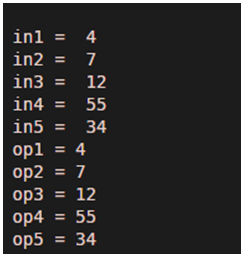
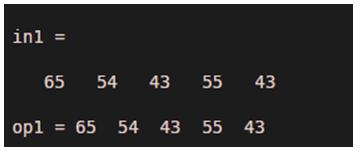
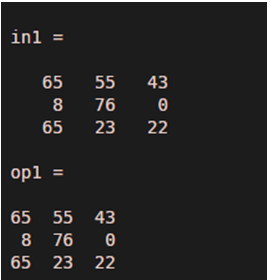
In this example 1 ( a ) let us assume five different inputs in1, in2, in3, in4, and in5.all the inputs are integers 4, 7, 12, 55, and 34 respectively. The output of all inputs is op1, op2, op3, op4, and op5. In the second part, 1 ( b ) input is in the form of an array or we can say vector so the output will also be in the form of an array. And in third part 1 ( c ) input is in form of a multi-dimensional matrix with three rows and three columns so that output will also be in form of a multi-dimensional matrix with three rows and three columns.
Matlab Program of Example 1 ( a )
clc ;

clear all ;

in1 = 4

in2 = 7

in3 = 12

in4 = 55

in5 = 34

op1 = num2str ( in1 )

op2 = num2str ( in2 )

op3 = num2str ( in3 )

op4 = num2str ( in4 )

op5 = num2str ( in5 )
Output:
Matlab Program of Example 1 ( b)
clc ;

clear all ;

in1 = [ 65 54 43 55 43 ]
op1 = num2str ( in1)
Output:
Matlab Program of Example 1 ( c )
clc ;

clear all ;

in1 = [ 65 55 43 ; 8 76 0 ; 65 23 22 ]
op1 = num2str (in1)
Output:
Example #2
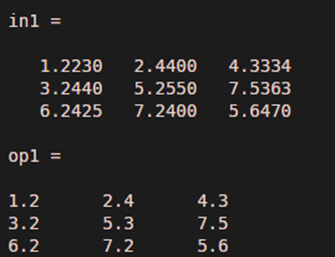
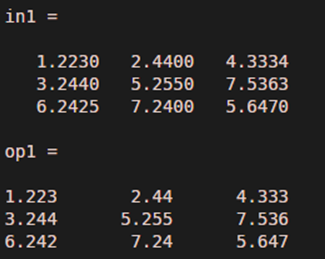
In this example, num2str function is applied along with precision. In first part, precision is 2 and in second part precision is 4 .input data is a multi-dimensional matrix with three rows and three columns for both the examples example 2(a) and example 2(b). We can observe the difference in both parts 2 (a) and 2 (b) in the form of digits. Example 2(a) will show output till 2 digits and example 2(b) will show up to four digits.
Matlab Program of Example 2 ( a )
clc ;

clear all ;

in1 = [ 1.223  2.44  4.3334 ; 3.244 5.255 7.5363 ; 6.2425 7.24 5.647 ]
op1 = num2str ( in1 , 2 )
Output:
Matlab Program of Example 2 ( b)
clc ;

clear all ;

in1 = [ 1.223 2.44 4.3334 ;    3.244 5.255 7.5363 ; 6.2425 7.24 5.647 ]
op1 = num2str ( in1, 4 )
Output:
Example #3
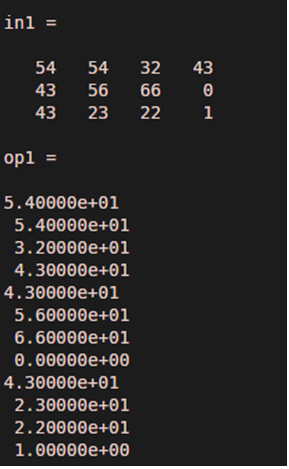
In this example let us assume input in the form of a multi-dimensional matrix with three rows ad four columns. Num2str function is applied along with the format specifier. This format specifier converts integer data in character or string as per format. In this example, we have pass one format specifier 9.5 e. This specifier is applicable to all elements of input irrespective of the type of input data.
Matlab Program of Example 3
clc ;

clear all ;

in1 = [ 54 54 32 43 ; 43 56 66 0 ; 43 23 22 1 ]
op1 = num2str ( in1 ,' %9.5e\n ' )
Output:
Conclusion
The function ‘num2str’ is a very effective and powerful function in Matlab. It not only converts integers into character form but also operates on precision and format specifiers. precision decides the maximum range of output digit and format specifiers decides the format of output elements.
Recommended Articles
This is a guide to num2str in Matlab. Here we also discuss the introduction and how does num2str Matlab done along with examples and its code implementation. You may also have a look at the following articles to learn more –

