
Updated June 5, 2023

Introduction to Nargin Matlab
In Matlab nargin function deals with a number of input parameters or arguments. It returns count as well as the actual value of the argument. Mostly it uses in the body of the program. As we know program divides into three blocks, the first is the heading of the code; the second is the body of the code and the last is displaying the result of the code or returning the parameter. Nargin syntax is compatible with the body of the function code only. There is no limit to using a number of parameters in nargin function. We can use any number of parameters inside the function.
Syntax
function [ op ] = usenargin ( input1, input2, input3 )
function [ parameter] = use nargin ( first input parameter, second input parameter, third input parameter)
Why we use Nargin Matlab?
Nargin stands for n argument inputs; therefore, it is used to give a number of input arguments assigns to the function, and it deals with how many input arguments pass to the function. If we pass one parameter, then it automatically returns the count as one. If we pass two arguments by comma separation, then it will return count as 2 similarly, it gives appropriate n number of parameters count.
Examples
Here are the following examples of Nargin Matlab
Example #1
Let us consider one function with the parameter “op”. It includes a total of three input arguments such as input 1, input 2, and input 3.narging function will automatically assign the values to the parameters. Here we have assigned three variables as arguments so that we can get one argument or two arguments or three arguments along with nargin function. In this particular example, code will return result in terms of how many parameters are given to the function; if there is more than one parameter, then it will give the result as multiple parameters, and if the there is only one parameter, then it will give result in the form of a single parameter.
Code:
function [op] = usenargin(input1, input2,input3)
if nargin < 2
display ('one input parameter')
else
display(' multiple parameters')
end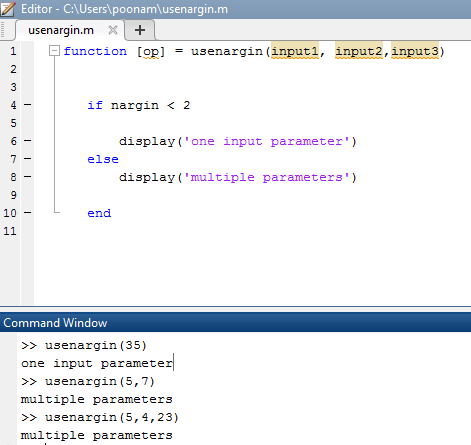
Example #2
In this scenario, we have three input parameters referred to as input 1, input 2, and input 3. Previously, we demonstrated the utilization of an if-else decision. Now, we will showcase the implementation of a switch loop using the nargin function. The nargin function will determine the number of parameters and provide that information to the switch block. The inside switch block, depending on the value of the parameter number, will jump to the respective case block and accordingly give the result. If there is only one parameter, then it will go to the case 1. Case 1 will give the square root of a value. If there are two parameters, it will jump to the case 2 and case 2 will give the addition of two values which we pass through the function call. And if there are three parameters, then it will jump to the third case, and the third case will return the result as the addition of all the input parameters.
Code:
function [ op] = usenargin ( input 1, input 2, input 3 )
switch nargin
case 1
op = sqrt ( input1 )
case 2
op = input 1 + input 2
case 3
op = input 1 + input 2  + input 3
otherwise
error ( ' need parameters ' ) ;
end
end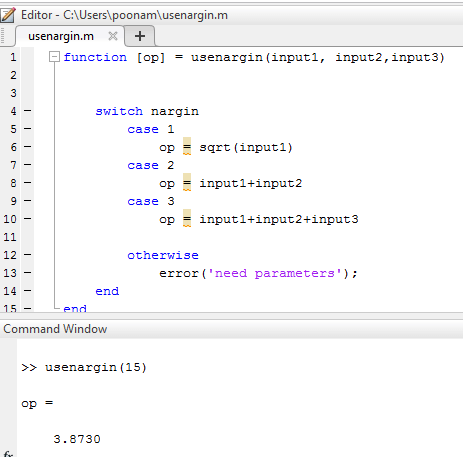
Example #3
In this example, we have used four input arguments such as input 1, input 2, input 3 and input 4.here; also, the nargin function is applied with switch. If there is only one input, then it will jump to case 1, and the case will return a range of values from 0 to the value of input one. If two inputs pass through the function, then it will jump to case 2. This case 2 will return a range of values from input 1 to the value of input 2. if there are three parameters present, then it will jump to the case 3, and case 3 will return a range of values from input 2 to the input 3. Similarly, case four will return a range of values from the value of input 3 to the value of input 4.
Code:
function [op] = usenargin ( input1, input2,input3,input4)
switch nargin
case 2
op = input1 : input2
case 1
op = 0 : input1
case 3
op = input2 : input3
case 4
op = input3 : input4
otherwise
op = 0 ;
end
end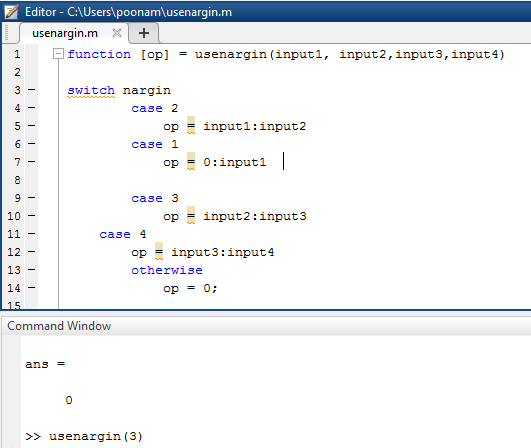
Conclusion
In this article, we have seen how to use the nargin function .it can be applied for if-else statements, for loop, switch, and other major terminologies in programming. By using the nargin function, we can pass multiple parameters as well as a function name. It has one more parameter that is varargin; it gives negative values as a result.
Recommended Articles
We hope that this EDUCBA information on “Nargin Matlab” was beneficial to you. You can view EDUCBA’s recommended articles for more information.

