


Updated June 5, 2023

Introduction to MySQL VARCHAR
Varchar data type is used in MySQL to store the characters or strings that can contain any alphabet, integers, or special symbols. There are some insights that you should be aware of while you use the varchar datatype so that you can make use of this variable and define them correctly, appropriately, and optimally that will be justified by both the limitations and constraints of MySQL database as well as the purpose for which you have declared the column as varchar and what is the content you want to store in that field. This article will guide us through understanding the varchar datatype and exploring how it holds, manipulates, and is utilized.
Storage of MySQL VARCHAR Datatype
The maximum length of the varchar data type column can be 65535. This datatype helps us to store the string values in the database. Besides the length that we define for varchar datatype storage, MySQL takes an additional 1 or 2 bytes of space to store the prefix value related to that column. The space the prefix value will require depends upon the length we declared for that varchar column. If you declare the column length as less than 255 bytes, it will consume 1 byte of data to store the prefix value. Likewise, if the varchar column requires more than 255 data, it will necessitate 2 bytes of space to store the prefix value.
We must follow one more rule while using the Varchar columns in our table. This rule limits the maximum row size in the table to 65535. That is why we must state the size of the columns considering that the sum of the size of all the columns should not exceed 65535.
Example
Let us first cross-check the rule that we specified earlier regarding row size. We will try to create a table named educba_varchar containing three columns, each with a length of 21843. Each column will require two additional bytes to store the prefix value. Hence, the total collective length of the columns that will make up the row size will be 21843 + 2 + 21843 + 2 + 21843 + 2 = 65535. That is the maximum row size limit. Let us check the output of the query statement that will be used to create this table that is –
CREATE TABLE IF NOT EXISTS educba_varchar (
column1 VARCHAR(21843) NOT NULL,
column2 VARCHAR(21843) NOT NULL,
column3 VARCHAR(21843) NOT NULL
) CHARACTER SET 'latin1' COLLATE LATIN1_DANISH_CI;
Execution of this query gives the following output –
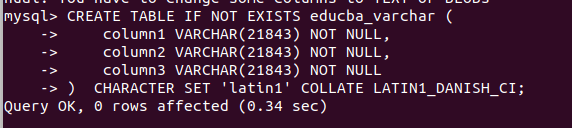
So, we can observe that our table is created successfully. Now, we will try to increase the length of one of the columns by only one byte. This will lead to the total row size of the table as 21844 + 2 + 21843 + 2 + 21843 + 2 = 65536, which is more than the limits of MySQL. Let us observe the results by executing the following query statement –
CREATE TABLE IF NOT EXISTS educba_varchar2 (
column1 VARCHAR(21844) NOT NULL,
column2 VARCHAR(21843) NOT NULL,
column3 VARCHAR(21843) NOT NULL
) CHARACTER SET 'latin1' COLLATE LATIN1_DANISH_CI;
that gives the following output –
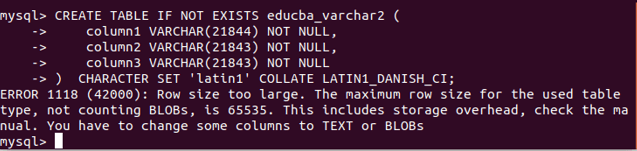
We can observe that as the row size limit exceeds 65535, we get the error saying the Row size is too large. The maximum row size for the used table type, excluding BLOBs, is 65535. This includes storage overhead; consult the instructions. You must convert some columns to TEXT or BLOBs.
Inserting values in varchar columns
Let us create a table named educba_writers using the following statement –
CREATE TABLE IF NOT EXISTS educba_writers (
id INTEGER NOT NULL PRIMARY KEY AUTO_INCREMENT,
firstName VARCHAR(10) NOT NULL
) CHARACTER SET 'latin1' COLLATE LATIN1_DANISH_CI;
Now we will insert values in the table as follow:
INSERT INTO educba_writers(firstName)
VALUES('Payal');
That gives the following output –

Let us try to insert the record using the following query statement, which will contain the first name with 10 characters in it –
INSERT INTO educba_writers(firstName)
VALUES('Vyankatesh');
that gives the following output –

Now, we will try to insert the name with a length greater than 10 using the following query –
INSERT INTO educba_writers(firstName)
VALUES('Siddhivinayak');
It issues the error as the word siddhivinayak contains 13 characters in it. Even for the word with 11 characters, it gives the following output and gives the error saying that the data is too long for the first name column as the size or length of the column is specified as 10 –
INSERT INTO educba_writers(firstName)
VALUES('Yudhishteer');
Spaces in varchar columns
When we store values in a table with a varchar column, we also include and store the spaces in the column value.
For example, whenever we store the value Om Prakash in the above table using the below query statement –
INSERT INTO educba_writers(firstName)
VALUES('Om Prakash');
The insertion is successful, and when we execute the following select query, we can retrieve the length of the column.
SELECT length(firstName) FROM educba_writers WHERE firstName = "Om Prakash";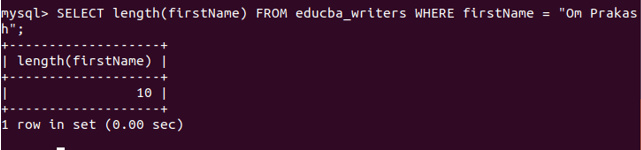
Execution of the above query gives the following output –
That means 9 characters and 1 space collectively; the length is considered as 10.
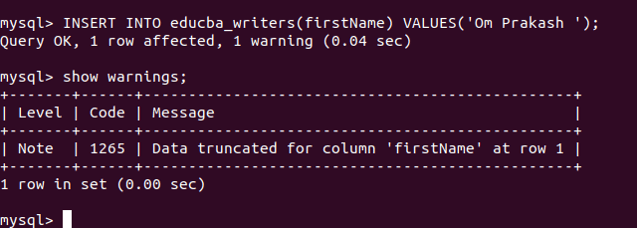
Whenever the trailing spaces are mentioned, they are too included and stored in the varchar datatype columns. However, if the column size is limited, the trailing spaces are ignored, the remaining value is stored in the column, and a warning is issued as the data is truncated for that column due to trailing space. For example, when we try to insert the value with trailing space in the Om Prakash name as follows in the query statement –
SELECT length(firstName) FROM educba_writers WHERE firstName = "Om Prakash ";it gives the following output –
Conclusion
We can make use of the varchar datatype to store the strings. We need to keep certain things in mind while designing the database and giving the size of the columns. The row size should not exceed 65535 bytes. Also, spaces are considered while adding varchar data or string values.
Recommended Articles
We hope that this EDUCBA information on “MySQL VARCHAR” was beneficial to you. You can view EDUCBA’s recommended articles for more information.

