
Updated June 3, 2023

Introduction to MySQL field()
The MySQL Field() function performs a case-insensitive search to retrieve the index position of a string or number value within a list of string or number values. The Field() function complements the ELT() function in the server.
The function accepts both strings and numbers as arguments given by the user. When using strings as arguments in the Field() function, the comparison is based on strings, while numerical arguments result in a search based on numbers. In case it compares all as double if the type of values is default otherwise.
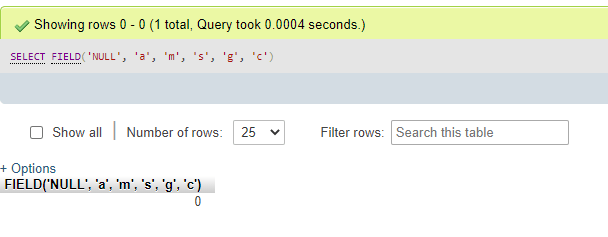
When you execute a query using the Field() function to find the index position of a specific value, if the value is not found, the function will return zero (0). Furthermore, if the value being searched is NULL, the function with a NULL argument cannot compare for equality with any value, resulting in a return value of 0.
Syntax
Let’s examine the syntax structure of the MySQL Field() function for utilization in the MySQL server, as depicted below:
FIELD(String/Number Value, value1,value2,value3,…………)Here, we will describe the terms as:
- String/Number Value: This parameter represents the value that needs to be searched within the specified list. It can be any string or integer value.
- value1, value2, value3, …………: This sequence of the required parameter is defined as the values where the Field() function will search the first parameter.
Also, let us discuss the result cases as follows:
- If the function does not find the required value in the list of values (value1, value2, value3, …………), then it will return 0.
- If the parameter is NULL, the Field() function will again output 0.
- If all the argument values in the function are treated as strings, the comparison will be conducted as string comparisons to determine the string index position.
- If the function holds all argument values as numbers, then the searching is executed as numbers to result in the index position of the number value.
How does the field() function works in MySQL?
MySQL database manages and stores different data values and provides operations to fetch certain information about the records. This process of query execution and knowing the result helps maintain the database records and related tables updated and secured for retrieving any table records such as indexes, column values or total, average, max, min, positions, relation, etc. In addition, MySQL supports many built-in functions that are beneficial to make changes and query data info from the database tables.
In this way, one of the string functions can be the MySQL Field() function that helps to fetch the index position of a particular value, either number or string, from a list of numbers or string values respectively. To demonstrate the process and functionality of the Field() function, let’s explore the queries used to implement this function below:
Suppose we will find the index position of a substring from a list of substrings as follows:
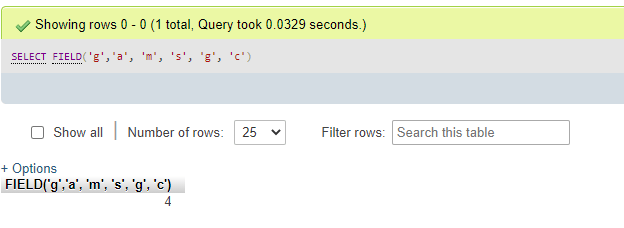
SELECT FIELD('g', 'a', 'm', 's', 'g', 'c');Using the Field() function, this query will output four as an index position. Also, we have used the SELECT keyword with the function to display the result after the search.
Also, since the Field() function performs a case-insensitive search then, let us see the following example:
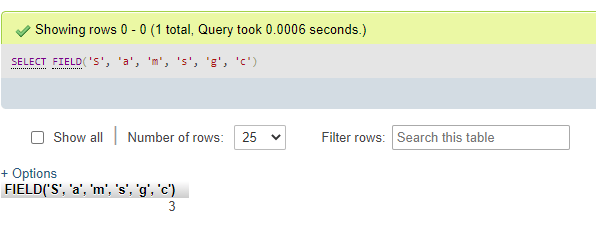
SELECT FIELD('G', 'a', 'm', 's', 'g', 'c');The output for this query is also 4 because the search is not influenced by whether the character is uppercase or lowercase.
Examples of MySQL field()
Let us demonstrate some examples using the MySQL Field() function to explore its uses of it specified as follows:
Example #1 – Using MySQL Field() function
Suppose we have few values in the list of strings, and we are finding the index position for one of the values either present or not present in the list of values as shown below:
SELECT FIELD('g','a', 'm', 's', 'g', 'c');Output:
SELECT FIELD('S', 'a', 'm', 's', 'g', 'c');Output:
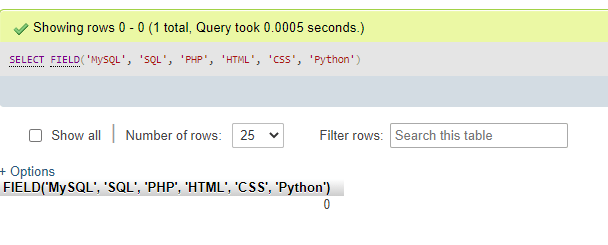
SELECT FIELD('MySQL', 'SQL', 'PHP', 'HTML', 'CSS', 'Python');Output:
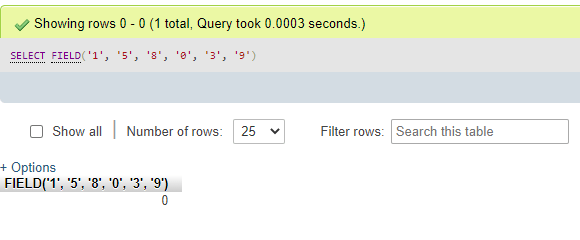
SELECT FIELD('1', '5', '8', '0', '3', '9')Output:
SELECT FIELD('NULL', 'a', 'm', 's', 'g', 'c');Output:
SELECT FIELD('v', 'NULL');Output:
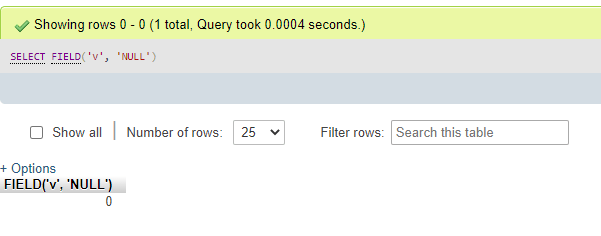
By analyzing the above examples, we can observe that the function returns its index position if the provided argument is present in the list of values. However, if the function does not find the argument, it will return zero (0) as the output value. Additionally, if any of the arguments in the function are NULL, the function also returns zero.
Example #2 – Using database table & ORDER BY clause
For this, we will use the succeeding syntax code provided as follows:
SELECT * FROM TableName [ORDER BY] FIELD(ColumnName, Value1, Value2, Value3, ……., ValueN) DESC;In this scenario, we use TableName as the sample table for the query search function, and ColumnName represents the first parameter we search for within the list of items containing values from the table.
To comprehend the usage of the Field() function in a database table, let’s begin by executing a query to create the table as shown below:
CREATE TABLE Books(BookID INT PRIMARY KEY, BookName VARCHAR(255) NOT NULL, Language VARCHAR(255) NOT NULL, Price INT NOT NULL);Again, let us add some records using the INSERT query in the table Books created above:
INSERT INTO Books(BookID, BookName, Language, Price) VALUES('101','Algebraic Maths','English','2057');Additionally, we insert other rows for books.
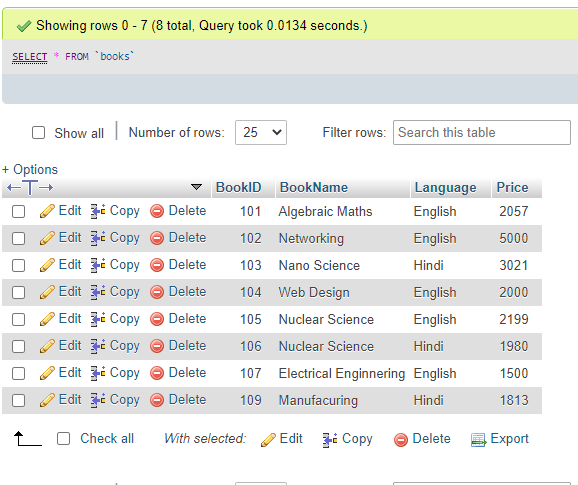
Now, let us display the contents of the table Books with SELECT query as:
SELECT * FROM Books;Output:
Next, we will query with MySQL Field() function in the table Books to search for a specific index position for the column from a sequence of values related to the first argument.
We can also sort the order of the values in the result set using the MySQL ORDER BY clause with the above Field() function command either in ascending order with the ASC keyword or DESC keyword for descending order:
SELECT * FROM Books ORDER BY FIELD(BookID, 101,102,103,104,105,106,107,108,109) DESC;Output:
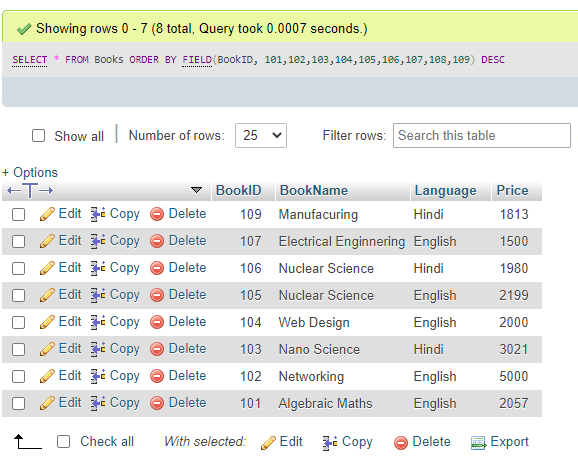
So, we can additionally use the ORDER BY clause with the Field() function to sort the values.
Conclusion
MySQL Field() function is also a type of MySQL String function that retrieves the index position of a data value as indicated with the first argument of the function by searching or matching the remaining value expressions stated in the second argument as a list of values parted with comma.
The function helps find out the existing index position and results if the one is absent.
Recommended Articles
We hope that this EDUCBA information on “MySQL field()” was beneficial to you. You can view EDUCBA’s recommended articles for more information.

