

Updated May 30, 2023

Introduction to MySQL DATE_ADD()
DATE_ADD() function, as the name clearly states, it is a function that helps to alter the date and time in MySQL. This function updates and returns the date_time value per the arguments explicitly provided within the brackets. You can use most of the intervals available in MySQL to define the DATE_ADD() function. The function lets us add not just positive values but also negative values. The result can be a date_time value or a string per the provided arguments. You can use a dynamic function to update the date.
Syntax
To use the DATE_ADD function, you need to provide both the date that will be modified and the interval argument. So the syntax will be like:
DATE_ADD (date_time, INTERVAL value AddUnit);Description:
- The ‘date_time’ represents the value or date and time that needs to be updated. You can define the interval within single quotes (“) or use a dynamic value like NOW().
- The ‘value’ represents the quantity of minutes, days, hours, or years that you will add to the ‘date_time’. It means the time you want to add to the specified date and time.
- The type of unit to be added is ‘AddUnit’. This specifies whether to add hours, minutes, seconds, days, or years. We can define a combination of units as well. Some examples of this are as follows:
- SECOND
- MINUTE
- HOUR
- DAY
- WEEK
- MONTH
- QUARTER
- YEAR
- YEAR_MONTH
- DAY_HOUR
- DAY_MINUTE
- DAY_SECOND
- HOUR_MINUTE
- HOUR_SECOND
- MINUTE_SECOND
- SECOND_MICROSECOND
Note that the value returned will either be a date and time or a string based on the above three arguments.
We can look into some examples to understand the working of the DATE_ADD() function.
How does DATE_ADD() function work in MySQL?
The working function is straightforward.
Syntax
DATE_ADD (date_time, INTERVAL value AddUnit);From this syntax, the function adds an interval of ‘value’ ‘AddUnits’ to ‘date_time’ and returns the updated date_time. Just keep in mind the date_time field is to follow the 24-hour clock. The keyword INTERVAL is mandatory in every statement.
Code #1
Let’s first see a dynamic value in the date_time field.
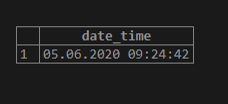
SELECT DATE_ADD(NOW(), INTERVAL 10 DAY) as date_time;The function NOW() will return the current date and time in YYYY-MM-DD HH:MM: SS format. The output of this query will add 10 days to the current date_time.
Output:
Code #2
SELECT DATE_ADD('2020-01-10 10:00:00', INTERVAL 10 SECOND) as date_time;So, We will update the date to 10 AM on 10th January 2020. We will add 10 seconds.
Output:
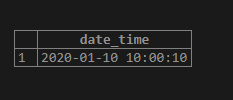
The output has come as 10 AM 10 seconds, of 10th January 2020.
Code #3
SELECT DATE_ADD('2020-01-10 10:00:00', INTERVAL 10 HOUR) as date_time;So, the date to be updated here is 10 AM on 10th January 2020. We will add 10 hours.
Output:
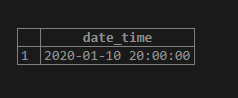
The query says to add 10 hours to the date_time provided. So from 10 AM, 10 hours is added, making it the 8 PM same date.
We saw adding time frames to the date_time value. Let’s add a number of days to the same and check.
Code #4
SELECT DATE_ADD('2020-01-10', INTERVAL 10 DAY) as date_time;So, the date to be updated here is 10 AM on 10th January 2020. We will add an interval of 10 days.
Output:
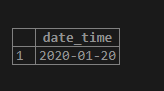
Adding ten days to the date_time will result at 10 AM on 20th January 2020—Cross-check with the calendar to confirm.
Code #5
SELECT DATE_ADD('2020-01-10 10:00:00', INTERVAL 10 WEEK) as date_time;So, the date to be updated here is 10 AM on 10th January 2020. The interval to be added is ten weeks.
Output:
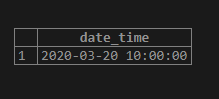
Here, the interval added is ten weeks. So the date will be shifted 10 weeks before 10th Jan 2020. Thus the expected output will be 20th March 2020—Cross-check with the calendar to confirm.
Code #6
SELECT DATE_ADD('2020-01-10 10:00:00', INTERVAL 10 YEAR) as date_time;So, We will update the date to 10 AM on 10th January 2020. We will add an interval of 10 years.
Output:
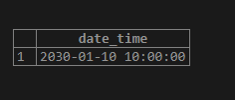
When ten years are added to the 10th of January 2020, the expected result is 10 AM on the 10th of January 2030. We have added time and day units to the date_time field. Now let’s try adding a combination of these values.
Code #7
SELECT DATE_ADD('2020-01-10 10:00:00', INTERVAL '10:10' YEAR_MONTH) as date_time;So, the date to be updated here is 10 AM on 10th January 2020. The interval to be added is a combination of years and months. Ten years and ten months are to be added to the date_time value.
Output:
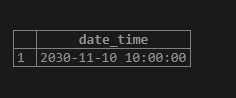
Adding ten years and ten months to 10th January 2020 will return 10th November 2030. The time will remain untouched in this query.
Code #8
SELECT DATE_ADD('2020-01-10 10:00:00', INTERVAL '1:10' HOUR_MINUTE) as date_time;So, We will update the date to 10 AM on 10th January 2020. You must add 1 hour and 10 minutes to the date_time value.
Output:
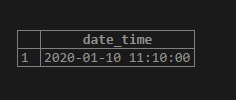
Adding 1 hour and 10 minutes to 10 AM of 10th January 2020 will return 10 minutes past 11 AM of the same date. The date will remain untouched in this query.
Let’s try adding negative values to this function.
Code #9
SELECT DATE_ADD('2020-01-10 10:00:00', INTERVAL -10 HOUR) as date_time;The query is to subtract 10 hours from the date_time provided. In this date_time value, the date will remain unchanged, and the expected output will be 12 AM on the same date.
Output:
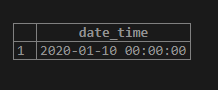
Code #10
SELECT DATE_ADD('2020-01-10 10:00:00', INTERVAL -10 DAY) as date_time;So, 10 days are to be subtracted from 10th January 2020. And the time field is to remain untouched.
Output:
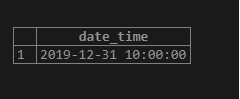
Moving 10 days backward in the calendar from 10th January 2020 will return 31st December 2019, and the time is to remain untouched.
Code #11
SELECT DATE_ADD('2020-01-10 10:00:00', INTERVAL '-60:-60' MINUTE_SECOND) as date_time;The query directs us to subtract 60 minutes and 60 seconds from 10 AM on 10th January 2020.
Output:
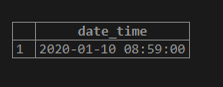
By moving 60 minutes and 60 seconds backward to 10 AM, the expected result is 8:59 AM of the same day.
Advantage
The main advantage of this function is the ease of performing date arithmetic. This function can quickly return any value ahead or behind a specific date/time.
Conclusion
We are now familiar with the DATE_ADD function. The function will add a specified unit of time or days to the date and time value provided in the statement. You can add both positive and negative values to the date_time field. This function supports most of the units in MySQL. The query is straightforward to amend any date and time field and return the result.
Recommended Articles
We hope that this EDUCBA information on “MySQL DATE_ADD()” was beneficial to you. You can view EDUCBA’s recommended articles for more information.

