
Updated March 6, 2023

Definition of Mongodb updateOne
MongoDB updateOne method is used to update only one document from the collection, if we wish to update only a single document same time we have using the updateOne method in MongoDB. Using the updateOne method we can update the first matching document, a single document, embedded documents, and also we are able to update single array elements. To update any single document using the updateOne method we need to use the $set operator to replace the present value with new value. Basically, MongoDB updateOne updates the first matching documents from the collection, it will ignore the another matching documents from the collection.
Syntax:
Below is that the syntax of the updateOne method in MongoDB.
db.name_of_collection.updateOne (

{Selection criteria of update query}, {$set operator}

{Upsert (optional), Writeconcern (Optional), collation (optional), arrayFilters (Optional), Hint (optional)}

)
Below is that the parameter description of the above syntax.
1) Name of the collection – This parameter is defined as collection name which was we have used with the updateOne method to update the one documents.
2) UpdateOne – This can be a method name used in MongoDB to update single documents within the collection.
3) Selection criteria of update query – In this section, we have defined the selection criteria of updated documents. Which documents we have updating this is defined in this selection criteria.
4) $set operator – This operator is used in MongoDB while updating any documents. It will update or replace the existing value with a new value.
5) Upsert – It is an optional parameter used with updateOne method in MongoDB. To use this parameter with updateOne method we need to define this parameter value as true in our query. Basically, a default value of this parameter is false in MongoDB.
6) Writeconcern – We can only use this parameter when we didn’t require the default value of this parameter.
7) Collation – This is also the default parameter used with updateOne method in MongoDB. This parameter will specify the use of collation operations in MongoDB. While using this it will allow the language-specific rules to the user.
8) ArrayFilters – The type of this parameter in the updateOne method is an array. This parameter is shown which array we have modifying using the updateOne method.
9) Hint – This specifies that we have using an index or not to filter the data. This is also an optional parameter using the updateOne method in MongoDB.
How updateOne works in Mongodb?
MongoDB update method is basically used to update a single document from the collection in MongoDB.
Using MongoDB updateMany method we can update many documents in the same query, but while using updateOne method we can update a single document from the collection.
The below example shows that using updateOne method we can update only one document from the collection in MongoDB.
db.MongoDB_Update.find ()

db.MongoDB_Update.updateOne ({name: “ABC"}, {$set: {name: "BCD"}})

db.MongoDB_Update.find ()
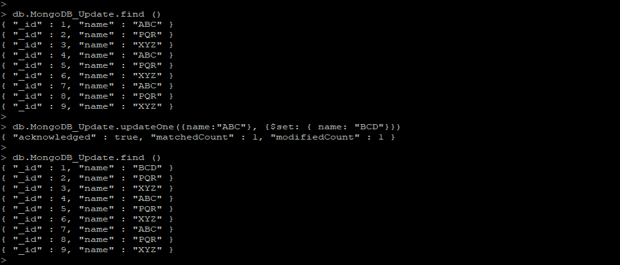
Figure: Using MongoDB updateOne method we can update only one document from the collection.
In the above example, we can see that ABC names have three documents in MongoDB_Update collection. While using updateOne method only one document is updated which was comes first in order.
In the above example document ID, 1 is updated, because the sequence of this document’s id is first in the MongoDB_Update collection.
MongoDB updateOne method will update only 1 document and skips another document even it will match the specified criteria which was we have defined in our query.
The output of the updateOne method will show the below parameters.
1) Acknowledged.
2) Matched count
3) Modified count
The result of acknowledged is shown the true value while giving an output of updateOne method.
The matched count is shown as how many documents match with the given specified criteria. If we have found any matched value then this parameter shows the output as 1 else it shows the output as zero.
If the matched count matches any documents using the given criteria and if any value is updated using updateOne method then the value of this parameter is 1.
If we have not found any matched value using the given criteria the value of this parameter is zero.
Below example shows how matched count and modified count parameter shows the output in updateOne method
db.MongoDB_Update.updateOne ({name:"PQR"}, {$set: {name: "BCD"}})

db.MongoDB_Update.updateOne ({name:"CBD"}, {$set: {name: "BCD"}})
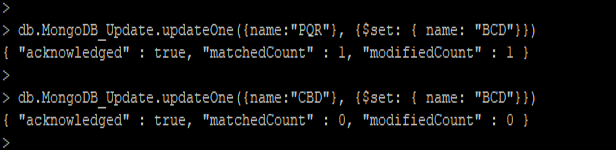
Figure – how matched count and modified count parameter shows the output in updateOne method.
In the first example, the updateOne method has found the matched result and updated the single documents, so it will show the matched count and modified count as 1.
But in the second example, updateOne method has not found the matched result and has not updated any documents, so it will show the matched count and modified count as zero.
Example
Below example shows updateOne method in MongoDB.
1) Update single document using updateOne method in MongoDB
In the below example, we have updated the name as BCD to MNP. We can see that the first name contains BCD is updated with the name MNP.
Code:
db.MongoDB_Update.find ()

db.MongoDB_Update.updateOne ({name:"BCD"}, {$set: {name: "MNP"}})

db.MongoDB_Update.find ()
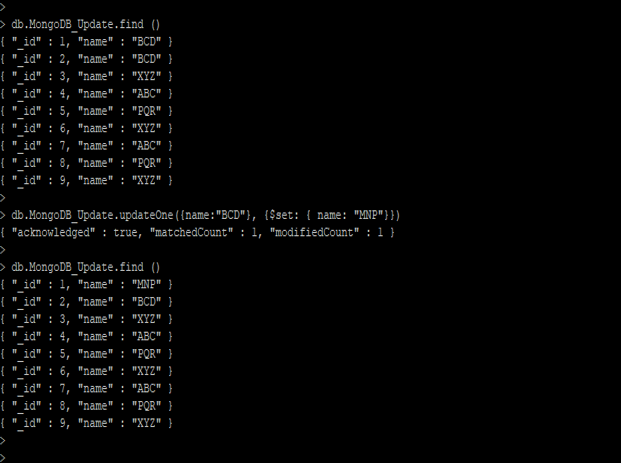
Figure – Example to update single document using updateOne method.
2) Update embedded document using updateOne method
In the below example, we have updated the embedded documents. We have updated the lap_spec set for the name as ABC.
Code:
db.MongoDB_Update.find ()

db.MongoDB_Update.updateOne ({name: "ABC"}, {$set: {"lap_spec.ram": 32, "lap_spec.screen": 18.5, "lap_spec.cpu": 1.66}})

db.MongoDB_Update.find ()
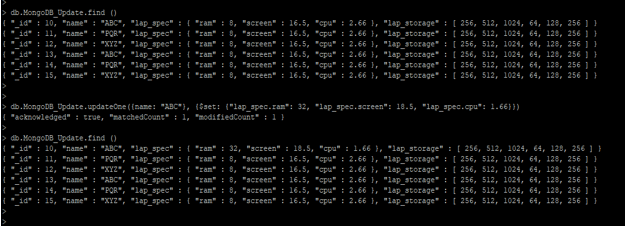
Figure – Example to Update embedded document using updateOne method .
3) Update array elements using updateOne method
In the below example, we have updated the array elements documents. We have updated the lap_storage array for the name ABC.
Code:
db.MongoDB_Update.find ()

db.MongoDB_Update.updateOne ({name: "ABC"}, {$set: {"lap_storage.0": 32, "lap_storage.1": 64, "lap_storage.2": 128, "lap_storage.3": 256, "lap_storage.4": 512, "lap_storage.5": 1024}})> db.MongoDB_Update.find ()

db.MongoDB_Update.find ()
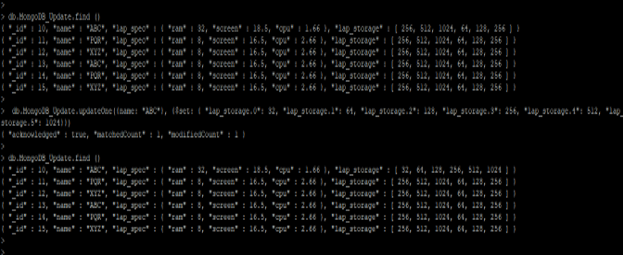
Figure – Example to Update array element document using updateOne method in MongoDB.
4) Update the first document using updateOne method
In the below example, we have updated the first document with the name MNP to ABC. We can see that the first name contains MNP is updated with the name ABC.
Code:
db.MongoDB_Update.find ()

db.MongoDB_Update.updateOne ({name: “MNP"}, {$set: {name: "ABC"}})

db.MongoDB_Update.find ()
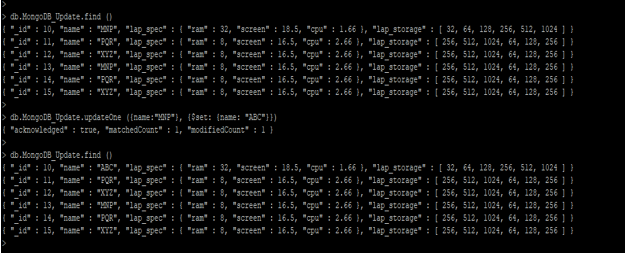
Figure – Example to update the first document using updateOne method in MongoDB.
Conclusion
MongoDB updateOne method is used to update single documents from the collection. Using the updateOne method in MongoDB we can update embedded as well as array element documents from the collection. Basically, updateOne method updates the first document from the selection criteria and skip another document.
Recommended Articles
This is a guide to Mongodb updateOne. Here we discuss the definition, How updateOne works in Mongodb? along with examples respectively. You may also have a look at the following articles to learn more –

