
Updated March 8, 2023

Definition of MongoDB Query Operators
MongoDB query operators are used to interact with the database using queries, there are different types of query operators are available in MongoDB. MongoDB query operators are nothing but keywords or special symbols which informed the interpreter to process the logical or mathematical operations. Basically, the query operator is enhanced more MongoDB functionality which allowed the user to create more complex queries and interacts with the data set. We have using the find command to fetch the data from collections using the query operator, also we need to use prefix as “$” sign before the query operators.
Syntax:
Below is the syntax of query operators in MongoDB.
db.name_of_collection.find ( { “Field_name”: { $query_operator_name: “value” } } ) .pretty()
Parameter description syntax of query operators in MongoDB.
1) Name of collection – This parameter is defined as the collection name from which we have retrieving documents as per the query operators which was we have used in our query.
2) Find – This method is used to retrieve data from collections. We can also use find method with query operator to retrieve specific documents in MongoDB.
3) Field name – This parameter is defined as the name of the field from which we have retrieving data as per the query parameter which was we have used in our query.
4) Query operator name – We need to use specified query operator name to retrieve documents from collection as per the query operations.
5) Value – The value nothing but the field value which was we have using with the query operator to perform the logical or mathematical operations on it.
6) Pretty – Basically MongoDB output is in an unstructured format using this method we can display our output in a structured format.
How query operators work in MongoDB?
- We can use MongoDB query operators in any command which was supported by MongoDB.
- Following are the types of query operators which was available in MongoDB.
1) Comments
2) Bitwise
3) Array
4) Comparison
5) Logical
6) Element
7) Evaluation
8) Geospatial
- MongoDB comparison operator is used to compare the value from documents. Below are the comparison query operators available in MongoDB.
1) Equal to ($eq)
2) Greater than ($gt)
3) Less than ($lt)
4) Greater or equal to ($gte)
5) Less or equal to ($lte)
6) Match value from array ($in)
7) Not equal ($ne)
8) Match none of the value from array ($nin)
- Logical operator in MongoDB is used to filter data as per given conditions. Below is the type of logical query operators.
1) Logical AND ($and)
2) Logical OR ($or)
3) Logical NOR ($nor)
4) Logical NOT ($not)
- Element query operators is used in MongoDB to identify the documents as per the documents field.
1) $exists – Match document as per specified field.
2) $type – Match document using the specified field.
- MongoDB evaluation query operators will used to evaluate the individual field or overall data structure from document.
- Below is the evaluation query operator available in MongoDB is as follows.
1) $jsonSchema – This operator is used to validate documents as per schema.
2) $mod – It will match the document when our field value is equal with the remainder value.
3) $regex – It will match the document as per our regular expression.
4) $text – It will perform the text search on the given field.
5) $where – It will match the document which satisfied the JavaScript expression.
- Array operators in MongoDB are basically designed for arrays with query documents. Below is the array query operator in MongoDB.
1) $all – It will match all the elements from array which satisfy the given condition.
2) $size – It will match the array as per specified size is equal to the array size.
3) $elemMatch – It will match the documents as per specified elemMatch condition.
- The last type of query operator in MongoDB is the comment operator. This is used to give comments to any expression or query. If we add comments to any query it will be easy for any people to trace or see the logs.
Example
Below is the example of a query operator in MongoDB.
1) MongoDB comparison query operator
Below example shows MongoDB comparison query operator. In following example we have used $eq, $gt, $lt, $gte and $lte query operator.
Code:
db.query_operator.find ()

db.query_operator.find ( { stud_id: { $eq: 1 } } )

db.query_operator.find ( { stud_id: { $gt: 2 } } )

db.query_operator.find ( { stud_id: { $lt: 2 } } )

db.query_operator.find ( {stud_id: { $lte: 2 } } )

db.query_operator.find ( { stud_id: { $gte: 2 } } )
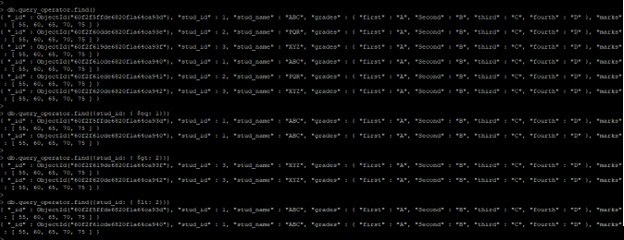
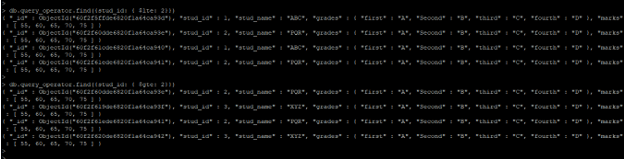
Figure – Example of comparison query operator in MongoDB.
2) MongoDB logical query operator
The below example shows MongoDB logical query operator. In following example we have used $and, $or and $nor query operator.
Code:
db.query_operator.find ()

db.query_operator.find ( { $and: [{stud_name: "ABC" }, { marks: { $gte: 70 } } ] } )

db.query_operator.find ( { $or: [ { stud_id: 1 }, { stud_name: "ABC" } ] } )

db.query_operator.find ( { $nor: [ { stud_id: 1 }, { stud_name: "ABC" } ] } )
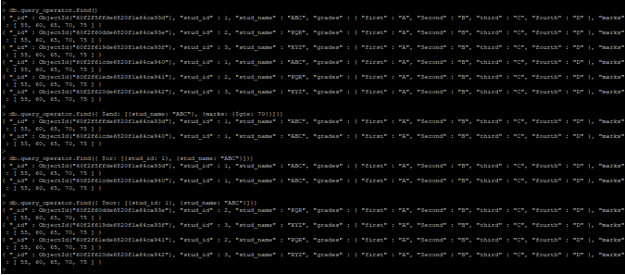
Figure – Example of logical query operator in MongoDB.
3) MongoDB element query operator
The below example shows MongoDB element query operator. In following example we have used $exists and $type query operator.
Code:
db.query_operator.find ()

db.query_operator.find ( { "marks": { $exists: true, $gte: 50 } } )

db.query_operator.find ( { "marks": { $type: "double" } } )
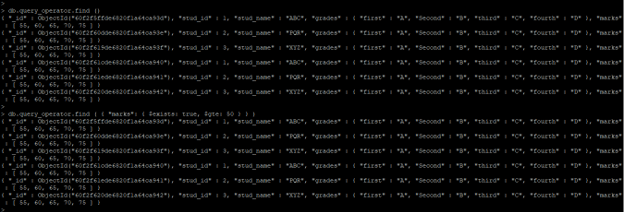
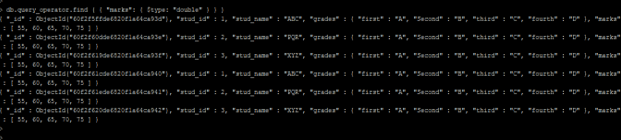
Figure – Example of element query operator in MongoDB.
4) MongoDB evaluation query operator
The below example shows MongoDB evaluation, query operator. In the following example, we have used $mod and $text query operator.
Code:
db.query_operator.find ()

db.query_operator.find ( { "stud_name": { $regex: '.B.' } } )

db.query_operator.createIndex ( { "stud_name": "text" } )
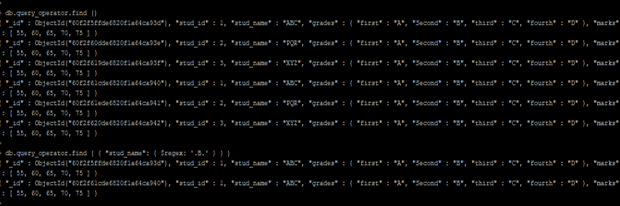

Figure – Example of evaluation query operator in MongoDB.
5) MongoDB array query operator
The below example shows MongoDB array, query operator. In the following example, we have used $all and $size query operators.
Code:
db.query_operator.find ()

db.query_operator.find ( { "marks": { $all: [ 60, 65 ] } } )

db.query_operator.find ( { "marks": { $size: 5 } } )
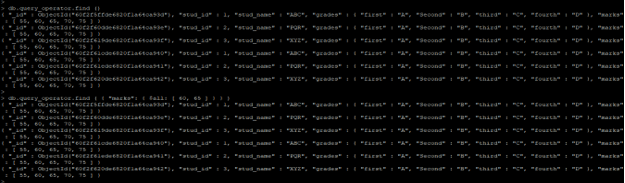

Figure – Example of array query operator in MongoDB.
Conclusion
Query operator is useful and important in MongoDB. MongoDB query operators are nothing but the keywords or special symbols which was used to inform the interpreter for processing logical or mathematical operations. Comparison, logical, element, evaluation, geospatial, array, bitwise, and comments are the types of query operator in MongoDB.
Recommended Articles
This is a guide to MongoDB Query Operators. Here we discuss the definition, How query operators work in MongoDB? and examples, respectively. You may also have a look at the following articles to learn more –

