
Updated March 8, 2023

Definition of Mongodb greater than
MongoDB provides a different kind of comparison operator to the user, the greater than is one of the comparison operators that are provided by the MongoDB. Normally MongoDB is greater than the comparison operator, it is used to compare the two different values such as specified value and filed value. Basically greater than operator is used to fetching the required document where the value of a field from the collection is greater than the specified value. Greater than operator we can use different methods such as like, find and update as per our requirement. The MongoDB greater than comparison operator we can denote by using the $gt symbol.
Syntax:
{specified field name:{$gt: specified value}}
Explanation
In the above syntax, we use the comparison operator of MongoDb that is greater than ($gt) with two different parameters as follows.
- specified field name: it is used to field name from the collection and this field is dependent on the user.
- $gt: it is the symbol of greater than comparison operator
- specified value: It is used to define the value for the comparison
How greater than works in MongoDB?
Now let’s see how the greater than comparison operator works in MongoDB as follows.
First, try to understand what the operator is. MongoDB provides different kinds of operators such as comparison, logical, element array and bitwise, etc. But we commonly used comparison operators among the different operators. Again we have different types of comparison operators such as eq, gt, lt, and gte, etc, and this operator we can use as per our requirement.
Normally greater than operator is used to compare the specified value with all documents from the collection and we found any match and if match value is greater than the specified value then it displays all documents from the collection.
The working of greater than operator is simple; we just need to mention the specified field name with the specified value that we want. The specified field name and specified value depend on the user. At the time of execution, it compares all specified values with all documents from the collection and if the value of the document is greater than the specified value then it displays specified records.
Example
Now let’s see the different examples of greater than operator as follows.
First, we need to create the new collection as follows.
First, we need to use a database then create a collection as follows.
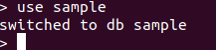
First, we created a sample database by using the following statement as follows.
use sample
Explanation
In the above statement, we use the command to create the new database, here we successfully created a sample database and we use it. The final output of the above statement we illustrated by using the following screenshot as follows.
After successful creation of the database, we need to create the collection by using the following statement as follows.
db.createCollection("student")
Explanation
In the above statement, we use createCollection command to create the new collection; here we created a new collection name as a student as shown. The final output of the above statement we illustrated by using the following screenshot as follows.

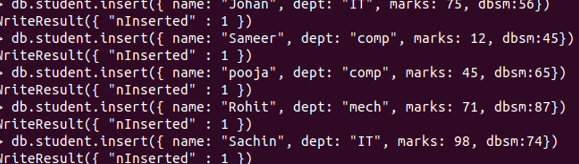
Now we have a collection, so now we need to insert the same document into the newly created collection that is a student by using the following statement as follows.
db.student.insert({ name: "Johan", dept: "IT", marks: 75, dbsm:56})

db.student.insert({ name: "Sameer", dept: "comp", marks: 12, dbsm:45})

db.student.insert({ name: "pooja", dept: "comp", marks: 45, dbsm:65})

db.student.insert({ name: "Rohit", dept: "mech", marks: 71, dbsm:87})

db.student.insert({ name: "Sachin", dept: "IT",marks: 98, dbsm:74})
Explanation
By using the above statement we successfully inserted five documents into the student collection, in which we inserted the name of the student, department name of the student, marks of a student, and marks of DBMS subject as shown. The final output of the above statements we illustrated by using the following screenshot as follows.
Now we can perform MongoDB greater than ($gt) comparison operator as follows.
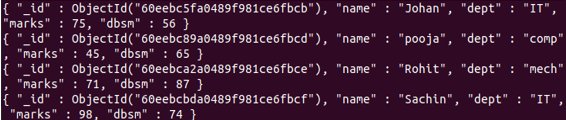
db.student.find({marks:{$gt:20}})
Explanation
In the above example, we need to find out those student marks greater than 20 at that time we can use the above statement. Here we first specify the collection name that is a student after that we use the find function with marks filed and user-specified value as shown. The final output of the above statement we illustrated by using the following screenshot as follows.
Now let’s see more examples of $gt as follows.
Suppose we need that student marks is greater than 80 at that time we can use the following statement as follows.
db.student.find({marks:{$gt:80}})
Explanation
In the above example, we use a comparison operator of MongoDB that is greater than, in this example, we need to find those students whose marks are greater than 80 as shown. The final output of the above statement we illustrated by using the following screenshot as follows

Now let’s see how we can use the update method with the $gt comparison operator as follows.
db.student.update( { "marks": { $gt: 70 } }, { $set: { dbms: 95 } } )
Explanation
In the above example, we try to implement the update method with the $gt comparison operator, in this example, we set the DBMS marks of students by using the $gt operator. Here we set 95 DBMS marks; those student marks are greater than 70 as shown in the above statement. The final output of the above statement we illustrated by using the following screenshot as follows.

We can also set the multi: true option in the update method as per our requirement as follows.
db.student.update( { "marks": { $gt: 70 } }, { $set: { dbms: 95 } }, {multi: true} )
Explanation
In the above example, we use the multi true option with the update method, here we set the DBMS marks the same as the previous example, the only difference is that when the condition is true then the multi-option is true. This condition is dependent on the user requirement. The final output of the above statement we illustrated by using the following screenshot as follows.

Conclusion
We hope from this article you learn more about MongoDB greater than. From the above article, we have learned the basic syntax of the greater than and we also see different examples of the greater than. From this article, we learned how and when we use MongoDB greater than.
Recommended Articles
This is a guide to MongoDB greater than. Here we discuss the definition, How greater than works in MongoDB? along with examples respectively. You may also have a look at the following articles to learn more –

