
Updated March 13, 2023

Introduction to MongoDB Drop Collection
MongoDB can be defined as a document focused database system which implements the theory of NoSQL. It is a freely available database management tool that delivers high performance and availability as well as automatic scaling. Basically, the MongoDB Drop Collection in MongoDB is a method indicated as db.collection.drop() intended to drop or remove a collection from a database. This drop collection method in MongoDB eliminates a collection from the database absolutely and does not further leave any indexes linked with the dropped collections. The MongoDB method db.collection.drop() does not contain any argument, and if executed with an argument, then the method generates an error.
Syntax of MongoDB Drop Collection
Following is the syntax code associated with the MongoDB Drop collection method, which is applied in the database to operate:
Db.NAME _OF_COLLECTION.DROP()
We can say that MongoDB resembles like a physical container to collect or store data records. Therefore, on the file system, each database contains its collection of files be located in. Typically, this MongoDB server includes various databases. Also, collections can be said as a cluster of MongoDB documents existing within an only database. This can be related to the tables implemented in an RDBMS (Relational Management System). MongoDB collection does not apply the idea of schema. Here, documents with collection generally include several fields. Hence, all the documents prevailing within a collection are intended for a comparable or associated purpose.
Now, a Document can be identified as a key-value pairs’ collection, which comprises a dynamic schema. This dynamic schema can be defined as something in which documents of the identical collection do not need to have a similar collection of fields or structure. A mutual field can hold several kinds of data records. In MongoDB, we find Embedded Documents in place of Table Join as in MySQL or Oracle. This MongoDB contains the Primary key and default key.
How to Drop Collection in MongoDB?
For removing any collection in the MongoDB, a user needs to implement the collection.drop() method. It will delete the particular collection from the database entirely without leaving any indexes connected to the same drop collection. It should be remembered that the drop collection method needs no argument with it, and in case if the argument is passed, then on execution, it will show pop up having errors. Similarly, all the related indexes with the specified collection will also get dropped when this drop method is run.
For instance, using the syntax for the drop method:
Db.collection.drop()
By using the drop collection but firstly view any collections present in the previously created database. Suppose we use the database test, and inside this database, we have few collections, so now this database can be applied for dropping the particular collection and then view the changes that occurred in the database collection list.
Use test

Db.books.drop()

Show Collections
Here, the ‘books’ is a collection name existing under the database test, and we have dropped it using the MongoDB drop collection method. Again, using the Show command, we can see the modifications done in the database collections. If you start with MongoDB 4.0.2, the drop collection method removes its related tag/zone ranges. This drop collection method as db.collection.drop() acquires an exclusive lock on the particular collection for the time period of the operation. It means that all succeeding operations on the collection need to wait unless db.collection.drop() reliefs the lock. In the preceding MongoDB 4.2, this db.collection.drop() method acquired an exclusive lock on the parent database, which blocks all operations on that database along with all its collection unless the operation is accomplished.
There is a change in the version 4.0 in MongoDB, where the db.collection.drop() agrees an optional document with syntax as follows:
Db.collection.drop( {writeConcern:<document>} )
You can view an extra field after the drop method as writeConcern, which indicates an optional one. A document conveying the writeconcern of the operation db.collection.drop() method. We need to omit to apply the default write concern. When there is an issue on a shared cluster, the Mongo converts the writeconcern of the drop command and its helper db.collection.drop() to “majority”. This is new in MongoDB 4.0. After execution, if the collection existing gets dropped, then returns True, and if the collection does not exist, then the drop method returns False.
Example of MongoDB Drop Collection
Given below is the example of MongoDB Drop Collection:
Initially, you can set up the MongoDB from the website at mongodb.com; download the MongoDB installer file and install the software tool with provided documentation.
You can use the Mongo shell command-line interface to proceed; it looks as follows:
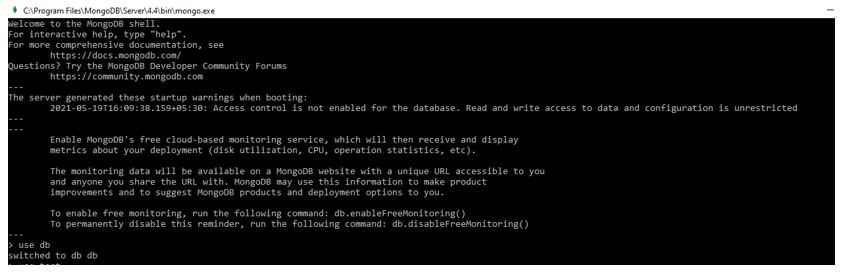
Let us view the databases present currently:
Code:
use test

show dbs
Output:
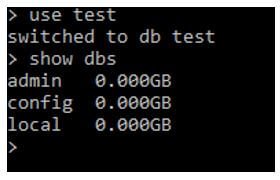
Initially, to use the drop collection first, we need to confirm the present collections in the database.
Code:
Use test

SHOW COLLECTIONS
Output:
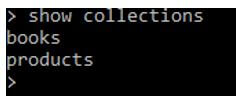
Here, in the output displayed, you can view a collection named as ‘products’ already existing in the database. This should be noted.
Now, we will drop the same collection shown above from the database using the command as:
Code:
db.products.drop()
Output:
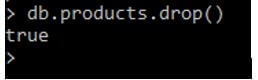
As you can see, the result is true, which means the products named collection is removed from the database.
Further to check, you can run the SHOW command again to view the collection present in the database:
Code:
SHOW COLLECTIONS
Output:
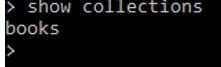
Now, as you can see, there is no collection that exists in the database currently.
Conclusion
Since MongoDB is an open-source product created by -10gen in the year oct’07 and is also maintaining till now, MongoDB and its operations are designed to role with the commodity servers storing the data records in a key-value pair. Hence, the MongoDB Drop Collection method helps to eradicate the definite collection from the current database providing True as a result if the collection prevails and False if the collection does not prevail in the database to drop.
Recommended Articles
This is a guide to MongoDB Drop Collection. Here we discuss the introduction, how to drop collection in MongoDB? and an example. You may also have a look at the following articles to learn more –

