
Updated March 14, 2023

Introduction to MATLAB Export Data
Export is the MATLAB function that is used to export the data from the Workspace. You can export variables from the MATLAB workspace to various file formats like .txt, jpg, Excel sheet, etc. In many applications, we need various files or databases as an output. These kinds of applications won’t work or operate without export functions. All types of data can export by using the export function in Matlab. Basically, data is exported in Workspace. Then that data can be exported to the destination. Along with the export function, we can give the name of the file which we are going to use in our program.
How to Export Data from MATLAB?
To export data from MATLAB we have different ways like we should export data to Microsoft excel file, we should export the data to a text file, and so on.
There is a simple step to export the data.
- Write the data into the script.
- Load the data to the workspace.
- After loading data exporting the data to the desire destination.
Export Data Methodologies
Given below shows export data methodologies:
Example #1
Let’s see example with Export Data to Excel sheet.
In this example, we discuss how to export Simulink scope data to an Excel sheet file using the writeable command in Matlab. Basically, in this example, we take that Simulink and assign sine wave and plot scope into it. We export the data from that Simulink, which basically stores the time and signal value. Then we can take a variable namely ‘ Ta ’, in Ta we can store the exported data from Simulink, for exporting data we use a write table inbuilt function which is available in MATLAB. Then simply display that data into the excel sheet
Code:
Ta = table(ScopeData.time, ScopeData.signals.values)

writetable(Ta,'Book1.xlsx')
Output:
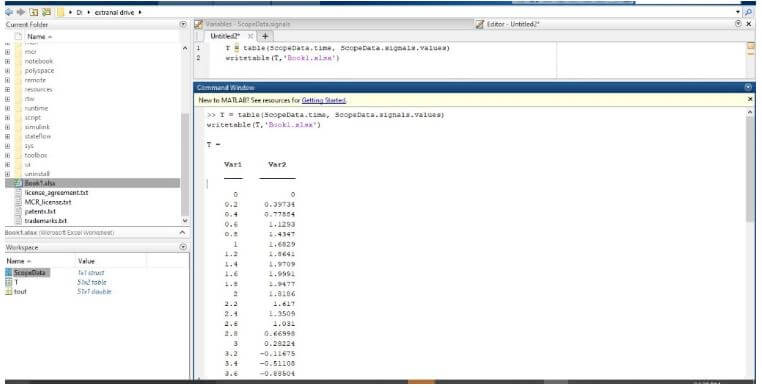
We saw that Matlab code for example and output in the command window. When we run the example table is created into the command window. The table contains the different readings of sine data created into the Simulink.
To export a table in the workspace to an Excel spreadsheet file, we use the writetable function.
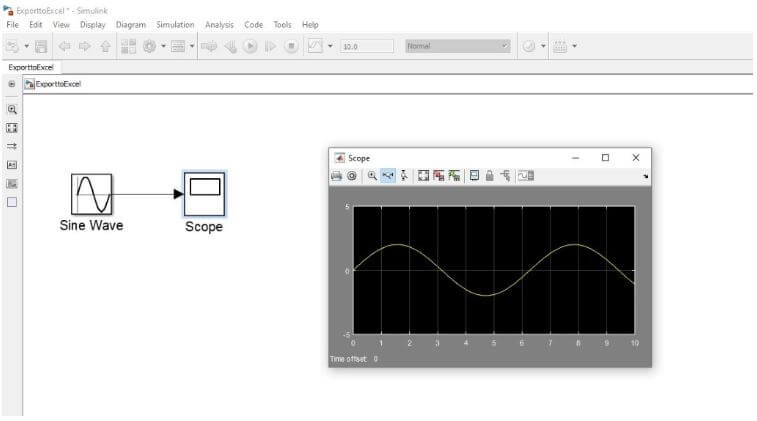
We saw that Simulink window. In Simulink window, there is a sine wave connected to the normal scope. After running the Simulink we observed the sine wave signal at the scope. We saw that signal. We can export data from the workspace to any worksheet in the file at any location. But by default, writetable writes your table data to the first worksheet in the file, starting at cell A1.
Finally, the data of Simulink scope in the Matlab is exported to Excel file by using writetable function. The below figures show that the exported data is in the excel file.
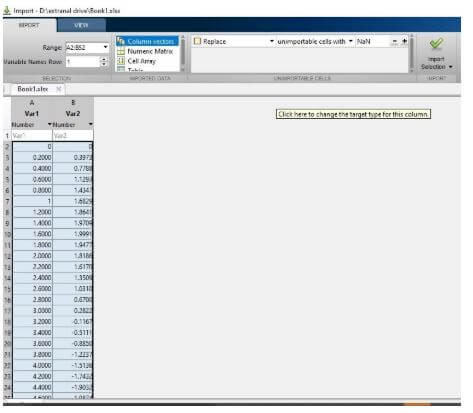
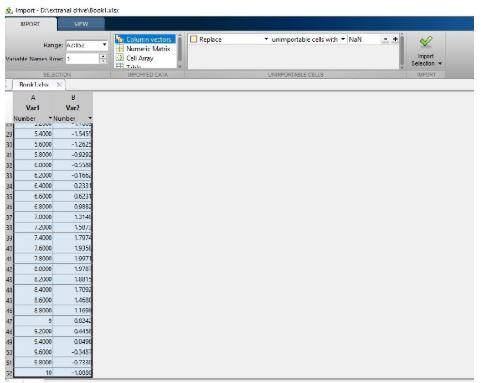
Finally, the data of Simulink scope in the Matlab is exported to an Excel file.
The above fig shows that the exported data is into the excel file.
Example #2
Let us consider another example of data exporting. Now we can export the tabular data from the MATLAB workspace into the file using the writetable function. We can create a simple table and write some additional points. After that export that data to the .txt file. Data can be exported from. txt file to further processing.
Steps to export the data to a text file:
- Firstly we create the tabular data by using the MATLAB function.
- After that, the tabular data is exported to the destination file using writetable function.
The writetable function help to export the data from workspace to file.
Code:
clc;

close all;

clear all ;

Size = [0.5;0.2;2;5.25;6.5];

Shape = {'rectangle';'Round';'square';'rectangle';'Round'};

Price = [10.3;13.49;10.70;12.30;16.9];

Stock = [396;702;445;191;572];

T = table(Size,Shape,Price,Stock)

writetable(T,'mydoc.txt');

type mydoc.txt
Output:
For example, we created the table and assigned that data to a variable then all data is passed to the mydoc.txt file.
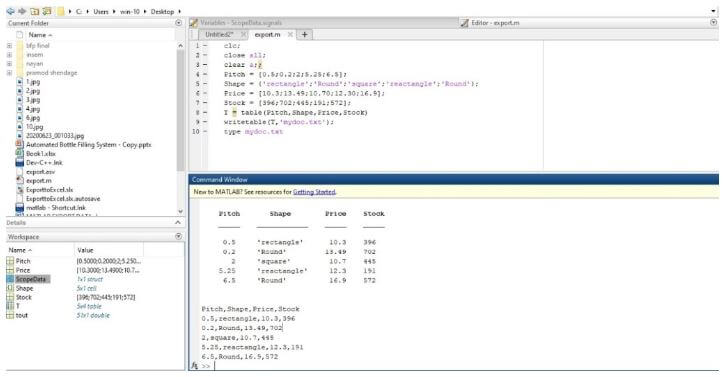
We saw that Matlab code for example and output in the command window.
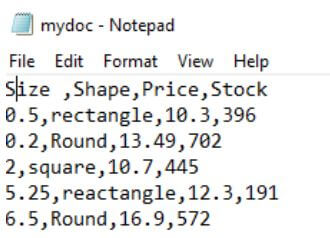
The above fig shows the exported data in the .txt file. This is the same data as the data in the table.
Conclusion
In this article, we saw the basic concepts about what is export the data in Matlab. And how we use an export function in Matlab. In this article, we also saw some of the examples related to export data with Matlab codes and also saw related outputs about it. Also saw how to export Simulink scope data to Excel sheet file using writetable command.
Recommended Articles
This is a guide to MATLAB Export Data. Here we discuss the introduction, how to export data from MATLAB? and methodologies respectively. You may also have a look at the following articles to learn more –

