


What is Least Privilege Access?
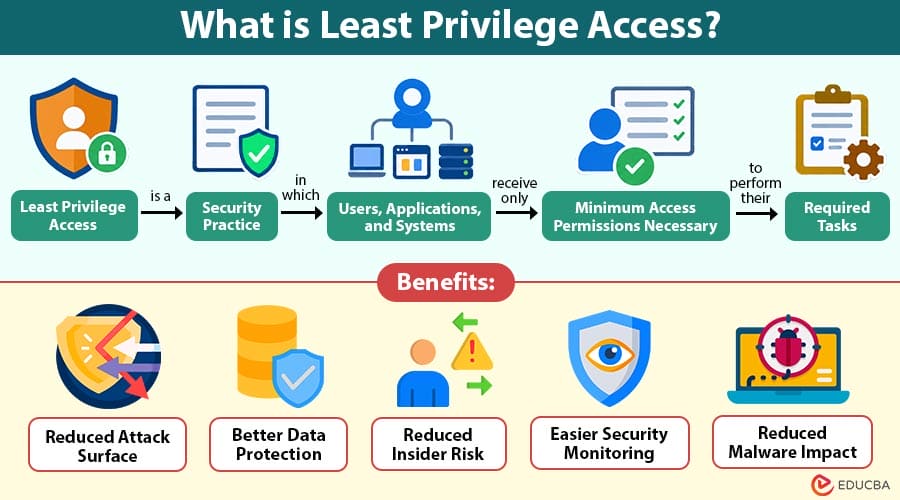
Least Privilege Access is a security practice in which users, applications, and systems receive only the minimum access permissions necessary to perform their required tasks.
For example, an employee responsible for creating invoices may need access to billing software but does not need permission to modify employee salaries or access confidential HR records.
Table of Contents:
Key Takeaways:
- Least privilege access provides users only necessary permissions, reducing security risks and unnecessary exposure.
- It protects sensitive information by restricting access according to specific roles, responsibilities, and requirements.
- Regular access monitoring and reviews help organizations remove unnecessary permissions and maintain stronger security.
- Least Privilege Access reduces attack surfaces, limits compromised accounts, and supports effective access management.
Why is Least Privilege Access Important?
Giving users excessive permissions can create significant security risks. If an account is compromised, attackers may use those permissions to access sensitive systems and information. Least Privilege Access reduces this risk by restricting unnecessary permissions.
Below are some major reasons why organizations use this approach:
1. Reduces Security Risks
Users with unnecessary permissions create additional entry points for attackers. Limiting access reduces the resources an attacker can reach if an account is compromised.
2. Protects Sensitive Information
Businesses handle confidential information such as customer records, financial data, employee information, intellectual property, and business documents. Least Privilege Access ensures that employees can access sensitive information only when it is relevant to their responsibilities.
3. Limits the Impact of Compromised Accounts
A stolen username and password can become dangerous when the account has extensive privileges. With limited permissions, attackers may be unable to access critical systems even after gaining control of an account.
4. Supports Compliance
Many organizations must follow data protection and cybersecurity requirements. Restricting access to sensitive information can help businesses demonstrate stronger access-control practices.
5. Improves Operational Control
Organizations can clearly define who can access specific systems, applications, files, and databases. This makes access management easier to monitor and control.
How Does Least Privilege Access Work?
Least Privilege Access generally follows a simple process.
Step 1: Identify User Responsibilities
The organization first determines what each employee or user needs to accomplish. For example, a marketing employee may need access to social media platforms, analytics tools, and marketing documents.
Step 2: Determine Required Permissions
The organization identifies the minimum permissions required to perform those responsibilities. The marketing employee may be allowed to create and edit campaigns but may not be allowed to modify financial records.
Step 3: Assign Appropriate Access
Assign permissions based on job responsibilities. Organizations can provide access through roles, groups, applications, or specific resources.
Step 4: Monitor Access
Organizations regularly review user activities and permissions to identify unusual behavior or unnecessary access.
Step 5: Remove Unnecessary Permissions
When employees change roles or leave the organization, update or remove their access. This prevents former or unnecessary permissions from remaining active.
Example of Least Privilege Access
Consider a company with separate finance, HR, marketing, and IT departments.
A finance employee needs access to accounting software and financial reports. However, they do not need access to employee medical records or IT administration tools.
Similarly, an HR employee may need access to employee records but does not require administrative access to the company’s network infrastructure.
By assigning permissions based on responsibilities, the company follows the principle of least privilege.
If the finance employee’s account is compromised, the attacker has fewer opportunities to access unrelated systems.
Difference Between Least Privilege Access and Traditional Access
The table below highlights the differences between the two:
| Least Privilege Access | Traditional Access |
| Minimum required permissions | Broader permissions |
| Lower exposure | Higher exposure |
| Access is regularly reviewed | Access may remain unchanged |
| Reduced impact from compromised accounts | Greater impact from compromised accounts |
| More granular control | Less granular control |
Benefits of Least Privilege Access
Implementing least privilege access can provide several benefits for organizations.
1. Reduced Attack Surface
Limiting user permissions reduces accessible systems and resources, minimizing potential entry points that attackers could exploit during security incidents.
2. Better Data Protection
Least Privilege Access ensures sensitive information is available only to authorized users who need it for legitimate business purposes.
3. Reduced Insider Risk
Restricting employee permissions reduces the possibility of accidental or intentional misuse of sensitive information and organizational resources.
4. Easier Security Monitoring
Security teams can more easily detect, look into, and react to anomalous access activity when permissions are well specified.
5. Reduced Malware Impact
Limited user privileges reduce malware’s ability to modify systems, access sensitive data, or cause widespread organizational damage.
Common Applications of Least Privilege Access
Least Privilege Access applies across different technology environments.
1. Cloud Computing
Organizations assign cloud permissions based on users’ specific responsibilities, limiting access to only the applications, databases, storage, and infrastructure required.
2. Databases
Database access can be restricted based on user responsibilities, allowing individuals to read, modify, or manage only the records they need.
3. Operating Systems
Employees can use standard user accounts for daily activities, reducing unnecessary administrator privileges and limiting potential system changes or security risks.
4. Applications
Application permissions can control which features, functions, and information users can access based on their specific roles and responsibilities.
5. Network Resources
Organizations can restrict access to servers, network devices, and internal systems according to employees’ business requirements and job responsibilities.
6. APIs and Service Accounts
APIs and service accounts should receive only necessary permissions, reducing opportunities for unauthorized access, misuse, or security incidents.
Challenges of Implementing Least Privilege Access
Although the principle provides strong security benefits, implementing it can create challenges.
1. Identifying the Correct Permissions
Organizations may initially struggle to determine exactly what permissions each employee requires. Giving too little access can prevent employees from completing their work, while giving too much can create security risks.
2. Managing Large Organizations
Businesses with thousands of employees may have complex roles and frequently changing access requirements.
3. Maintaining Access Reviews
Permissions need to be reviewed regularly. Without ongoing monitoring, users may accumulate unnecessary privileges over time.
4. Balancing Security and Productivity
Extremely restrictive access controls can slow down employees if legitimate access requests require frequent approval. Organizations therefore need to balance strong security with efficient operations.
Final Thoughts
Least Privilege Access is a cybersecurity practice that gives users, applications, and services only the permissions they need. It reduces unnecessary access, protects sensitive information, limits damage from compromised accounts, and strengthens access management across cloud services, remote work environments, and interconnected digital systems.
Frequently Asked Questions (FAQs)
Q1. Can least privilege access be used for temporary access?
Answer: Yes. Organizations can provide temporary or time-limited permissions when users need additional access for a specific task or situation.
Q2. How does least privilege access help prevent unauthorized changes?
Answer: It prevents users without the required permissions from changing system settings, deleting resources, installing software, or modifying protected information.
Q3. Does least privilege access apply to applications and software?
Answer: Yes. Applications and software should receive only the permissions necessary to perform their functions, reducing unnecessary access to systems and data.
Q4. Can least privilege access improve accountability?
Answer: Yes. Assigning specific permissions to defined users or roles makes it easier to determine who is authorized to perform particular actions within an organization.
Recommended Articles
We hope that this EDUCBA information on “Least Privilege Access” was beneficial to you. You can view EDUCBA’s recommended articles for more information.


