

Updated May 10, 2023
Introduction to Joins in MySQL
MySQL Joins play an essential role in joining two tables together based on one or more common values shared by two tables.
Example: Let’s consider we have two tables; one is the employee table consisting of employee_id, phn_no, salary, and department. Another table is the address table which consists of employee_id and address. So if we need to find out employee_id, department, and address, then we have to join both the tables sharing a common field as employee_id.
Query:
SELECT e1.employee_id, e1.department, a1.address
FROM employee e1
INNER JOIN address a1
ON e1.employee_id = a1.employee_id;
Types of Joins in MySQL
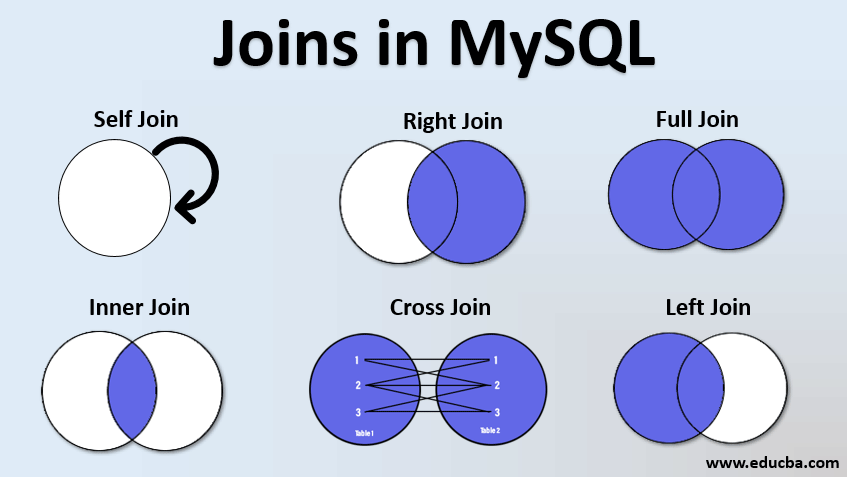
There are different types of Joins in MySQL. Below mentioned joins come across in day-to-day use and are most useful when carrying out many queries in real-case scenarios.
- Inner join
- Left join
- Right join
- Full outer join
- Self-join
- Cross join
1. Inner Join
Inner join returns the value which is matching in both tables.
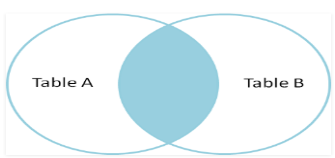
This portion comes in the output, as shown in the picture above.
Example #1
| Emp_id | Department | Salary |
| 1001 | IT | 1000 |
| 1002 | CSR | 800 |
| 1003 | IT | 2000 |
This is the employee table.
| Emp_id | Address |
| 1002 | Delhi |
| 1003 | Bangalore |
| 1005 | Bbsr |
Here is the address table of those employees. The parent table employee’s primary key emp_id is used as the foreign key in the address table, which is the child table. We will find the emp_id, department, and address of one employee using an inner join. Because inner join states, It fetches the records which are present/common in both the tables.
Query:
SELECT emp.emp_id, emp.department, ads.address
FROM employee AS emp
INNER JOIN address AS ads
ON emp.emp_id = ads.emp_id;
We give an alias to the table name just to avoid being more time-consuming. For example, in the above query, we use the alias ‘emp’ for the employee table and ‘ads’ for the address table.
Output:
| Emp_id | Department | Address |
| 1002 | CSR | Delhi |
| 1003 | IT | Bangalore |
As in the above example, emp_id 1002 and 1003 were common between the tables; the inner join command fetches only these employees’ output.
Example #2
Here we have 2 tables, table1 & table2. Both tables consist of one attribute, each as column A and column B, respectively.
Table1
| Column A |
| 1 |
| 1 |
| 2 |
| 3 |
| 4 |
Table2
| Column B |
| 1 |
| 2 |
| 2 |
| 3 |
| 3 |
| 5 |
Query:
If we apply inner join here,
SELECT * FROM Table1
INNER JOIN table2
ON columnA = columnB;
Output:
| Column A | Column B |
| 1 | 1 |
| 1 | Null |
| 2 | 2 |
| Null | 2 |
| 3 | 3 |
| Null | 3 |
2. Left Join
This join returns all the records from the left table and the matched records from the right table.
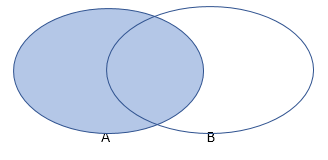
As the diagram above shows, it consists of all records of table A and the common ones from A and B.
Example #1
| Customer_id | Name | City |
| 1 | Harish | Cuttack |
| 2 | David | Bangalore |
| 3 | Mahesh | Bhubaneswar |
| 4 | Sam | Kolkata |
Customer Table:
| Order_id | Amount | Customer_id |
| 19868 | 7575.00 | 4 |
| 19976 | 434654.00 | 2 |
| 99680 | 7457.00 | 3 |
Order Table:
We will find out the customer_id, name, and order_id associated by using left join.
Query:
SELECT cust.Customer_id, cust.Name, ord.Order_id
FROM customer cust
LEFT JOIN order ord
ON cust.customer_id = ord.customer_id;
Output:
| Customer_id | Name | Order_id |
| 1 | Harish | null |
| 2 | David | 19976 |
| 3 | Mahesh | 99680 |
| 4 | Sam | 19868 |
As we discussed, this left join fetched all the customer id from the customer table and the common ones between both the tables. The customer_id ‘1’ will show as ‘null’ because the ‘1’ customer_id is not present in the order table.
Example #2
Here we have 2 tables, table1 & table2. Both tables consist of one attribute, each as column A and column B, respectively.
Table1
| Column A |
| 1 |
| 1 |
| 2 |
| 2 |
| 3 |
Table2
| Column B |
| 1 |
| 2 |
| 2 |
| 4 |
| 4 |
| 5 |
| 5 |
Query:
If we apply left join on above 2 tables,
SELECT * FROM table1
LEFT JOIN table2
ON columnA = columnB;| Column A | Column B |
| 1 | 1 |
| 1 | Null |
| 2 | 2 |
| 2 | 2 |
| 3 | Null |
3. Right Join
This join returns all the records from the right table and the matching ones from the left table.
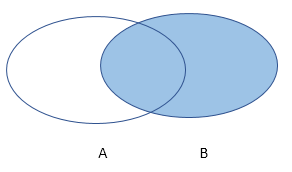
The above diagram shows it fetches all records from table B and the common one, which is present in both the tables.
Example:
| Customer_id | Name | City |
| 3 | Mahesh | Bhubaneswar |
| 4 | Sam | Kolkata |
| 5 | Ram | Mumbai |
Customer Table:
| Order_id | Amount | Customer_id |
| 19868 | 7575.00 | 4 |
| 19976 | 434654.00 | 2 |
| 99680 | 7457.00 | 3 |
Order Table:
We will find out customer_id, name, and order_id associated with it using the right join.
Query:
SELECT cust.Customer_id, cust.Name, ord.Order_id
FROM customer cust
RIGHT JOIN order ord
ON cust.customer_id = ord.customer_id;
Output:
| Customer_id | Name | Order_id |
| 2 | null | 19976 |
| 3 | Mahesh | 99680 |
| 4 | Sam | 19868 |
As we performed right join here, so the query fetched all customer id from the order table and the common records, which are in both the tables.
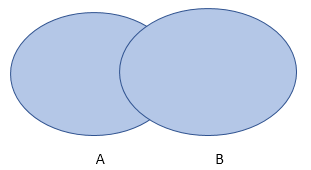
4. Full Outer Join
The full outer join returns all the records from both tables if a common field is shared.
Example:
| Customer_id | Name | City |
| 3 | Mahesh | Bhubaneswar |
| 4 | Sam | Kolkata |
| 5 | Ram | Mumbai |
Customer Table:
| Order_id | Amount | Customer_id |
| 19868 | 7575.00 | 4 |
| 19976 | 434654.00 | 2 |
| 99680 | 7457.00 | 3 |
Order Table:
We will find out the customer_id, name, and order_id associated with it using a full outer join.
Query:
SELECT cust.Customer_id, cust.Name, ord.Order_id
FROM customer cust
FULL OUTER JOIN order ord
ON cust.customer_id = ord.customer_id;
Output:
| Customer_id | Name | Order_id |
| 2 | null | 19976 |
| 3 | Mahesh | 99680 |
| 4 | Sam | 19868 |
| 5 | Ram | null |
This full outer join fetched all the customer IDs from the customer table as well as the order table.
5. Self-Join
Self-join is a regular join, and here the table joins with itself only.
| Emp_id | Name | Phone_no | City | Country |
| 1001 | R. Madhvan | 9687687698 | Bangalore | India |
| 1002 | Gobu Sharma | 9856453423 | Pune | India |
| 1003 | Debasish Das | 8765456787 | Mumbai | India |
| 1004 | Amit Rout | 4567788635 | Pune | India |
| 1005 | Sambit Kar | 8789887873 | Hyderabad | India |
Here is the employee table consisting of several fields. We will find out the employees living in the same city.
Query:
SELECT e1.name AS Employee_name1, e2.name AS employee_name2, e1.City
FROM employee e1, employee e2
WHERE e1.name <> e2.name
AND e1.city = e2.city;Output:
| Employee_name1 | Employee_name2 | e1.city |
| Gobu Sharma | Amit Rout | Pune |
| Amit Rout | Gobu Sharma | Pune |
6. Cross Join
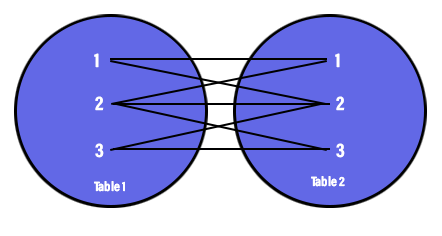
This join produces a result where the number of rows in the first table gets multiplied by the rows in the second table. This kind of result is called the Cartesian Product. If we use the WHERE clause with this join, then this will work as an inner join.
Example:
| Prod_id | Product_name | Prod_unit | Company_id |
| 1 | Chex mix | Pcs | 12 |
| 2 | Cheez-it | Pcs | 15 |
| 3 | Biscuit | pcs | 16 |
Product Table:
| Company_id | Company_name | Company_city |
| 15 | Foodies | Delhi |
| 16 | Jack n Jill | Cuttack |
| 17 | Natural | Bangalore |
Company Table:
We will apply a cross-join to these tables.
Query:
SELECT p.product_name, p.prod_unit, c.company_name
FROM product p
CROSS JOIN company c;Output:
| p.product_name | p.prod_unit | c.company_name |
| Chex mix | Pcs | Foodies |
| Cheez-it | Pcs | Foodies |
| Biscuit | Pcs | Foodies |
| Chex mix | Pcs | Jack n Jill |
| Cheez-it | Pcs | Jack n Jill |
| Biscuit | Pcs | Jack n Jill |
| Chex mix | Pcs | Natural |
| Cheez-it | Pcs | Natural |
| Biscuit | Pcs | Natural |
Conclusion
The significance of those joins is very important while working in real-time scenarios and some other technologies. In visualizations like Tableau and Power BI, joins play a vital role. The structured practice of this is key to embed these new techniques and skills.
Recommended Articles
We hope that this EDUCBA information on “Joins in MySQL” was beneficial to you. You can view EDUCBA’s recommended articles for more information.

