


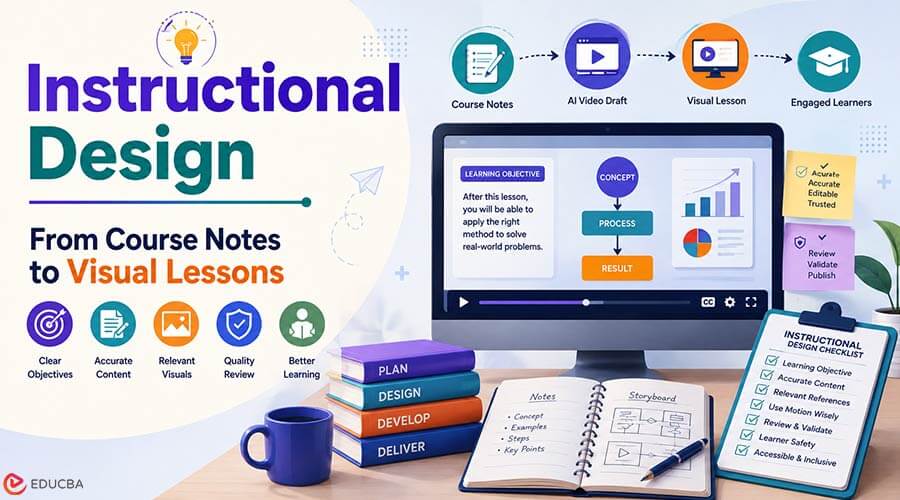
Good instructional design does more than define a topic. It helps a learner move from confusion to a usable mental model. That is true whether the subject is Excel, Python, marketing, project management, finance, design, data science, or career development.
Short videos can support that learning journey, but they are easy to misuse. A polished clip can make an idea feel clear before the examples, caveats, and practice steps are actually ready. For education publishers and course teams, treat an AI video draft as a planning aid, not the lesson itself.
The useful question is simple: which part of the tutorial needs motion? A formula explanation, workflow diagram, visual metaphor, before-and-after example, or module introduction may benefit from a short draft. A rule, exam answer, code snippet, financial model, or compliance note may need exact text and verified screenshots instead.
Used carefully, Seedance 2.5 on JXP can help course creators and editors turn approved lesson notes into a reviewable video concept. The current JXP page offers Reference Generation and Text to Video, with support for multimodal references, longer clip planning, and revision controls. Teams should confirm current generation limits, output settings, and usage rights inside the product before starting a commercial or educational project.
Start With the Learning Objective in Instructional Design
Effective instructional design starts with what learners need to understand. Is the lesson introducing a concept, comparing two methods, showing a sequence, explaining a mistake, or preparing the learner for practice?
Write the objective as an observable outcome: what should the learner be able to identify, explain, compare, or perform after the lesson? Instead of writing “understand Excel charts,” a stronger objective might be: after the lesson, the learner should be able to select an appropriate chart for a simple comparison.
For example, an Excel lesson may need a simple flow from raw data to a clean chart. A Python lesson may need a visual distinction between input, logic, and output. A marketing lesson may need a customer-segmentation diagram. A project management lesson may need a timeline that shows dependencies without pretending to be a live project plan.
The model shouldn’t have to guess each reference’s role. The prompt should explain which note defines the concept, which graphic controls layout, which reference guides motion, and which exact labels to add later in editing.
Keep Exact Teaching Content Editable
Educational content depends on precision. A generated video should not be trusted to create final formulas, code, definitions, citation examples, accounting terms, legal disclaimers, exam answers, command syntax, or financial assumptions.
The draft can reserve space for step numbers, diagrams, labels, and short captions. The final wording should come from the approved article, course outline, instructor notes, textbook-style explanation, verified software screen, or subject-matter review. This principle is central to instructional design because learners need accurate, consistent, and editable teaching content.
If learners are expected to click through a real interface, enter code, build a formula, or reproduce a workflow, the final lesson should use verified screen recordings, editable code, or approved screenshots rather than generated UI.
This is especially important for technical and professional topics. A wrong variable name, outdated menu label, incorrect finance term, or oversimplified statistical explanation can mislead a learner even if the video looks smooth.
Choose References That Fit the Lesson
Reference materials can make a lesson easier to visualize. Safer materials include original diagrams, blank templates, simple charts, abstract UI blocks, non-identifiable device frames, course-owned graphics, platform-supported synthetic or illustrated characters, and sanitized scene outlines containing no private student, customer, or employee information.
JXP’s current creation workflow indicates that it may not support real-person face references, including portraits and celebrity likenesses. Course teams should also avoid any copyrighted, licensed, confidential, or third-party material that is not supported by the current workflow or explicitly cleared for external AI processing. Instructor portraits, student photos, classroom recordings, textbook pages, licensed training videos, private worksheets, third-party course materials, and software screenshots containing sensitive account data all need careful review before use.
If a real person, real classroom, or real workplace example is central to the course, final publication should rely on consented and verified footage or screenshots created through an appropriate editorial process. Generated drafts should not imitate those people or replace their testimony.
Use Motion for Structure, Not Authority
Motion can help learners see relationships. A concept can move from problem to method to result. A diagram can reveal one layer at a time. A visual metaphor can make an abstract idea easier to remember. In instructional design, these visual elements should support the learning objective, not distract from the core lesson.
But motion does not make a claim correct. A video can show a chart rising, a process improving, or a learner succeeding, but you should not use those visuals as evidence. If the lesson includes performance claims, career outcomes, investment examples, exam results, or software benchmarks, the article or course material needs its own support.
Longer drafts can help when a lesson needs a beginning, middle, and ending. Still, one short video should not try to teach the entire topic. It should introduce the idea, clarify one step, or help the learner know what to study next.
After any local edit, review the complete clip again because nearby timing, labels, motion, lighting, or continuity may also change.
Review for Accuracy and Learner Safety
Before publication, editors should review the draft against the actual lesson. Does it match the article’s explanation? Are examples labeled as examples? Does any generated interface look like a real product screen? Are captions, formulas, code, dates, names, and numbers added from verified sources?
The review should also check learner safety. Career, finance, health-adjacent, legal, exam-prep, and compliance topics should not sound more certain than the source material allows. Requirements may vary by industry, tool version, region, or institution, so the final lesson should point learners back to current documentation or qualified guidance where needed.
An appropriately qualified subject-matter expert should review health, legal, financial, safety-critical, and regulated training and should direct learners to current authoritative guidance.
The team should also review teaching effectiveness, not just production quality. Can a learner restate the core idea? Does the animation reduce cognitive load, or add distraction? Does the example appear after the definition in the right place? Is there a practice question or knowledge check after the video? Can the main point still be understood without sound?
A small learner test or knowledge check is more useful than judging the draft only within the production team. Final lessons should include accurate captions, readable contrast, sufficient display time, a transcript, and text alternatives for diagrams where needed.
A practical visual lesson workflow can give course creators, editors, and instructors a draft to discuss before final recording, design, or publication.
Improve Course Material Through Instructional Design
A video draft can reveal weak teaching structure. Maybe the article starts with a definition when it needs an example. Maybe a chart needs a clearer label. A software tutorial should use a verified screen recording instead of an illustrative clip. Maybe the learner needs a practice question before the final summary.
That feedback can improve the written tutorial as much as the video. It can lead to better headings, cleaner examples, clearer diagrams, and more useful module introductions.
Educational media works best when it respects the learner’s trust. Used with verified lesson content and careful review, Seedance 2.5 can support early visual planning while instructional design principles, exact examples, and final editorial judgment remain in human hands.
Final Thoughts
Instructional design is about more than turning course notes into attractive visuals. Effective learning content starts with clear objectives, accurate information, relevant examples, and thoughtful visual structure. AI video tools can help course creators develop early concepts, visualize ideas, and identify gaps in lesson material, but they should support, not replace, human expertise and editorial review.
By combining instructional design principles, verified teaching content, accessible visuals, and careful quality checks, educators can create video lessons that are engaging, accurate, and genuinely useful to learners.
Recommended Articles
We hope this guide on Instructional Design helps you create accurate, engaging, and learner-focused visual lessons. Explore these recommended articles for additional insights and strategies to strengthen your e-learning and instructional content.

