
Updated March 6, 2023
Definition of DB2 VARCHAR Type
DB2 provides the different types of data types to the user, the varchar is also one type of data type that is provided by the DB2. Basically DB 2 varchar data type is used to store the string with variable-length characters. By using DB2 varchar we can define the column name with variable-length character string as per the user requirement. When we compare varchar data type with other database systems such as MySQL and PostgreSQL it uses the static data types that means it only accepts string values. In varchar data type there are two options such that it maximum length then we can use normal varchar keyword and if we need to store long length string then we use varbinary keyword.
Syntax:
create table specified table name(colm 1 name data type(varchar) size,colm 2 name data type(varchar) size, columN name data type(varchar) size );
Explanation:
In the above syntax, we use the create table statement to create a new table with different attributes and data types, here we only specify the varchar data type as shown in above syntax. In this syntax size keyword is an integer value that is useful to represent maximum length of varchar data type. The size should be greater than 0 and less than 32740. If we need to use a long length string then we can use varbinary(size) instead of varchar.
How varchar type works in DB2?
Now let see how varchar data type works in DB2 as follows.
As the name recommends, varchar implies character information that is a variable-length character we can also call as Variable Character, it is an uncertain length string information type. It can hold numbers, letters, and unique characters. DB2 varchar ordinarily holds 1 byte for every character and 2 additional bytes for the length data. It is prescribed to utilize varchar as the information type when segments have variable length and the real information is path not exactly the given limit.
Fixed length and variable length character:
Utilizing VARCHAR data type we can save disk space, however, it brings about a 2-byte overhead expense for each specified value. Utilizing VARCHAR likewise requires extra handling for differing length rows. Subsequently, utilizing CHAR is desirable over VARCHAR, except if the space that you save by utilizing VARCHAR is critical. The reserve space is not huge if the most extreme section length is little or if the lengths of the qualities don’t have a critical variety.
String subtypes:
Sometimes databases access the table by using different encoding schema, so at times following subtypes of string are important as follows.
BIT: It is used to avoid the character representation.
SBCS: It is used to represent single-byte characters.
MIXED: It is used to represent the single and multi-byte characters.
Encoding schemes for string data:
For string data type, all characters are addressed by a typical encoding portrayal (Unicode, ASCII, or EBCDIC). We can use encoding schema to string data types and to particular kinds that depend on string types.
Global organizations that participate in worldwide exchange frequently store information from more than one country in a similar table. A few nations utilize diverse coded character set identifiers. Db2 for z/OS upholds the Unicode encoding plan, which addresses a wide range of geologies and dialects. In the event that you need to perform character transformation on Unicode information, the change is bound to safeguard the entirety of your data.
Sometimes, you may have to change characters over to an alternate encoding portrayal. The cycle of change is known as character transformation. Most clients needn’t bother with information on character transformation. At the point when character transformation happens, it does so consequently and a fruitful change is imperceptible to the application and clients.
Examples
Now let’s see the different examples of DB2 varchar data types as follows.
First create a new table as follows.
create table company (Comp_Id int(20), comp_name varchar(30),

comp_address varchar(30));
Explanation
In the above example, we use a create table statement to create a new table name as a company with different attributes such as Comp_id, comp_name, and comp_address with different data types and different sizes as shown in the above statement. Note here comp_name and comp_address have varchar data type with size 30 as shown.
For confirmation insert some records by using the following insert into the statement as follows.
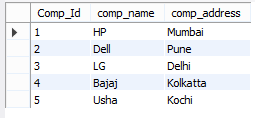
insert into company (Comp_Id, comp_name, comp_address) values(1, "HP", "Mumbai"), (2, "Dell", "Pune"), (3, "LG", "Delhi"), (4, "Bajaj", "Kolkatta"), (5, "Usha", "Kochi");

select * from company;
Explanation
In the above example, we use insert into a statement to insert new records into the company table. Here we insert string values in the comp_name and comp_address column with minimum length. The end out we illustrate by using the following screenshot as follows.
Now let’s see what happen we try to insert string whose length is 32 as follows
insert into company (Comp_Id, comp_name, comp_address) values(6, "HP", "HPCL, Petroleum House, 17 Jamshedji Tata Road, Churchgate, Mumbai");

select * from company;
Explanation
In the above example, we try to insert a long length string as shown in the above statement, note here when we try to execute the above statement but it shows the error message that means we cannot insert more than 30 length string. The end out we illustrate by using the following screenshot as follows.

As per requirement we can use any size for varchar data type in DB2.
Rules and regulation for varchar in DB2
1. First we need to specify the size of varchar data type.
2. We must need to insert strings that are less than the specified size of the varchar data type.
3. We cannot insert a longer length string than defined.
4. If we need to insert a long length string then we need to specify the varbinary keyword at that time of table creation or we alter the table.
Conclusion
We hope from this article you learn DB2 varchar type. From the above article, we have learned the basic syntax of varchar type and we also see different examples of varchar type with different rules and regulations. From this article, we learned how and when we use the DB2 varchar type.
Recommended Articles
This is a guide to DB2 VARCHAR. Here we discuss definition, syntax, and parameters, How varchar type works in DB2? examples with code implementation. You may also have a look at the following articles to learn more –

