
Updated March 6, 2023
Introduction to DB2 UNION
DB2 UNION statement is used to get a collective result that consists of all the records retrieved by the two subsets. The subsets can be the select query statements that retrieve certain rows and columns as the result. When using the UNION operator we have to make sure that the order in which the columns are retrieved from both the subqueries as well as a number of the column values retrieved from both subsets should be same. Also, for usage of UNION operator, the datatype of all the column values that are retrieved from both subqueries should be same or compatible with each other. The compatibility of datatypes mean that one of the datatype of the column can be converted implicitly by the system with respect to the same numbered column retrieved from the other sub query.
In this article, we will see how we can make the use of UNION operator to get all the combined result set formed by the result of both the sub queries. We will also learn about the syntax and implementation of UNION operator along with the examples.
Syntax:
First Subselect query

UNION

Second Subselect query
In the above syntax, the UNION operator is placed between the two sub-select statements which can be a select query done on one or more tables that may or may not involve multiple joins in it. It is required that both the subselect queries retrieve the same number of columns in the same order and they should have their data types compatible with the column value retrieved for the same position from another sub-select query.
The UNION operator internally executes the query in two steps. In the first step, it executes the two sub-select query statements and aggregates all the result set values retrieved from the first sub-select query, and then in the second step, it goes for deleting all the rows that have been duplicated in the collective result set.
One of the most common usage of the UNION operator is to merge a list of values that are been retrieved from two or more tables. The main difference between the UNION operator and the join operation is that even though both the operators help to combine the result from multiple tables, the UNION operator executes and retrieves the result by appending the rows vertically while in case of the JOIN operator the result is retrieved by appending the rows horizontally. Also, one more difference between the UNION and the JOIN operator is that UNION combines multiple rows while JOIN combines multiple columns.
Examples
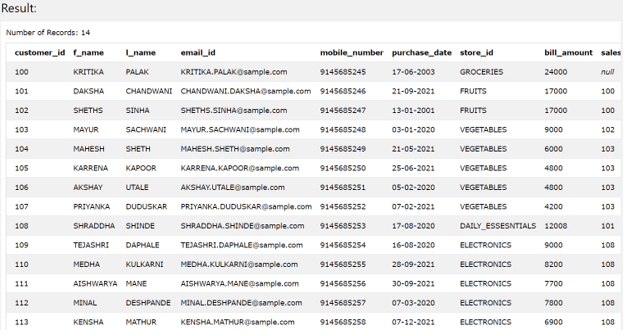
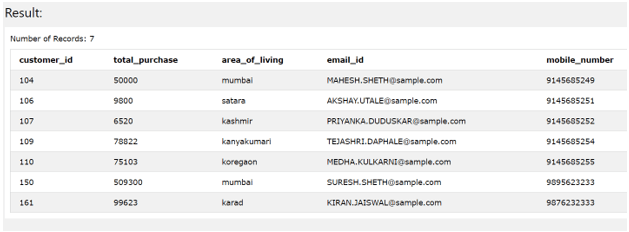
Suppose that we have two tables named Sales_Customers and Customer_categories. The Sales_Customers table contains all the records having the details of each of the purchase-sale amount done for that customer depending on how much is purchased by that customer in that transaction while Customer_categories stores the total amount of purchasing sone by that customer. The data for both tables can be seen by using the following query statements.
SELECT * FROM Sales_Customers;
The execution of above query statement gives following output
SELECT * FROM Customer_categories
The execution of above query statement gives following output
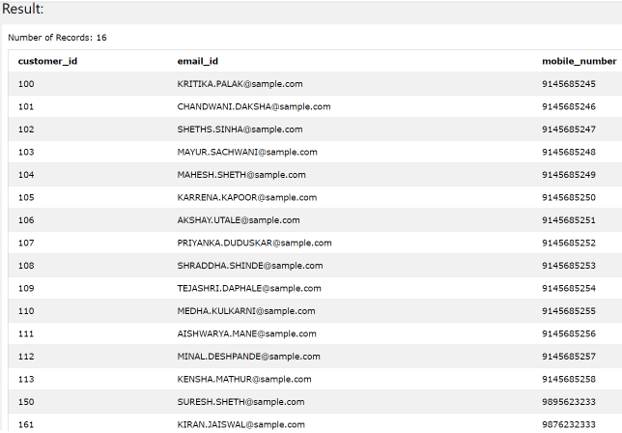
Now, suppose we want to retrieve the data for all the customers contact information present in both the tables Sales_Customers and Customer_categories. There are some contacts of customers that are present in Sales_Customers but not in Customer_categories while some contacts are there which are present in Customer_categories but not in Sales_Customers. Both the tables also hold certain common contacts present in both. When we retrieve all the contacts by using the UNION clause in the below statement we get all the unique records present in both the tables and the common records are retrieved only once.
SELECT

customer_id,

email_id,

mobile_number

FROM

Customer_categories

UNION

SELECT

customer_id,

email_id,

mobile_number

FROM

Sales_Customers;
The execution of above query statement gives following output:
Difference between UNION and UNION ALL
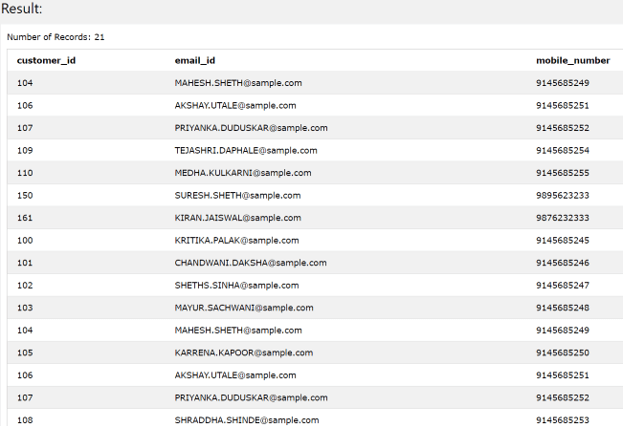
The UNION operator retrieves only the unique rows that means while combining the result set retrieved after executing both the sub-select statements the common rows which are duplicates are removed from the final result set. In case of UNION ALL, the duplicate rows are still persisted in the final result set. Let us have a look at the difference with the help of an example. Let’s use the same above example. We have seen that the common records are retrieved only once when using the UNION operator. Now, in place of UNION, if we use UNION ALL operator, we will get the duplicate entries of the common records retrieved from both the tables as shown below –
SELECT

customer_id,

email_id,

mobile_number

FROM

Customer_categories

UNION ALL

SELECT

customer_id,

email_id,

mobile_number

FROM

Sales_Customers;
The execution of above query statement gives following output –

Using UNION along with ORDER BY clause –
We can retrieve the ordered result set which will be based on certain column(s) value retrieved from both the sub queries. The order can be specified by using the ORDER BY clause with the sorting expression specified either by specifying the name of the column provided if both the sub queries retrieve the same column name or by using the alias for the retrieved column value for each sub query or by specifying the integer number which stands for the position of the column on the basis of which the ordering needs to be done. Let us see how we can do the ordering by using the alias as shown below –
SELECT column value or any expression AS any_name

FROM first table

UNION

SELECT ...

FROM second table

ORDER BY any_name;
The ordering of the result set can be done using the position integer by following a structure as shown below –
SELECT column value or any expression

FROM first table

UNION

SELECT ...

FROM second table

ORDER BY 1
The above statement structure can be used if we have to order the result set based on the column value retrieved in the first column value.
Conclusion
We can make the use of the UNION operator to combine the result of two sub queries which will retrieve the unique rows having the same number of columns with same datatypes as retrieved by the subqueries.
Recommended Articles
This is a guide to DB2 UNION. Here we discuss the Introduction, syntax, Difference between UNION and UNION ALL, examples with code implementation. You may also have a look at the following articles to learn more –

