
Updated March 13, 2023

Introduction to DB2 date
DB2 provides the different types of functions to the user; DB2 date functions () is one of the functions that are provided by the DB2. Basically, the date function is used to return the data as per the user requirement. It fetches the data from the system. What happens sometimes we need to determine the difference between two different timestamps. At that time, we can use the date function (). DB2 date function () returns the approximate value because it assumes 30 days in each month, excluding leap year. DB2 provides different kinds of date factions () to the user. We can use that function as per the requirement of the user.
Syntax
date (specified expression)
Explanation
In the above syntax, we use the date function () with the specified expression; here, the specified expression means that it returns the built-in data types such as date, timestamp, character string, or any numeric data type.
How does the date function work in DB2?
Now let’s see how the date function () works in DB2 as follows.
Normally expression returns the end output in different forms as follows.
If returns expression is character or graphics string
It returns the legitimate string portrayal of a date or timestamp with a genuine length that isn’t more prominent than 255 bytes for the actual format of string portrayals of dates and timestamps. So, for example, a character or graphics string with a genuine length of 7 that addresses a legitimate date in the structure yyyyddd, where yyyy are digits indicating a year and ddd are digits somewhere in the range of 001 and 366, meaning a day of that year.
If an expression is a number and should be more prominent than or equivalent to one and not exactly equivalent to 3652059.
On the off chance that expression isn’t DATE esteem, expression is given a role as follows.
- If the expression is TIMESTAMP WITH TIME ZONE esteem, expression is cast to TIMESTAMP WITHOUT TIME ZONE, with a similar exactness as expression.
- On the off chance that expression is a string, then the specified expression is cast to DATE.
The consequence of the final output is a date.
The outcome can be invalid; if the contention is invalid, the outcome is the invalid worth.
Different principles rely upon the information kind of the contention as follows.
- On the off chance that the contention is a timestamp, the outcome is the date part of the timestamp.
- On the off chance that the contention is a date, the outcome is that date.
- On the off chance that a contention is a number, the outcome is the date that is n-1 days after January 1, 0001, where n is the integer of the number.
- If the contention is a string, the outcome is the date that is addressed by the string. On the off chance that the string contains a time region, the time region is disregarded. On the off chance that the CCSID of the string isn’t equivalent to the comparing default CCSID at the worker, the string is first changed over to that CCSID.
Different Date functions in DB2 are as follows.
ADD_YEARS: ADD_YEARS data function is used to add specified years into the expression with the current date.
DATE_PART: It is used to return the specified portion of the date function that is based on the expression.
DATE_TRUNC: It is used to return the timestamp expression.
DAY: It is used to return the day of specified expression as per the requirement
DAYNAME: It is used to return the string that means the name of the day. For example, Monday is the name of the day.
DAYOFMONTH: It is used to return the integer value that means it returns the date between 1 and 31 (day of the month).
DAYOFWEEK: It is also used to return the integer values that mean the day of the week. The range of integer values is that 1 to 7; if it returns the 1, that means the first day of the week.
DAYOFWEEK_ISO: It used to return the day of the week like the above function, where 1 is for Monday and 7 for Sunday.
DAYOFYEAR: It is used to return the day of the year from the specified values.
DAYS: It is used to return the day in integer format.
DAYS_BETWEEN: It is used to return the day between the specified values.
DAYS_TO_END_OF_MONTH: It is used to return the how a day in the end month of the year.
FIRST_DAY: It is used to return on the first day of the month.
LAST_DAY: It is used to return on the last day of the month.
MONTH: It is used to return the month of the specified value.
NEXT_DAY: It returns the next day from the specified value.
NEXT_MONTH: It returns the next month from the specified value.
It also has many more date-related functions.
Examples of DB2 date
Now let’s see the different examples of the DB2 date function as follows.
First, see how the now () function works as follows.
select now()
Explanation
The end output of the above statement we illustrate by using the following screenshot.

select monthname("2021-04-23");
Explanation
Suppose we need to know the month of the specified date at that time; we can use the above statement. The end output of the above statement we illustrate by using the following screenshot.
select dayname("2021-04-23");
Explanation
Suppose we need to know the day of the specified date at that time; we can use the above statement. The end output of the above statement we illustrate by using the following screenshot.

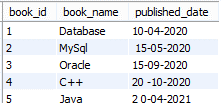
First, create a new table as follows.
create table book_pub(book_id int not null, book_name varchar(60), published_date varchar(60), PRIMARY KEY(book_id));
Now we insert some records into the book_pub table. The final table is shown in the below screenshot.

select * from book_pub;
Now use the date function as follows.
select book_name, published_date from book_pub where published_date=’15-09-2020’;
Explanation
By using the above statement, we try to find which book is published on 15-09-2020 by using the date function. The end output of the above statement we illustrate by using the following screenshot.
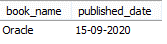
In this way, we can use the date function as per the requirement of the user.
Conclusion
We hope from this article you learn the DB2 Date function. From the above article, we have learned the basic syntax of the Date function, and we also see different examples of the Date function. Furthermore, from this article, we learned how and when we use the DB2 Date function.
Recommended Articles
This is a guide to the DB2 date. Here we discuss How does the date function work in DB2, along with the different examples. You may also have a look at the following articles to learn more –

