


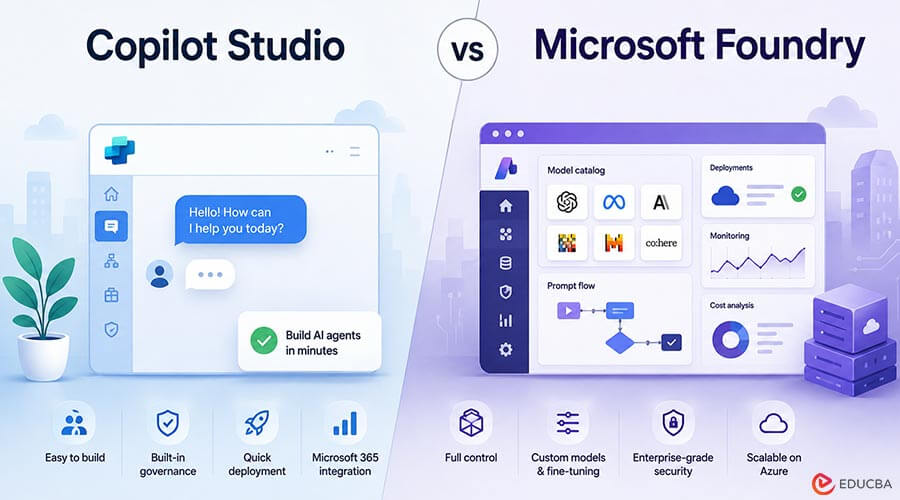
Choosing between Copilot Studio vs Microsoft Foundry depends on more than comparing features. The two platforms take fundamentally different approaches to AI development, pricing, model management, security, and scalability. Copilot Studio is designed for organizations that want to build and deploy AI agents with minimal infrastructure management, particularly within the Microsoft 365 and Power Platform ecosystem. Microsoft Foundry, on the other hand, provides developers and AI teams with greater control over models, deployments, networking, customization, and cloud resources. The right choice ultimately depends on how much control the organization needs and how much operational responsibility it is prepared to manage.
Key Differences Between Copilot Studio vs Microsoft Foundry
Here are four key differences between Copilot Studio and Azure AI Foundry to consider before making a decision.
1. Billing: Credits vs. Tokens
Copilot Studio Uses Credits
When you pay for an AI agent, Copilot Studio bills in credits, whereas Microsoft Foundry bills in tokens and individual Azure services. Copilot Studio charges one Copilot Credit for a plain-text answer, two for a generative answer, and five for each action step. Credits cost $0.01 each pay-as-you-go or $200 for a 25,000-credit pack, dropping the effective rate to $0.008 once you pass 20,000 credits a month.
Microsoft Foundry Uses Tokens and Azure Services
Microsoft Foundry breaks the bill into parts. Model usage is metered in tokens, GPT-4o Global input runs about $0.0025 per 1,000 tokens, with output priced the same, while retrieval (Azure AI Search), storage, and hosted-agent compute appear as separate Azure meters. Swap models, shrink compute, or move storage to a cheaper region and your invoice adjusts in real time.
Put simply, a two-credit Copilot reply might mirror a 3,000-token Foundry call, yet the dollars land in different buckets. Before you compare features, translate your workload into the platform’s native meter, credits for Copilot Studio or tokens plus services for Foundry, so budgeting surprises surface early.
2. Model Flexibility and Customization
Copilot Studio: Curated Models, Zero Maintenance
Copilot Studio offers a managed catalog of primary models such as GPT-4o, GPT-5.5 Chat, and Claude Sonnet 5, selectable from a simple dropdown. Microsoft keeps the weights up to date, scales capacity, and enforces responsible AI guardrails so you can focus on prompts and business logic rather than endpoints or safety filters. When a newer variant appears, you can switch models and republish in minutes without downtime. If the catalog still falls short, you can connect any Foundry-deployed or third-party endpoint as a prompt tool; the agent keeps its managed envelope while Copilot Credits meter the external call. This option provides a safety valve for specialized models without full infrastructure overhead.
The trade-off is depth. Copilot Studio still prioritizes conversational use cases. In contrast, Azure AI Studio supports a full spectrum of AI initiatives, as highlighted in MCA Connect’s concise rundown of the difference between Copilot Studio and Azure. You cannot fine-tune GPT-4o on proprietary tickets or pin an exact model version for auditing; if the temperature feels off, you adjust prompts rather than hyperparameters. For most citizen-developer and line-of-business bots, that bargain, which prioritizes speed over granular control, wins more often than not.
Microsoft Foundry: Open Catalog and Fine-Tuning on Tap
Microsoft Foundry offers an open catalog of hundreds, often thousands, of models from Microsoft, OpenAI, Meta, Mistral, and community providers, with the count updated weekly.
After you pick a model, choose a deployment type:
- Global Standard for the lowest price (GPT-4o Global input costs about $0.0025 per 1,000 tokens)
- Data Zone Standard, when added governance is worth an additional about 10 percent
- Regional Standard when data residency or single-digit-latency targets require locality
Need sub-150 ms latency for a consumer app? Deploy the model in three regions and route traffic with the Responses API, a placement control Copilot Studio cannot match. Customization goes further: fine-tune GPT-4o on support tickets, prune parameters for speed, or create a guarded endpoint that redacts personally identifiable info before inference. Each variant becomes its own SKU so that Finance can track cost and performance side by side.
More control means more oversight. Every deployment consumes quota, needs monitoring, and can drift if you swap the base model. Foundry treats models like code artifacts: version-controlled, IaC-deployable, and subject to MLOps sign-off, ideal for platform teams and excessive if you only need a quick FAQ bot.
3. Security and Governance
Copilot Studio: Power Platform Policies Carry the Shield
Copilot Studio security begins inside your Power Platform environment. Each agent automatically inherits tenant DLP rules, Conditional Access, and audit settings the moment you select Publish, so your security team relies on the same dashboards that already govern Power Apps and Flows. Since July 2026, the Entra Agent ID model assigns every agent its own identity with least-privilege permissions, role-based revocation, no secret rotation, and full visibility in Entra audit logs. Your data stays in the region because the generative call runs in the same geographic region as the environment. You can also enable customer-managed keys to place encryption keys in your own Key Vault.
Visibility is built in. Conversation transcripts flow to Microsoft Purview; credit, flow, and action consumption appear in the Power Platform admin center; Sentinel workbooks correlate outlier prompts or throttling spikes within minutes. Your security team keeps the tools it already trusts. You lose deep network controls such as VNets or private endpoints, yet you gain a ready-made control plane that speaks the language of Microsoft 365 administrators.
Microsoft Foundry: Azure-Grade Locks, Keys, and Network Fences
In Microsoft Foundry, every agent, model, and tool appears as an Azure resource. You secure them with the same controls, Role-Based Access Control, Azure Policy, and customer-managed keys, that already protect your virtual machines and containers. Need on-premises isolation? Place the agent inside a VNet, attach a private endpoint, and route traffic through an existing ExpressRoute circuit; tokens never leave your address space. You can even mix zones, keeping the model in a low-cost Global endpoint while retrieval runs on a regional Search index protected by managed identity.
Telemetry runs deep. Traces land in Azure Monitor, latency and token metrics in Application Insights, and cost data in Cost Management, so your SecOps team investigates suspicious prompts exactly as they would for a virtual machine. More control brings more responsibility. Key Vault rotation, Policy authoring, and preview-feature reviews sit with your cloud team. For banks, healthcare providers, or any organization already enforcing Azure governance, that parity turns a proof of concept into a production-ready deployment.
4. Licensing, Scaling, and Operational Control
Copilot Studio: Tenant Licensing and the Credit Balancing Act
Copilot Studio licensing blends seat rights with prepaid credits. Microsoft 365 E3 or E5 alone does not unlock runtime access; you also need the Microsoft 365 Copilot license. With that license in place, your employees can run internal agents without spending credits on standard text answers. External users, computer-use steps, or complex flows draw from your Copilot Credit balance. Credits work like a prepaid phone card. You pay $0.01 per credit on a pay-as-you-go plan, or $200 per month for a 25,000-credit pack. The break-even point is about 20,000 credits a month; below that, PAYG is cheaper; above that, the pack drops the effective rate to $0.008 per credit.
Microsoft caps prepaid capacity at 125 percent of your pack total to prevent runaway agents. When a flow exhausts its slice, it stops. The Power Platform admin center tracks usage; if you exceed the limit and have an Azure billing plan, the service switches to PAYG; otherwise, new sessions pause until the next month. Plan for peaks, not averages. A five-day marketing push usually belongs on PAYG, while a steady HR bot that serves 50,000 employees needs at least one capacity pack, maybe two during open enrollment. By modeling high-water marks first, you keep Copilot Studio costs predictable, exactly how finance prefers.
Microsoft Foundry: Consumption-Only Pricing, Quotas You Must Respect
Microsoft Foundry requires no seat licenses or credit packs; you pay purely for consumption. Each request shows up as line items: model tokens (for example GPT-4o Global ≈ $0.0025 per 1,000 input tokens), Azure AI Search RU/s, Storage GB, hosted-agent CPU seconds, and egress. The bill feels like a utility statement, transparent yet volatile if nobody watches the meter. Quotas act as the first brake. Every subscription starts with per-model token-per-minute ceilings, regional caps, and family limits. Exceed one, and the service returns HTTP 429. Seasoned teams file quota-increase tickets during staging and set Application Insights alerts that trigger well before saturation.
Scaling is as granular as the pricing. You might burst inference to a larger SKU for Black Friday, move Search to serverless during an idle quarter, or shut down hosted-agent compute overnight. Infrastructure as code makes this choreography repeatable, but only if FinOps and DevOps share dashboards; otherwise the first surprise bill becomes an expensive lesson. Foundry offers elastic capacity and precise cost control, but forecasting and throttling remain your job. Treat every agent like a microservice with autoscale rules, budget alerts, and kill switches, and you can capture cloud economics Copilot Studio cannot match.
Decision: Choosing the Right Path for Your Scenario
The Copilot Studio vs Microsoft Foundry decision comes down to four practical questions: where users will meet the agent, how much control over models and retrieval you need, what your traffic and budget patterns look like, and who will operate the solution day-to-day. Microsoft 365 surfaces such as Teams, Outlook, and Word favor Copilot Studio for built-in identity and one-click publishing. Custom apps, public websites, or an API mesh favor Foundry, whose REST endpoints and SDKs give you channel freedom.
If managed defaults are fine, Copilot Studio trades depth for speed; if you must fine-tune, rerank or pin model versions, choose Foundry. Predictable employee-centric load suits Copilot capacity packs, while spiky or seasonal demand rewards Foundry’s pay-per-token model provided you set quota alerts. Finally, a Power Platform team points to Copilot Studio, and a DevOps or MLOps crew comfortable with Terraform and VNets points to Foundry.
Recommended Articles
This comparison of Copilot Studio vs Microsoft Foundry highlights the key differences in pricing, customization, security, and scalability. Check out these recommended articles for more insights into AI development, cloud infrastructure, and enterprise technology.

