
What is Collaboration Software?
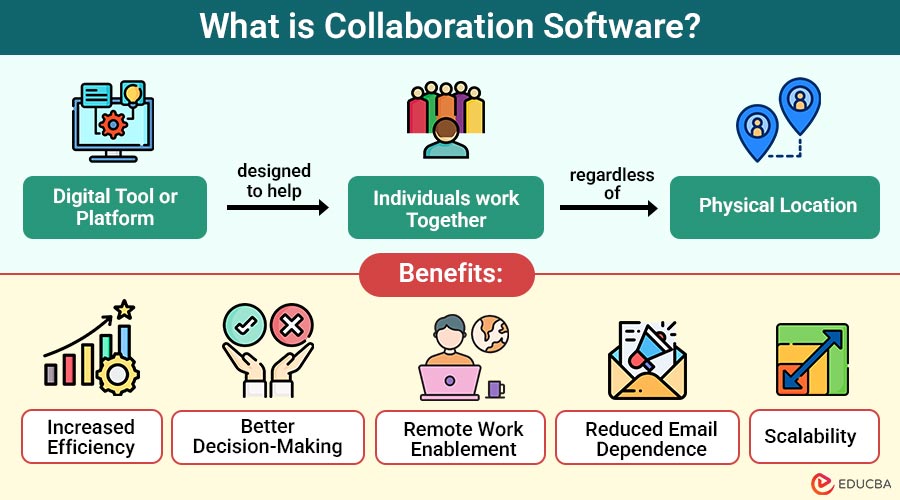
Collaboration software refers to any digital tool or platform designed to help individuals work together efficiently, regardless of physical location. These tools enable teams to communicate, share files, track tasks, co-author documents, and manage projects in real time.
Example:
Microsoft Teams is a popular example. It allows users to:
- Chat in real-time
- Make video or voice calls
- Collaborate on Word, Excel, and PowerPoint documents simultaneously
- Integrate with apps like SharePoint, Planner, and OneDrive
Table of Contents:
- Meaning
- Importance
- Core Features
- Types
- Benefits
- Top Collaboration Software Tools
- Challenges
- Future Trends
Key Takeaways:
- Collaboration software streamlines teamwork by integrating tools for communication, coordination, and shared digital workspaces, enabling seamless collaboration across the globe.
- These platforms enhance team productivity, ensure accountability, and support seamless collaboration across time zones and locations.
- Top collaboration tools offer a range of capabilities, including messaging, video meetings, document editing, task tracking, and cloud file sharing.
- With AI, real-time translation, and voice commands, collaboration software will become smarter and more intuitive.
Why is Collaboration Software Important?
The modern workplace is increasingly decentralized. Employees may work from home, in co-working spaces, or across different continents. In this environment, effective collaboration software offers several critical advantages:
1. Facilitates Remote Work
Enables seamless teamwork across different locations by providing shared digital spaces for communication and task coordination.
2. Improves Productivity
Streamlines workflows reduces email overload, and eliminates redundant efforts through centralized communication and project management tools.
3. Enhances Transparency
Provides real-time visibility into project status, task ownership, and team updates, keeping everyone fully informed.
4. Promotes Accountability
Assigns clear responsibilities, sets deadlines, and tracks progress to ensure each team member meets their commitments.
5. Boosts Innovation
Fosters real-time brainstorming, idea sharing, and knowledge exchange, allowing diverse teams to develop creative solutions collaboratively.
Core Features of Collaboration Software
To be truly effective, collaboration tools should include several key features:
1. Real-Time Messaging and Chat
Instant communication is crucial. Integrated messaging systems allow team members to ask quick questions, clarify doubts, and share updates instantly.
2. Video Conferencing
Many collaboration tools offer built-in or integrated video conferencing to host virtual meetings, webinars, or brainstorming sessions.
3. Task and Project Management
Visual boards (like Kanban), timelines, Gantt charts, and to-do lists help in planning, assigning, and tracking tasks effectively.
4. Document Sharing and Co-Editing
Users can upload, share, and co-edit documents in real-time using a document collaboration tool fostering a unified approach to content creation and revision.
5. File Storage and Management
A centralized repository organizes files, makes them easily accessible, and stores them securely.
6. Integrations and APIs
Most tools integrate with third-party applications, such as Google Workspace, Microsoft 365, Slack, Trello, and CRM platforms, to enhance their functionality.
7. Notifications and Alerts
Customizable alerts notify team members of task updates, meeting reminders, or important project milestones.
8. User Roles and Permissions
Ensuring data security, it allows administrators to govern who can see, edit, and distribute content.
Types of Collaboration Software
There are several categories of collaboration tools, each serving a specific purpose:
1. Communication-Centric Tools
These tools support instant messaging, video conferencing, and chat threads to keep teams connected in real-time.
2. Project Management Platforms
Enable teams to assign responsibilities, set deadlines, and track project milestones through organized, visual task boards and dashboards.
3. Document Collaboration Tools
For smooth, real-time written content collaboration, allow multiple people to edit, comment, and exchange documents simultaneously.
4. Comprehensive Collaboration Suites
Integrate communication, task management, document sharing, and scheduling features into one unified platform for streamlined team coordination.
Benefits of Using Collaboration Software
Here are the key benefits organizations gain by adopting collaboration software for team communication and project execution:
1. Increased Efficiency
The time spent alternating between tools is reduced by collaboration software, which consolidates multiple functions into a single platform.
2. Better Decision-Making
With centralized communication and real-time data access, teams can make informed decisions faster.
3. Remote Work Enablement
It helps distributed teams maintain cohesion, even when spread across different time zones.
4. Reduced Email Dependence
Replaces lengthy email chains with dynamic conversations, channels, and threaded discussions.
5. Scalability
Suitable for both small teams and large enterprises, with features that scale as your organization grows.
Top Collaboration Software Tools
Here are some of the top collaboration platforms currently dominating the market:
1. Slack
A communication platform offering channels, file sharing, and integrations for streamlined, real-time team collaboration.
- Best for: Real-time team messaging and integrations
- Platform: Web, desktop, mobile
- Free Tier: Yes
2. Microsoft Teams
Combines chat, video meetings, and Office 365 tools to support workplace communication and productivity in one platform.
- Best for: Enterprises using Microsoft Office tools
- Platform: Web, desktop, mobile
- Free Tier: Yes
3. Asana
Task and project management software that enables workflow planning, team collaboration, and progress tracking with reporting.
- Best for: Managing complex projects
- Platform: Web, desktop, mobile
- Free Tier: Yes
4. Trello
A Kanban-style project manager that helps users organize tasks visually with boards, lists, and cards.
- Best for: Visual project planning
- Platform: Web, desktop, mobile
- Free Tier: Yes
5. ClickUp
An all-in-one workspace offering customizable tasks, goals, documents, and chat to streamline team workflows and productivity.
- Best for: Customizable workflows and integration-rich teams
- Platform: Web, desktop, mobile
- Free Tier: Yes
6. Google Workspace
A suite of collaborative apps like Docs, Sheets, and Meet, designed for cloud-based teamwork and real-time editing.
- Best for: Document creation and cloud-based teamwork
- Platform: Web, mobile
- Free Tier: Limited (via personal Google account)
Challenges in Using Collaboration Software
While the benefits are clear, collaboration platforms can pose certain challenges:
1. Tool Overload
Using multiple collaboration tools simultaneously can overwhelm users, confuse them, reduce productivity, and fragment communication.
2. Learning Curve
Adopting new collaboration platforms often requires training and adjustment time, which can temporarily impact team efficiency and productivity.
3. Security Risks
Weak access controls, misconfigurations, or unmonitored sharing can expose sensitive information, leading to significant data breaches or leaks.
4. Integration Gaps
Some collaboration tools struggle to integrate seamlessly with existing legacy systems, disrupting workflows and reducing operational efficiency.
Future Trends in Collaboration Software
With AI and automation entering the picture, the future of collaboration tools looks more intelligent and proactive:
1. AI-Powered Suggestions
Collaboration tools will intelligently recommend actions or auto-assign tasks by analyzing user behavior and patterns.
2. Real-Time Language Translation
Instant translation features will enable seamless communication between global team members speaking different native languages.
3. Voice Commands and Virtual Assistants
Hands-free interaction through voice-enabled assistants will streamline navigation, project updates, and task management effortlessly.
4. Enhanced Cybersecurity
Biometric authentication and zero-trust security models will ensure robust data protection across all collaborative platforms.
Final Thoughts
Collaboration software is essential in today’s evolving work environments. It bridges communication gaps, boosts transparency, and fosters teamwork. The right tool enhances productivity and builds an engaged, innovative workforce. Whether for small teams or global enterprises, scalable solutions exist. Start small, scale wisely, and let technology support your team in focusing on creativity, problem-solving, and success.
Frequently Asked Questions (FAQs)
Q1. Is collaboration software only useful for remote teams?
Answer: No. While it is essential for remote teams, even in-office or hybrid teams benefit greatly from better task management, communication, and knowledge sharing.
Q2: How do I choose the best collaboration software for my team?
Answer: Consider your team size, workflows, integrations required, budget, and ease of use. Opt for free trials to evaluate fit.
Q3. Can collaboration tools replace emails entirely?
Answer: Not completely, but they significantly reduce email overload by moving conversations to threads and channels.
Q4. What industries benefit the most from collaboration software?
Answer: Tech, education, healthcare, marketing, and construction benefit the most, but any team needing better communication and workflow gains value.
Recommended Articles
We hope that this EDUCBA information on “Collaboration Software” was beneficial to you. You can view EDUCBA’s recommended articles for more information.

