


Location-based services have become an essential part of modern smartphones. From navigation and weather apps to social media platforms and location-based games, many applications rely on GPS data to deliver personalized experiences. However, there are situations where users may want to change GPS location on iPhone and Android devices without physically traveling to a different place.
Whether you are testing a location-based app, accessing region-specific content, protecting your privacy, or exploring virtual locations for educational purposes, changing your GPS location can be useful. In this guide, we will explain how GPS location changing works and how to change location on iPhone and Android devices in 2026.
What is GPS Location?
GPS (Global Positioning System) is a navigation system that helps devices identify their real-time location using satellites. Modern smartphones use a combination of GPS satellites, Wi-Fi networks, Bluetooth signals, and cellular towers to provide accurate location data. Many apps use this information to offer location-dependent features, including navigation and maps, ride-sharing services, weather forecasts, social media check-ins, local search results, and location-based games.
Because location data influences so many digital services, changing your GPS location can affect how certain apps behave and what content they display.
Why do People Change GPS Location on iPhone and Android?
There are several legitimate reasons to change GPS location on iPhone and Android devices.
- Testing location-based applications: Developers and testers often need to verify how apps behave in different geographic regions. Instead of physically traveling to multiple locations, they can simulate GPS coordinates and test location-based features more efficiently.
- Playing location-based games: Many mobile games use GPS data as part of gameplay. Some users use GPS location simulation, also called Pokemon Go spoofer technology, to explore virtual locations. However, GPS spoofing in games may violate the terms of service and is generally not recommended. Users should always follow the official guidelines and policies of the games they play.
- Using location-based social and dating apps: Apps such as Tinder, Bumble, and other location-based platforms often show nearby users based on geographic distance. Some users prefer to change their location when traveling, relocating, or exploring connections in a different city before arriving there. Virtual location tools can help preview and interact with content from other regions.
- Protecting personal privacy: Some users prefer not to share their precise location with every app they use. Learning how to change GPS location on iPhone and Android can help reduce unnecessary exposure of personal location data while still allowing access to location-dependent features.
- Accessing region-specific content: Certain applications and services provide different content, recommendations, or features depending on the useris location. Simulating a different GPS location can help users test or explore localized experiences.
- Educational and demonstration purposes: Virtual location tools are frequently used in training sessions, product demonstrations, presentations, and educational projects that require simulated movement or location changes without physical travel.
Can you Change the GPS Location on an iPhone?
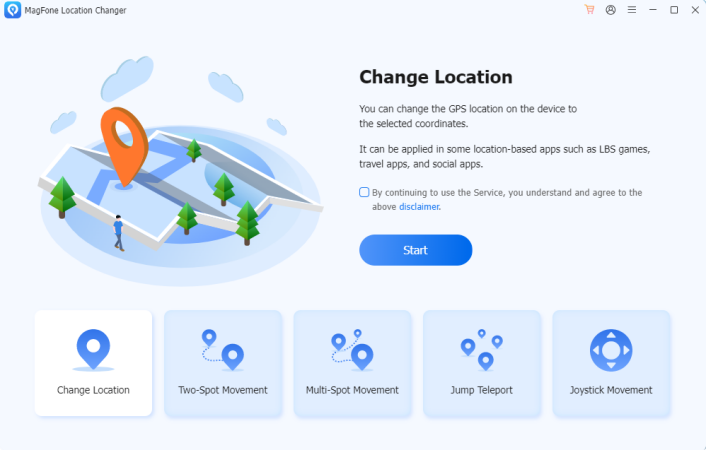
Yes. While Apple does not provide a built-in feature for GPS location simulation, users can change GPS location on iPhone and Android devices using specialized location-changing software. Unlike Android devices, iPhones typically require a desktop-based solution to communicate with the device and modify its reported GPS location.
(Image Source: MagFone)
Install a location-changer tool on your computer and connect your iPhone via USB. Select a virtual destination on the map. Apply the new location. Open your apps to use the simulated GPS position. Once activated, location-aware applications will recognize the selected virtual location rather than your physical location.
Can You Change GPS Location on Android?
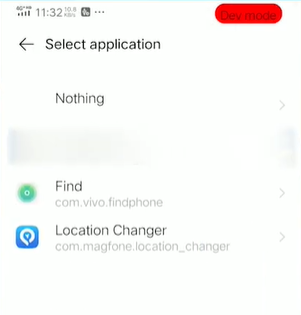
Android offers greater flexibility for GPS simulation. Many Android devices support developer options that let users select a mock location app. After enabling the necessary settings, users can choose a virtual location and override their device’s actual GPS coordinates. Enabling Developer Options and allowing mock locations. Installing a GPS simulation application. Selecting a destination on the map and activating the virtual location.
(Image Source: MagFone)
Some users prefer desktop-based solutions because they offer additional features, such as route simulation and joystick control.
How to Change GPS Location on iPhone and Android?
One of the easiest ways to change GPS location on iPhone and Android is to use a dedicated location changer, such as MagFone Location Changer. The software is designed to help users simulate GPS movement without requiring advanced technical knowledge. It works on both iPhone and Android and offers different location modes.
Key features of MagFone Location Changer
- Change GPS location with one click
- Support for both iPhone and Android
- Simulate movement between locations
- Create custom travel routes
- Adjustable movement speed
- User-friendly map interface.
Step 1: Install MagFone Location Changer on your PC or Mac. Connect your phone to your computer with a USB cable, then follow the instructions on the screen.
(Image Source: MagFone)
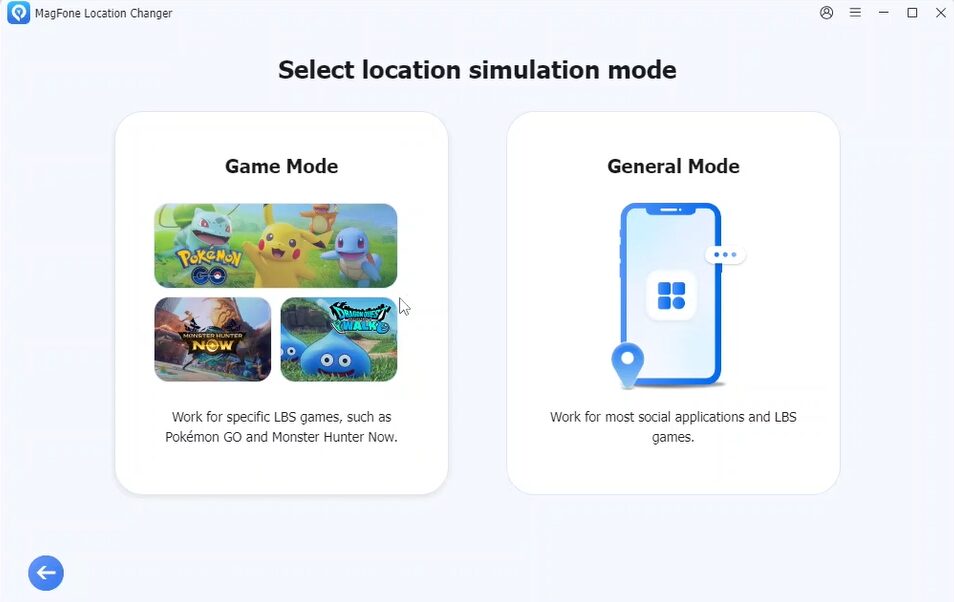
Step 2: Select General mode or Game mode, depending on your needs. After entering the map interface, enter a city, address, or GPS coordinate.
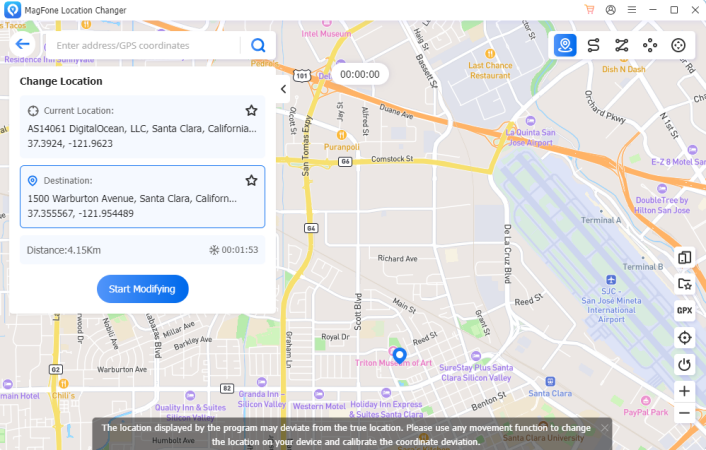
(Image Source: MagFone)
Step 3: Click the location-changing button to update your device’s GPS position. Open a maps application or any location-based service to confirm that the new location has been successfully applied.
How Does GPS Location Simulation Work?
Many users wonder how tools that change GPS location on iPhone and Android work behind the scenes. Modern GPS simulation software overrides the location information reported by the operating system. Instead of transmitting your actual coordinates, the device provides the virtual coordinates selected within the software. This process affects most applications that rely on system-level location services.
Depending on the software being used, additional features may include:
- Single-location teleportation
- Route planning
- Multi-stop movement simulation
- Automatic speed adjustment
- Historical route playback.
These capabilities are especially useful for software testing, application demonstrations, and location-based research.
Things to Consider Before Changing Your GPS Location
Although GPS simulation is widely used for testing and educational purposes, users should keep several factors in mind; responsible use helps ensure a safe and reliable experience.
- Always comply with the terms of service of the apps you use
- Understand how changes in location may affect app functionality
- Use trusted software from reputable developers
- Make sure the software works with your device and operating system.
Final Thoughts
Changing GPS location has become increasingly common in 2026 as more applications rely on location-based services. Whether you are testing software, protecting your privacy, exploring location-based features, or simulating travel routes, virtual location technology provides a practical solution.
Both iPhone and Android users can change GPS location on iPhone and Android devices using dedicated tools. For those seeking a simple cross-platform solution, MagFone Location Changer offers an intuitive way to simulate GPS movement, customize routes, and switch locations without physically traveling. As location-based technologies continue to evolve, GPS simulation tools will remain valuable resources for developers, testers, and everyday users alike.
Disclaimer: This article is for informational and educational purposes only. Users should always follow the terms of service and local regulations when using GPS location-changing tools. EDUCBA does not encourage the misuse of location simulation software to violate app policies or engage in unauthorized activities.
Recommended Articles
We hope this guide to changing GPS location on iPhone and Android helps you explore virtual locations, protect your privacy, and manage location-based apps more effectively. Explore these recommended articles for more insights on GPS simulation, mobile privacy tools, location-based apps, virtual navigation, and smartphone customization.

