


Updated May 12, 2026
Publishing a successful illustrated children’s book used to mean hiring an illustrator, waiting weeks for revisions, and spending thousands before a single copy sold. That formula has changed. Today, independent publishers are building entire catalogs on Amazon KDP using AI image tools, and Banana AI on Kimg AI sits at the center of that shift. Whether you’re starting your first title or scaling to fifty, the workflow looks completely different from what it did even two years ago.
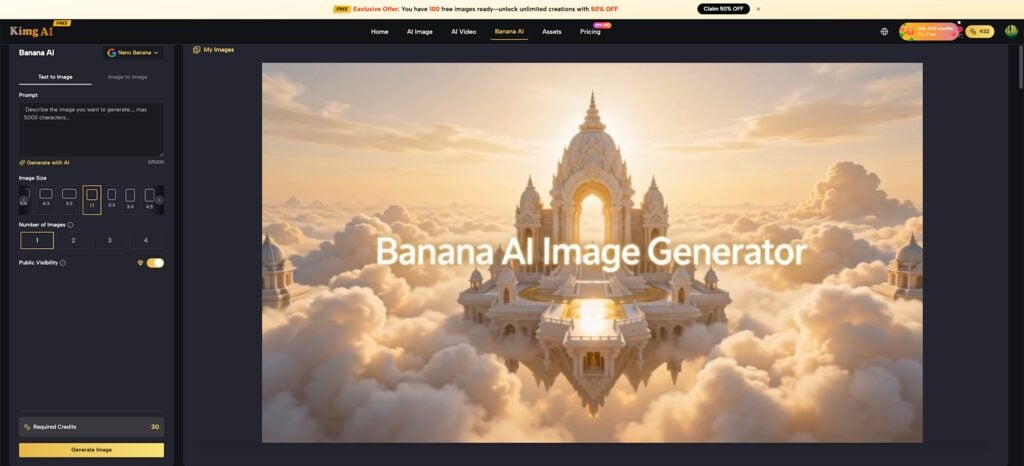
(Image Source: Kimg AI)
Why Amazon KDP Favors Illustrated Books?
The children’s book category on Amazon KDP rewards volume and visual consistency. Here’s why illustrated books specifically perform well:
- Illustrated books face less price pressure than text-only titles, since buyers pay for the visual experience.
- Character-driven stories benefit from consistent art across every spread, which signals professionalism to parents browsing thumbnails.
- Niche themes (bedtime routines, friendship, animals, seasonal holidays) are searchable and repeatable once a visual style is established; duplicating it across a series is a genuine business strategy.
- Low page counts (24–40 pages) mean faster production cycles compared to adult fiction.
The bottleneck has never been story ideas. It’s always been illustration. That’s exactly where a capable Banana AI Image Generator changes the math.
What Does Banana AI Image Generator Actually Offer Illustrators?
Kimg AI’s Banana AI is not a single model; it is a family of models, including Nano Banana, Nano Banana 2, and Nano Banana Pro, each tuned for different output needs—understanding which version of the Banana AI Image Generator to use matters.
Text-to-Image Generation
- Accepts prompts up to 5,000 characters, giving illustrators fine-grained control over character poses, background mood, color palettes, and lighting.
- Particularly strong at rendering soft, children ‘s-book aesthetics: rounded forms, warm tones, and clear foreground subjects.
- Nano Banana Pro outputs are noticeably sharper and more compositionally coherent for print-quality demands.
Image-to-Image Editing
- Upload a rough sketch or reference photo, then use a prompt to guide how the Banana AI Image Editor transforms it.
- Useful for refining a character’s expression, adjusting background clutter, or converting a photograph into an illustrated style.
- Maintains the core structure of the original image while applying the requested changes, which is critical when character consistency across spreads is important.
Multi-Image Composition
- Blend multiple visual concepts or references into one cohesive scene.
- This becomes important when illustrating complex spreads; a child, a dinosaur, and a jungle setting don’t need to be generated separately and patched together in editing software.
Iterative Refinement
- The Pro Redo feature processes an existing output again with enhanced detail, rather than generating it from scratch.
- Saves time on near-perfect results that need a small structural fix.
Building a Children’s Book Illustration Workflow With Banana AI Image Generator
The actual production process for a KDP-ready illustrated book can be broken into a repeatable sequence when using a Banana AI Image Generator.
Character Design First
- Please define your main character in one detailed prompt, including age, hair color, clothing, expression, and art style.
- Generate 4 variations in a single batch to choose the strongest base.
- Lock that prompt and use it consistently throughout the project to maintain character coherency.
Scene-by-Scene Generation
- Write each spread’s scene description as its own prompt, referencing the character description you locked in step one.
- Keep backgrounds simple at this stage, and add environmental detail in a second pass using image-to-image editing.
- Generate in batches; review all at once before moving to refinement.
Cover Illustration
- The cover is the single most important visual asset for KDP discoverability.
- Use Nano Banana Pro within the Banana AI Image Generator for cover generation, with higher output fidelity, better fine-text integration, and print-ready contrast than base models.
- Upload to Kimg AI’s page at up to 4K resolution, which comfortably meets KDP’s minimum print resolution requirements.
Upload and Finalize
- Kimg AI supports up to 8 reference images per generation session. Use this to feed the model pose references, color palette samples, and style guides simultaneously.
- Download final assets in high resolution for direct use in KDP’s interior PDF template.
Consistency Across a Series: The Real Competitive Edge
One book is a debut. Ten Books is a brand. Series consistency is what turns a casual buyer into a repeat customer on Amazon.
Style Locking
- Nano Banana and Nano Banana 2 respond predictably to repeated prompt structures. Once a style formula works, it works reliably across dozens of generations with the Banana AI Image Generator.
- Document your working prompts in a simple spreadsheet; treat them like brand assets.
Character Continuity
- The Banana AI Image Generator handles character-to-character consistency well when the same reference prompt anchors each session.
- For a series with a recurring protagonist, this removes the most common complaint buyers leave in KDP reviews: “the character looks different in every book.”
Art Style Portability
- The same style prompt that worked for a dinosaur adventure title can be ported directly into a holiday book or a counting exercise with minimal adjustment.
- This portability is where the Banana AI image workflow genuinely outperforms commissioning per title from human illustrators on a per-page rate.
Editing and Polishing for Print-Ready Illustrations
Generating a strong image is step one. Getting it print-ready requires a different set of tools, but Kimg AI’s Banana AI Image Generator handles much of this within the same interface.
Background Removal via Prompt
- Kimg AI doesn’t rely on an automated removal button; instead, the Banana AI Image Editor lets users specify a plain white, transparent, or solid-color backdrop directly in the prompt, during the generation stage.
- This approach gives more control than one-click removal tools, since the background intent is baked into the image rather than cut out after the fact.
- For KDP interior spreads, prompting for a clean, uncluttered background from the start saves post-processing time and produces cleaner edges around characters.
Upscaling for Print
- Kimg AI supports upscaling to 4K, meeting KDP’s interior image resolution requirements without requiring a third-party upscaler.
- Always upscale before exporting to your layout file. Pixelation is the fastest way to get a KDP file rejected at upload.
Inpainting and Outpainting
- Inpainting lets the Banana AI Image Editor fill in, or correct specific regions of an image, fix a hand that looks wrong, clean up background clutter, or swap a prop without regenerating the full spread.
- Outpainting extends an image’s canvas edges, useful when a landscape-oriented illustration needs to fit a portrait-format page bleed.
Scaling From One Title to a Full Children’s Book Catalog
The publishers doing well on KDP in 2026 aren’t treating each book as a standalone project. They’re running production systems powered by the Banana AI Image Generator.
Theme Batching
- Identify 8–12 related themes before starting: generation, animals, emotions, bedtime, alphabet, and seasons. Then produce all character and scene assets in a single production block.
- Switching contexts mid-project is the fastest way to break visual consistency.
Prompt Libraries as Production Assets
- A well-documented prompt library is one of the most valuable things a KDP publisher can build.
- Tested prompts for specific character types, lighting moods, and background environments save hours per title after the first few books are completed.
Repurposing Across Formats
- The same illustrations generated with a Banana AI Image Maker can serve multiple KDP formats: a 32-page picture book, an 8-page board book adaptation, and a coloring book variant, all from a single asset set.
- This multiplies revenue per production hour without multiplying illustration time.
Final Thoughts
The economics of Amazon KDP children’s books have genuinely changed. Kimg AI’s Banana AI Image Generator, powered by Nano Banana, Nano Banana 2, and Nano Banana Pro, gives independent publishers access to a scalable illustration workflow that was previously out of reach for solo creators. From character design and scene generation to editing, upscaling, and maintaining series consistency, the Banana AI Image Generator enables the production of high-quality illustrated books more quickly and efficiently. The tools are accessible, the workflow is learnable, and the real competitive advantage lies in systematically using the Banana AI Image Generator to build a profitable, visually consistent children’s book catalog on Amazon KDP.
Recommended Articles
We hope this guide on using the Banana AI Image Generator to build a children’s book catalog on Amazon KDP helps you streamline illustration production and scale your publishing workflow. Explore these recommended articles for additional insights and strategies to create high-quality books faster and grow your KDP business.


