


Updated March 4, 2023
Difference Between Adobe Illustrator vs Adobe Photoshop
The following article provides an outline for Adobe Illustrator vs Adobe Photoshop. Adobe Illustrator software deals with vector-based images or illustrations. It is being used to create and edit logos, marks, or any other design related to the alphabet or numeric. Basically, we use such software because it can create high resolution-based images or high scalar images, which benefits us for zooming as much as we can, but the quality remains the same.
This software has features that make a user create numbers and texts easily by using predefined commands. Adobe Photoshop is a commonly used software by photographers all around the world. This software deals with the pixel-based entity means regular images snapped from cameras. This software can develop the images on a resolution basis; you can’t zoom beyond that point; else, you won’t get the quality. It can create, cut, modify, enhance, and repair the images to look them better in the way a user wants.
Head to Head Comparisons Between Adobe Illustrator vs Adobe Photoshop
Below is the top 9 difference between Adobe Illustrator vs Adobe Photoshop: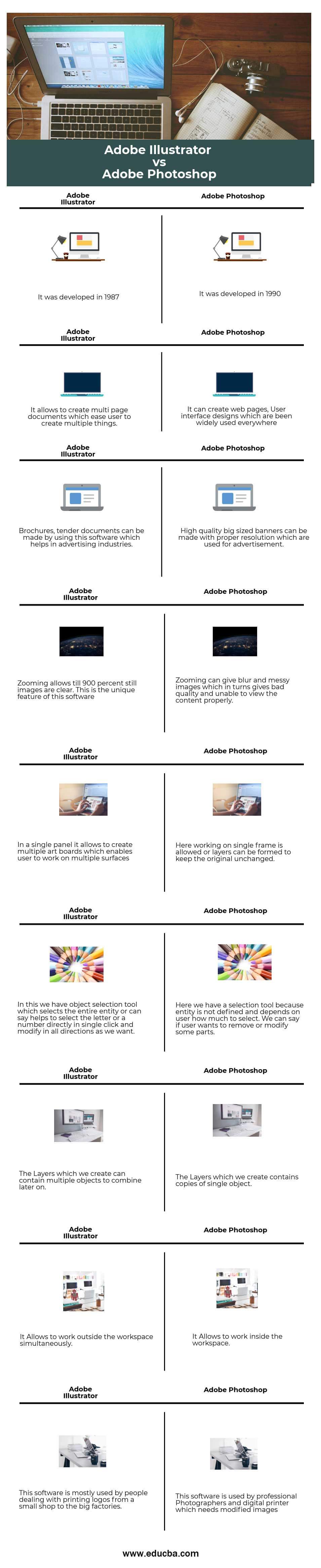
Key Differences Between Adobe Illustrator vs Adobe Photoshop
Both are popular choices in the market; let us discuss some of the major differences:
- If we consider a line in an illustrator, then it consists of 2 dots of algorithm instead of having pixels in it. Similarly, if we would have a normal line of pixels, then it’s hard to use on a vector platform.
- Adobe illustrator acts like a mathematical grid, which means when we make the images bigger, it calculates itself in the background to get the proper quality where pixels are not needed. Also, in Illustrator, there is a unit for vector images that is DPI (dots per inch). In Photoshop, if the image is having 200 ppi (parts per inch) and if we zoom the image by 2x, then the PPI is halved due to which quality reduces, vice versa if we reduce the size, PPI increases.
- All the text which is used in Microsoft word is vector images created in Illustrator. In Photoshop, it is hard to create a numerical or alphabetical entity.
- In Illustrator, it doesn’t need to modify the graphics which has been created. Simultaneously in Photoshop, it gives you the chance to modify the image multiple times; we can change the pixel count and increase its quality.
- Vector graphics are created in Adobe Illustrator instead of Raster images, or bitmap graphics are created in Photoshop.
- Using Illustrator is an artwork and using Photoshop is a skill because when you deal with precision, it’s an art and when deals with clarity and high-end images, that’s a skill.
- Illustrator can’t implement page numbers automatically; that is the drawback of this software. The drawback of Photoshop is that it can’t create texts and numbers as Illustrator.
- In Photoshop, a user can achieve natural-looking illustrations and as per the real world is concerned because it’s a digital-analog for painting. Similarly, in Illustrator, it is less natural but can work with more precision which is good for a logo or any vector component for its creation. Basically, Illustrator doesn’t need good looking.
Adobe Illustrator vs Adobe Photoshop Comparison Table
Below is the topmost comparisons between Adobe Illustrator vs Adobe Photoshop:
| Sr. No | Adobe Illustrator | Adobe Photoshop |
| 1 | It was developed in 1987. | It was developed in 1990. |
| 2 | It allows creating multi-page documents, which ease users to create multiple things. | It can create web pages, user interface designs which have been widely used everywhere. |
| 3 | Brochures, tender documents can be made by using this software which helps in the advertising industries. | High quality big sized banners can be made with a proper resolution which is used for advertisement. |
| 4 | Zooming allows till 900 percent still images are clear. This is the unique feature of this software. | Zooming can give blur and messy images, which in turn gives bad quality and unable to view the content properly. |
| 5 | In a single panel, it allows creating multiple artboards, which enable a user to work on multiple surfaces. | Here working on a single frame is allowed, or layers can be formed to keep the original unchanged. |
| 6 | In this, we have an object selection tool that selects the entire entity or can say helps to select the letter or a number directly in a single click and modify in all directions as we want. | Here we have a selection tool because an entity is not defined and depends on the user how much to select. We can say if a user wants to remove or modify some parts. |
| 7 | The layers which we create can contain multiple objects to combine later on. | The layers which we create contain copies of a single object. |
| 8 | It allows working outside the workspace simultaneously. | It allows working inside the workspace. |
| 9 | This software is mostly used by people dealing with printing logos from a small shops to the big factories. | This software is used by professional Photographers and a digital printer which needs modified images. |
Conclusion
Basically, both software deals with their own concepts and features, they are being designed by the same manufacturer, but the user interface is kept different to satisfy their goals. We can say both software are poles apart by viewing their features, concepts, and Interfaces. It is better to use both the software’s simultaneous because sometimes we need to add some text, watermark to the image which needs for our blog or anywhere. Some of the commands are the same, and the most important thing is that we can edit the image in the illustrator as well, which saves the time of the user. If you are fluent in one of the software and not on the other, then it’s not a difficult job to learn. Anyway, it’s a bit hard at the start, but much easier for a user if he gets friendly with both.
Recommended Articles
This is a a guide to Adobe Illustrator vs Adobe Photoshop. Here we discuss key differences with infographics and comparison table. You may also have a look at the following articles to learn more –

