


What is Access Control?
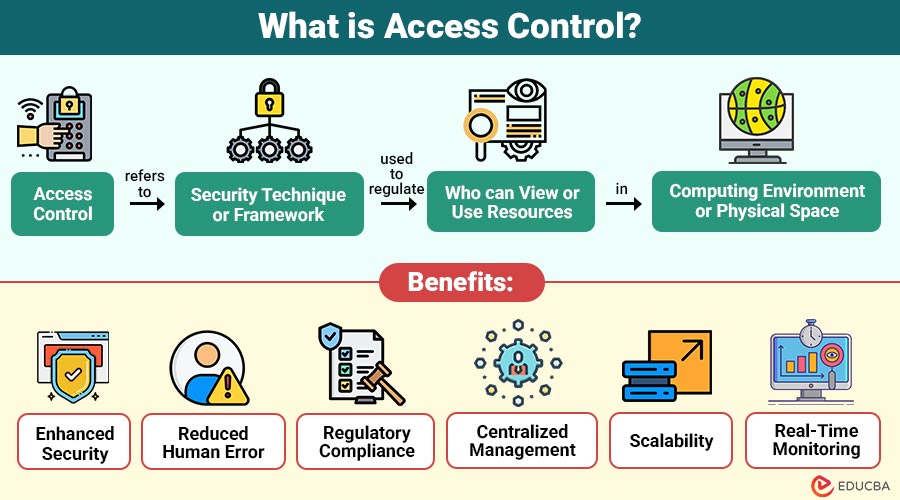
Access Control refers to the security technique or framework used to regulate who can view or use resources in computing environment or physical space. It makes sure that only authorized users, systems, or devices can access specific information, applications, or facilities based on predefined permissions.
In essence, access control answers two fundamental questions:
- Who is allowed to access a resource?
- What actions are they permitted to perform?
Examples:
- In a corporate network, access control determines which employees can read, edit, or delete files.
- Access controls at a physical office establish who is allowed to enter places that are restricted, like labs or server rooms.
Table of Contents:
Key Takeaways:
- Access control safeguards sensitive resources by allowing only authorized users to perform specific actions securely.
- Implementing access control enhances compliance, reduces breaches, and maintains operational efficiency across digital and physical environments.
- Modern systems combine biometrics, AI, and cloud solutions for dynamic, context-aware, and scalable access management.
- Effective access control promotes accountability, auditability, and real-time monitoring to mitigate risks and insider threats.
Importance of Access Control
Access control is an essential component of both cybersecurity and physical security strategies. Its importance can be summarized as follows:
1. Data Protection
Access control prevents potential cyberthreats or leaks and safeguards intellectual property by restricting sensitive information access to authorized personnel.
2. Regulatory Compliance
Implementing access control helps organizations adhere to regulations like GDPR, HIPAA, and ISO 27001, avoiding penalties and legal complications.
3. Risk Reduction
By restricting unauthorized access, access control reduces the likelihood of data breaches, insider threats, and other malicious activities within organizations.
4. Operational Efficiency
Automated access management streamlines authorization workflows, reduces manual intervention, and ensures employees have appropriate permissions efficiently and securely.
5. Accountability
Systems track user actions, creating audit trails for monitoring, investigations, and forensic analysis in case of security incidents.
Types of Access Control Systems
It can be divided into two categories: logical and physical.
1. Physical Access Control
This system regulates entry to physical spaces like offices, buildings, or restricted areas. An access control panel can help manage and coordinate access permissions between connected security devices, ensuring only authorized personnel can access sensitive locations securely.
Examples:
- Keycards or RFID badges
- Biometric scanners (fingerprint, facial recognition)
- Electronic door locks
- Security gates or turnstiles
2. Logical Access Control
This type limits access to digital systems, applications, data, and network resources, ensuring only authorized users can interact with sensitive information securely.
Examples:
- Passwords and PINs
- Multi-factor authentication (MFA)
- Role-based permissions in IT systems
- Firewalls and VPNs
Models of Access Control
Several models determine how access permissions are granted or restricted. The most commonly used models include:
1. Discretionary Access Control (DAC)
By granting control over permissions like read, write, and execute, DAC enables the resource owner to decide who has access to their resources.
2. Mandatory Access Control (MAC)
MAC enforces access based on security labels or classifications. Users cannot modify permissions; organizational policies strictly determine access.
3. Role-Based Access Control (RBAC)
RBAC grants access based on users’ roles within an organization, ensuring permissions match job responsibilities.
4. Attribute-Based Access Control (ABAC)
ABAC evaluates user, resource, and environmental attributes to decide access dynamically, offering flexible and context-aware security.
How Access Control Works?
Here is a step-by-step breakdown of the process:
1. Identification
The user presents a unique credential, such as a username, ID card, or token, to securely declare their identity to the system.
2. Authentication
The system verifies the user’s identity using passwords, biometrics, or one-time codes, ensuring the person accessing the system is legitimate.
3. Authorization
After authentication, the system determines the user’s permitted actions, such as read, write, or execute, based on roles, attributes, or policies.
4. Audit
All access attempts, successful or denied, are logged for monitoring, compliance, and forensic analysis, ensuring accountability and detecting unauthorized activities.
Technologies Used in Access Control
Modern systems integrate advanced technologies to enhance security and convenience:
1. Biometric Authentication
Biometric systems verify identity using unique physical traits like fingerprints, facial recognition, or iris scans, ensuring secure and personalized access control.
2. RFID and Smart Cards
RFID tags and smart cards electronically store user credentials, enabling fast, convenient, and secure authentication for physical and digital access points.
3. Cloud-Based Access Control
Cloud access control allows administrators to remotely manage permissions, monitor activity in real time, and configure systems securely through web-based interfaces.
4. Multi-Factor Authentication
MFA efficiently strengthens security and stops unwanted access by combining two or more verification techniques, such as passwords, OTPs, or biometrics.
5. AI and Machine Learning
AI-powered systems monitor user behavior, detect anomalies, and automatically identify potential security threats or unauthorized activities within access-controlled environments.
6. Blockchain
Blockchain technology provides decentralized, tamper-proof identity verification, ensuring secure and transparent access management across systems without relying on a central authority.
Benefits of Implementing Access Control
Organizations benefit in multiple ways by implementing a structured system:
1. Enhanced Security
Prevents unauthorized individuals from entering systems or accessing sensitive data, protecting organizational assets from internal and external security threats.
2. Reduced Human Error
Automated access policies minimize mistakes, such as misconfigurations or accidental permission changes, reducing potential security vulnerabilities and operational risks.
3. Regulatory Compliance
By putting access control in place, businesses may avoid fines and adhere to regulations like GDPR, HIPAA, and ISO 27001.
4. Centralized Management
Centralized access control simplifies user permissions management across multiple systems, streamlining administrative tasks and maintaining consistent security policies organization-wide.
5. Scalability
Organizations can easily adapt access control systems to manage new users, resources, or locations securely.
6. Real-Time Monitoring
Continuous monitoring detects suspicious activity or unauthorized attempts immediately, enabling rapid response to potential threats and ensuring proactive security management.
Challenges in Access Control
While access control systems offer many advantages, they also present challenges, such as:
1. Complex Configuration
Designing and configuring roles, permissions, and policies for users can be complicated, time-consuming, and prone to errors in large organizations.
2. User Management Issues
Onboarding, offboarding, and updating user access are challenging tasks that require constant attention to prevent unauthorized access or security gaps.
3. Integration with Legacy Systems
Older infrastructure may not support modern technologies, making integration difficult and sometimes requiring costly upgrades or workarounds.
4. Insider Threats
Even authorized users can intentionally or accidentally misuse their privileges, posing significant security risks to sensitive data and systems.
5. Cost of Implementation
Deploying advanced solutions can be expensive initially, including software, hardware, training, and ongoing maintenance costs for the organization.
Real-World Applications
Systems are widely used across industries:
1. Healthcare
Hospitals use access control to protect patient records, comply with HIPAA regulations, and restrict access to sensitive medical equipment or data.
2. Finance
Banks implement access control to safeguard customer information, regulate database access, and prevent unauthorized transactions or insider threats.
3. Education
Schools and universities secure student records, restrict entry to labs, libraries, and facilities, ensuring safety and privacy for students and staff.
4. Government
Government agencies protect classified documents and national security information, granting access strictly based on clearance levels and organizational roles.
5. IT and Cloud Services
Manages digital identities, regulates system permissions, and prevents data breaches in cloud environments and IT infrastructure.
Final Thoughts
Access control is a crucial element of modern security, regulating access to safeguard assets, ensure compliance, and maintain operational integrity. By leveraging technologies like biometrics, AI, and cloud management, organizations can protect data, prevent unauthorized access, and respond to cyber threats effectively. A robust framework also fosters trust, accountability, and resilience in today’s dynamic digital environment.
Frequently Asked Questions (FAQs)
Q1. What is the main goal of access control?
Answer: To ensure only authorized users can access specific resources, protect data and assets from misuse.
Q2. How does access control differ from authentication?
Answer: Authentication verifies identity, while access control defines what the authenticated user is allowed to do.
Q3. Can access control prevent insider threats?
Answer: While it reduces the risk, it must be combined with audits and behavior monitoring to address insider threats fully.
Q4. Why is multi-factor authentication important in access control?
Answer: It adds extra layers of verification, significantly reducing the chance of unauthorized access.
Recommended Articles
We hope that this EDUCBA information on “Access Control” was beneficial to you. You can view EDUCBA’s recommended articles for more information.


