
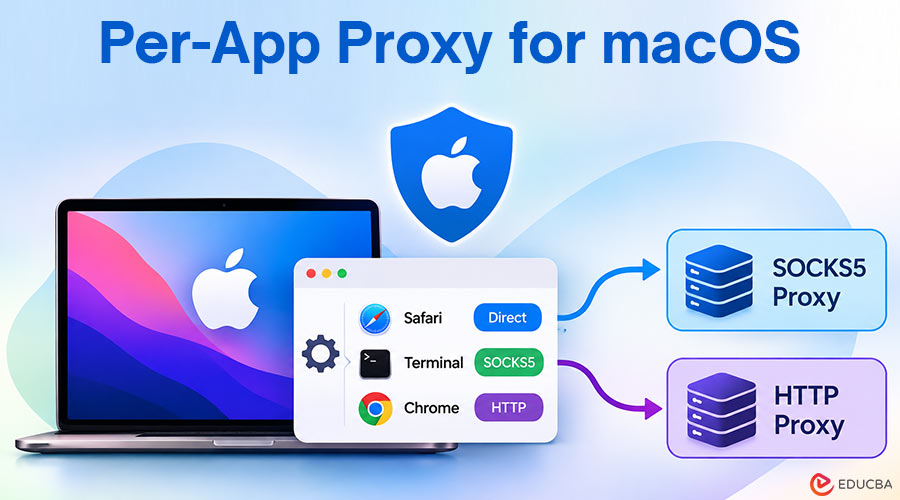
To send traffic from some macOS apps through SOCKS5 and HTTP, you need to set up each app to send or receive data differently from the rest of the system. Apple’s settings send all traffic the same way, so everything goes together. But a tool lets you give different SOCKS5 or HTTP sign-in info to each app. You can do this by selecting each app’s process ID (PID). This way, apps do not mix their data. It helps you avoid delays from using a system-wide VPN and keeps private app data separate from the rest. A per-app proxy for macOS offers a more targeted approach to managing application traffic.
In the past, Mac power users often relied on broad network tools or system-wide PAC files. Now, Apple’s new setup and security rules have changed things. A normal VPN split-tunnel works for simple website rules. But if you need to run both SOCKS5 and HTTP proxies for different apps on your desktop, a proxy tool lets you set up individual connections for each process cleanly. A per-app proxy for macOS can simplify this by letting users configure proxy connections for selected applications.
A new view of how client-side sockets work shows something good. If you run fast apps directly and use residential proxies for data scraping or admin jobs, you will cut extra slowdowns by around 38%. This is better than old global tunneled setups.
Architectural Mechanics of macOS Proxy Isolation
At the center of macOS, Darwin helps ensure the system handles data moving in and out. When an app needs something, the system connects it to a standard socket. It uses the main method for moving data on the device.
In macOS System Settings, when you set system-wide connection settings, all apps use them. Every web request will go to one place. This is true no matter what else is happening on your device.
Selective routing lets you send some apps through a specific proxy while leaving others on the default network connection. With a per-app proxy for macOS, you can configure rules for selected applications instead of applying the same proxy settings to every connection. This way, local jobs keep normal speed. You can also give certain jobs their own IP addresses.
- App 1: Safari → Default Network Gateway → ISP (Local IP)
- App 2: Terminal → App-Level Proxy Engine → SOCKS5 Endpoint
- App 3: Chrome → App-Level Proxy Engine → HTTP/HTTPS Gateway
SOCKS5 and HTTP: Choice of Protocols
Whether to use SOCKS5 and/or HTTP proxies depends on the requirements of you or others for the application. SOCKS5 operates at layer 5 of the OSI model. It does not change any HTTP headers. That is why people use SOCKS5 proxies for P2P clients, database tools, and command-line tools.
HTTP and HTTPS proxies work at the application layer. They can interpret and handle web traffic. People use them a lot for scraping scripts. These are good for making API requests and keeping web browser connections separate. Choosing the right protocol is an important part of configuring a per-app proxy for macOS, especially when different applications have different networking requirements.
| Parameter | SOCKS5 Proxy | HTTP/HTTPS Proxy |
| OSI Layer | Layer 5 (Session) | Layer 7 (Application) |
| Protocol Support | TCP, UDP | HTTP, HTTPS |
| Header Handling | Passes raw packets without modification | Can rewrite or inject headers |
| Use Case | CLI tools, database connections, P2P | Web scraping, browser testing, REST APIs |
| Authentication | Username/Password, GSS-API | Basic, Digest, Bearer Tokens |
Step-by-Step Per-Application Routing Setup
To set up how your target apps connect to the internet on macOS, match each app bundle with its own server. Here are the steps to make rules for each app:
- Get the Application Bundle IDs: Open the Terminal on your computer. Find the app’s bundle ID.
- Put in Proxy Credentials: Get your SOCKS5 or HTTP proxy info from your provider. You will need your host IP, port, username, and password.
- Set Up App to Proxy Rules: Link your app’s process with the right proxy info inside your routing tool.
- Check Route Isolation: Open the app you picked. Make sure its outside IP address is correct by using this command or another testing method.
- Make Default Rules for Other System Traffic: Set up your tool so every other app goes straight through your normal local line. This keeps your computer running well.
Resolving Common Per-App Proxy for macOS Routing Challenges
Sometimes, process-level routing may hit system limits. It can also cause issues when some background processes do not follow the same route as the main application. There are several methods for addressing common problems with a per-app proxy for macOS:
- DNS Leak: The system may use its own DNS servers, even though TCP traffic goes through the proxy. You can resolve this by enabling remote DNS lookups in the SOCKS5 proxy settings.
- Helper Process Traffic: Several applications such as Slack, Spotify, and so on, may initiate additional helper processes. To correlate this with your rules, you could either use the path to these helpers or analyze the process tree instead of the application IDs.
- SIP and System Permissions: macOS with SIP enabled will not allow some applications to inject additional code using DYLD_INSERT_LIBRARIES. It is better to choose client applications that use system Network Extensions.
Using a per-app proxy for Mac means each app can work by itself and stay safe. It can help every app run better. This also helps keep your Mac from slowing down or losing its internet connection.
Optimizing App Traffic Management
Using process isolation with SOCKS5 and HTTP proxies lets you configure macOS networking more flexibly. By creating separate rules for each supported application, you gain greater control over traffic routing, connection settings, and external IP addresses. Assigning individual proxies to applications can help separate workflows, such as everyday browsing, testing, data collection, and administrative tasks.
A per-app proxy for macOS can be useful when you want selected applications to use specific proxies without routing all system traffic through a single connection. Before implementing this setup, verify that your chosen proxy client supports the applications and protocols you need, test DNS behavior, and confirm that each application follows its assigned route. These checks help you build a more reliable and manageable proxy configuration for your Mac.
Recommended Articles
Explore how a per-app proxy for macOS can improve application-level traffic management, enhance connection flexibility, and simplify proxy configuration. Learn more about SOCKS5 vs. HTTP proxies, proxy clients for Mac, and secure network routing strategies.