


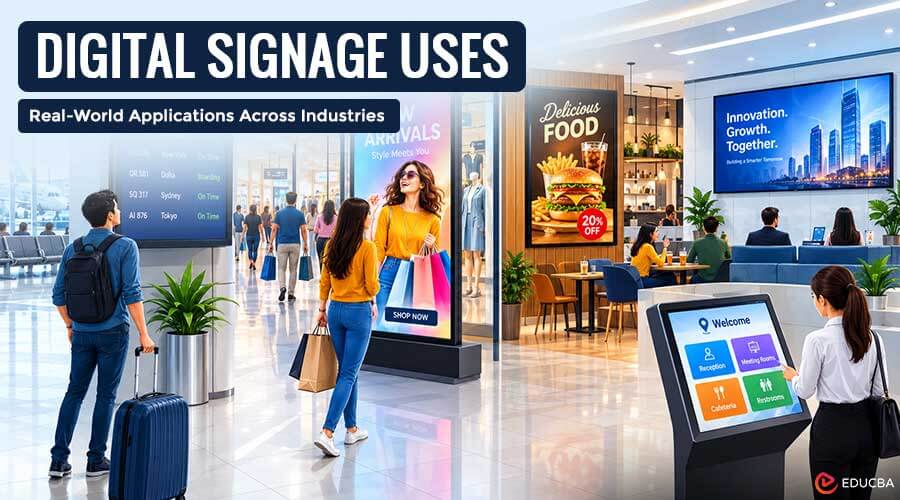
A screen behind a teller counter, a menu board that updates itself at lunchtime, a lobby display that greets a guest by name, digital signage has quietly become the default way organizations share information in physical spaces. This guide explores digital signage uses across different industries, offices, and hotels, focusing on practical applications and documented examples rather than a simple list of features.
Why So Many Organizations Are Switching to Screens?
Printed signs quickly become outdated when prices, schedules, or safety information change. Replacing them also takes time, especially across multiple locations. IMARC Group put the global digital signage market at approximately $28.5 billion in 2024. That figure reflects investment spread across dozens of unrelated sectors, not concentrated in one.
According to Deloitte-cited research, 47% of shoppers say digital screens improve their in-store experience. The appeal is not just the screen itself. It is centralized control: one dashboard can push a price change, a safety alert, or a welcome message to every connected display at once. That cuts the gap between “something changed” and “everyone sees it” from days to seconds. That is why digital signage spans banking, healthcare, manufacturing, and hotels. Each setting needs information to stay current.
Digital Signage Uses Across Different Industries
The spread across sectors is wider than most single roundups capture.
A few of the clearest examples:
- Banking and financial services: Branches use interactive displays and self-service kiosks to post currency exchange rates, market data, and account information, reducing routine staff inquiries.
- Retail: Video walls, digital billboards, and menu boards handle promotions, product highlights, and wayfinding across stores and shopping malls.
- Healthcare: Patient information boards, waiting-room displays, and queue management systems communicate wait times and appointment status. The Chapidze Heart Center reportedly increased daily patient throughput from about 70 to over 200 after adding digital queue displays and kiosks.
- Transportation: Train stations, airports, and bus terminals rely on ticketing kiosks and real-time scheduling screens for arrivals, departures, and gate changes.
- Manufacturing: Factory floors use internal dashboards and safety-alert screens to post shift targets and equipment status where the work happens.
Retail, healthcare, banking, and hospitality are among the industries that commonly use digital signage. Understanding what industries use digital signage shows how the technology can be adapted to different environments and communication needs.
Other notable digital signage uses across industries include:
- Education: Schools, colleges, and training centers use digital bulletin boards and interactive kiosks to communicate schedules, safety announcements, events, and campus information.
- Entertainment venues: Cinemas, concert halls, and sports arenas use digital displays for event schedules, ticketing, promotions, and venue navigation.
- Automotive: Dealerships and service centers display vehicle specifications, promotional information, service updates, and appointment queues.
- Real estate: Real estate agencies use digital property listings and virtual tours in offices, windows, and showrooms. Property prices and availability can be changed without replacing printed materials.
Inside the Office: Where Screens Earn Their Keep?
Away from customer-facing settings, workplace signage covers a surprisingly long list of internal needs:
- Advertising and branding: Reinforcing marketing messaging internally, or letting partner businesses advertise to visitors, which can generate its own revenue.
- Audience measurement: Tracking interaction metrics to understand how employees or visitors actually engage with displayed content.
- Client check-in: Letting visitors register, alert staff, and log parking through an interactive display instead of a front-desk sign-in sheet.
- Corporate initiatives and company history: Surfacing quarterly results, charity drives, or a company’s backstory to build trust with both staff and visitors.
- Crisis messaging: Issuing a screen takeover across every connected endpoint when an emergency requires total awareness.
- Employee recognition and HR communications: Marking work anniversaries, enrollment deadlines, and onboarding notices somewhere staff will actually see them.
- Job boards and employee training: Posting open internal positions and keeping an FAQ or knowledge base visible where the team already looks.
- Safety signage: Reinforcing protocols in zonal layouts so a work area under review is clearly marked as off-limits.
- Office tours and wayfinding: Helping visitors locate a conference room or navigate a building without stopping at every door.
- Menu board signage: The same display logic used in restaurants, applied to break-room or cafeteria offerings to speed up the line.
- Gamification and suggestion boxes: Turning feedback and friendly competition into something visible rather than buried in an inbox.
- Deliver the news: Running headlines, weather, and sports scores in waiting rooms and lobbies so visitors have something to do besides watch the door.
- Client stories and lead capture: Highlighting customer success stories on video, and letting visitors enter their information at a trade-show booth or reception desk instead of filling out a paper form.
- Remote and field communications: Pushing updates to mobile endpoints so a field service agent has current information in hand before walking into a customer’s building.
- Countdown timers and event messaging: Building anticipation for a deadline, whether that is an open-enrollment window or the company holiday party, and inviting staff to the next live event with sign-up details attached.
- Health and wellness reminders, and office hoteling: Prompting people to take a break and helping employees reserve a desk for the day in offices that share workspace instead of assigning it.
A workforce communications platform lets one update reach every screen at once. This improves coordination across the workplace.
What Hotels, in Particular, Get Right?
Hospitality deserves its own mention because guest-facing signage covers ground that most other industries do not touch:
- Automated check-in: Guests collect a room key from a kiosk without queuing at the front desk.
- Welcome information: Lobby displays cover restaurant hours, local travel updates, and upgrade offers that a staff member would otherwise repeat all day.
- In-room screens: A personalized welcome message pairs with local headlines or a hotel’s social feed.
- Personalized concierge displays: Routine questions get answered at any hour without needing a person on shift.
- Wayfinding: Screens point guests to a spa or restaurant, often with a QR code for direct booking.
- Travel information: Displays stream local transit updates or flight schedules for airport properties.
- Emergency notices: Systems triggered by a common alert protocol push evacuation orders or weather warnings as soon as conditions change.
- Partner promotion: Theatre and concert venues, tour guides, car and bike hire, and boat trips cycle through on a loop or a dedicated screen zone, driving incremental revenue.
- Social media walls: Instagram or TikTok shots tagged with a branded hashtag display in the lobby.
- Reviews and testimonials: Signage surfaces guest reviews or a QR code inviting new ones.
- Bookings and schedules: A spa treatment or poolside class appears alongside a quick way to reserve it.
- Wall art: The Cosmopolitan of Las Vegas famously used floor-to-ceiling video walls to make a lobby feel larger than it is.
- Live-streamed entertainment: Webcam footage or curated channels play in shared spaces instead of rolling news.
- Digital menu boards: An in-house restaurant kitchen updates dishes, prices, or daily specials from a central system instead of reprinting a laminated menu.
Digital signage can reduce front-desk inquiries by roughly 35%. It answers common questions before guests need staff assistance. Select important screens, install the software, and schedule content. Add more screens as the rollout expands.
The Common Thread
None of these use cases, banking rate boards, hospital queue displays, factory safety alerts, hotel concierge screens, require a production team. Most start with a single connected display and expand once the format proves useful in that setting. The common thread is not the industry but the shift from static signage to content that updates instantly. That flexibility explains why digital signage uses continue to expand across customer-facing spaces, workplaces, public facilities, and hospitality environments.
Recommended Articles
We hope this guide to digital signage uses helps you understand how businesses across industries can communicate more effectively. Check out these recommended articles for more insights and practical strategies.


