
Updated August 11, 2026
What is a RAG Pipeline?
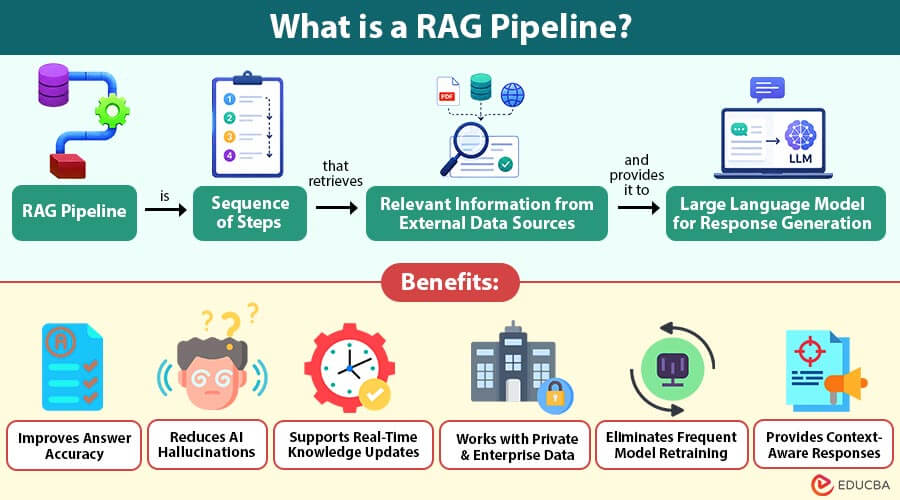
A RAG pipeline is a sequence of steps that retrieves relevant information from external data sources and provides it to a large language model (LLM) for response generation.
Instead of answering questions using only pre-trained knowledge, the pipeline first searches documents, databases, websites, or knowledge bases for relevant content. An accurate and context-aware response is subsequently generated by combining the information that was retrieved with the user’s inquiry.
In simple terms, a RAG pipeline helps AI find the right information first and generate better answers afterward.
Table of Contents:
Key Takeaways:
- RAG pipelines retrieve relevant external information to improve the accuracy and reliability of AI responses.
- RAG combines data retrieval, embeddings, vector databases, and language models for better responses.
- RAG supports real-time updates and private business data without frequent model retraining.
- Effective RAG pipelines require quality data, accurate retrieval, proper chunking, security, and maintenance.
Why is a RAG Pipeline Important?
A RAG pipeline is important because it improves accuracy, reduces hallucinations, uses current data, and delivers better AI responses.
1. Improves Response Accuracy
Retrieves relevant information before generating responses, consistently improving answer accuracy, reliability, and overall response quality for users.
2. Reduces AI Hallucinations
Uses trusted external knowledge sources to reduce incorrect, misleading, or fabricated responses generated by AI systems effectively.
3. Supports Real-Time Information
Retrieves the latest information from connected data sources without requiring expensive model retraining or frequent updates.
4. Uses Private Business Data
Connects AI securely to internal documents, databases, policies, and knowledge repositories to deliver organization-specific responses accurately.
5. Saves Training Costs
Eliminates frequent model retraining by updating external knowledge bases, reducing development time and operational expenses significantly.
6. Delivers Better User Experience
Provides relevant, personalized, context-aware responses that effectively improve user satisfaction, engagement, and decision-making across different applications.
How Does a RAG Pipeline Work?
A RAG pipeline follows several steps to retrieve and generate accurate responses.
Step 1: User Query
The user asks a question or submits a request.
Example:
“What is our company’s remote work policy?”
Step 2: Query Processing
The system understands the user’s request and converts it into a searchable format.
Step 3: Embedding Generation
The query is converted into numerical vectors using an embedding model. These vectors help compare the user’s question with stored documents.
Step 4: Information Retrieval
A vector database or search engine finds the most relevant documents based on similarity.
Step 5: Context Selection
The system selects the best matching information and removes irrelevant content.
Step 6: Prompt Construction
The retrieved information is combined with the user’s question to create a complete prompt.
Step 7: Response Generation
The large language model generates an answer using both the retrieved information and its language understanding.
Step 8: Response Delivery
The final answer is returned to user with improved accuracy and context.
Key Components of a RAG Pipeline
Below are the key components that work together to retrieve information and generate accurate AI responses in a RAG pipeline.
1. Data Sources
Repositories containing information that the RAG pipeline retrieves to generate accurate, relevant, and context-aware AI responses efficiently.
Examples:
- PDF documents
- Word files
- Websites
- Databases
2. Document Loader
Collects data from multiple sources, extracts content, and prepares documents for indexing and retrieval within the pipeline.
3. Text Chunking
Splits large documents into smaller meaningful sections, improving retrieval accuracy, search relevance, and overall response quality consistently.
4. Embedding Model
Converts text into numerical vector representations, enabling semantic search based on meaning instead of exact keyword matching.
5. Vector Database
Stores text embeddings and quickly retrieves the most semantically similar content to generate efficient AI responses.
Popular Vector Databases:
- Pinecone
- Weaviate
- Milvus
- Chroma
- Qdrant
- FAISS
6. Retriever
Searches the vector database and retrieves the most relevant document chunks matching the user’s query with high accuracy.
7. Prompt Builder
Combines retrieved document context with the user’s question to effectively create an optimized prompt for the language model.
8. Large Language Model
Generates natural-language responses using retrieved context, consistently producing accurate, relevant, and human-like answers for users.
Examples:
- GPT
- Claude
- Gemini
Types of RAG Pipelines
Below are the different types of RAG pipelines, each designed to improve information retrieval and AI response generation.
1. Basic RAG
Retrieves relevant documents and sends them directly to the language model for accurate question-answering and responses.
2. Advanced RAG
Uses reranking, filtering, and query optimization to improve retrieval accuracy and overall response quality significantly.
3. Hybrid RAG
Combines keyword and vector search to deliver accurate retrieval by combining exact matches with semantic understanding.
4. Multi-Step RAG
Performs multiple retrieval stages before generating responses, effectively improving reasoning accuracy for complex tasks and queries.
5. Agentic RAG
Uses AI agents to select tools, databases, and documents before generating intelligent, context-aware responses automatically.
Popular Tools for Building a RAG Pipeline
Below are popular tools for building, managing, and optimizing different components of a RAG pipeline.
| Tool | Purpose |
| LangChain | Builds RAG workflows and AI applications |
| LlamaIndex | Connects LLMs with enterprise data |
| Haystack | Develops search and question-answering systems |
| Pinecone | Cloud-based vector database |
| Weaviate | Open-source vector search platform |
| Milvus | High-performance vector database |
| Chroma | Lightweight vector database |
| Qdrant | Vector similarity search engine |
| FAISS | Fast vector similarity search library |
| Elasticsearch | Keyword and hybrid search |
| OpenAI Embeddings | Creates vector embeddings |
| Sentence Transformers | Generates semantic text embeddings |
Applications of RAG Pipeline
Below are the key applications of RAG Pipelines across various industries that help organizations retrieve information and generate accurate AI responses.
1. Customer Support
AI chatbots retrieve company knowledge to deliver accurate, consistent, and context-aware customer support responses quickly every time.
2. Enterprise Search
Employees search internal documents using natural language, improving information access, productivity, and workplace decision-making across organizations.
3. Healthcare
Retrieves clinical guidelines, patient records, and medical research to support accurate diagnosis and informed treatment decisions effectively.
4. Legal Services
Searches contracts, legal documents, regulations, and case information to improve research speed and legal decision-making efficiency.
5. Financial Services
Retrieves policies, compliance rules, and financial reports to answer customer inquiries accurately while supporting regulatory requirements efficiently.
6. Education
Helps students and teachers effectively retrieve textbooks, lecture notes, and learning resources through intelligent, AI-powered search assistants.
7. Software Development
Retrieves API documentation, coding examples, and technical guides to help developers write accurate code faster and more efficiently.
Benefits of a RAG Pipeline
Below are the benefits of using a RAG pipeline, followed by the main challenges organizations may face when implementing it.
1. Improves Answer Accuracy
Uses reliable external knowledge to generate accurate, relevant, and trustworthy responses for users across various applications consistently.
2. Reduces AI Hallucinations
Retrieves verified information from trusted sources, minimizing incorrect, misleading, or fabricated AI-generated responses effectively and consistently.
3. Supports Real-Time Knowledge Updates
Accesses the latest information without retraining models, ensuring responses remain current, relevant, and reliable over time.
4. Works with Private and Enterprise Data
Securely connects AI to internal documents, databases, and business knowledge to deliver organization-specific responses and insights.
5. Eliminates Frequent Model Retraining
Updates external knowledge bases rather than retraining language models, significantly reducing development effort, costs, and maintenance requirements.
6. Provides Context-Aware Responses
Combines retrieved information with user queries to deliver relevant, personalized, and context-aware responses every time effectively.
Challenges of a RAG Pipeline
Below are the main challenges in effectively implementing and maintaining a RAG pipeline.
1. Data Quality
Poor-quality or outdated documents reduce retrieval accuracy, resulting in unreliable, incomplete, or incorrect AI-generated responses frequently.
2. Chunking Strategy
Incorrect chunk sizes can separate important context, consistently reducing retrieval quality and overall response accuracy for users.
3. Retrieval Accuracy
Finding the most relevant documents becomes difficult as knowledge bases grow larger and more complex over time.
4. Latency
Searching large knowledge bases increases response time, which affects application performance and the overall user experience during interactions.
5. Vector Database Management
Managing embeddings and indexes requires regular updates, optimization, and maintenance for consistent retrieval performance and accuracy.
6. Security and Access Control
Sensitive corporate data requires strong authentication, permissions, and security controls to avoid unauthorized access and data breaches.
Final Thoughts
A RAG pipeline improves large language models by retrieving relevant information from trusted data sources before generating responses. This increases accuracy, reduces AI hallucinations, supports real-time and private data access, and enables reliable, scalable AI applications across customer support, healthcare, finance, education, enterprise search, and many other industries.
Frequently Asked Questions (FAQs)
Q1. Can a RAG pipeline work without a vector database?
Answer: Yes. A RAG pipeline can use traditional keyword search engines such as Elasticsearch or database queries. However, vector databases generally provide better semantic search for natural language questions.
Q2. Is a RAG pipeline suitable for small businesses?
Answer: Yes. Small businesses can use RAG pipelines to build AI assistants for customer support, document search, and internal knowledge management without creating or training their own language models.
Q3. How often should the knowledge base in a RAG pipeline be updated?
Answer: The update frequency depends on the application. Businesses with frequently changing information may update documents daily or in real time, while others may update weekly or monthly.
Q4. Does a RAG pipeline replace a large language model?
Answer: No. A RAG pipeline works alongside a large language model by supplying relevant information before the model generates a response. The language model still performs the reasoning and text generation.
Recommended Articles
We hope that this EDUCBA information on “RAG Pipeline” was beneficial to you. You can view EDUCBA’s recommended articles for more information.


