
Updated August 7, 2026
What is Tool Calling?
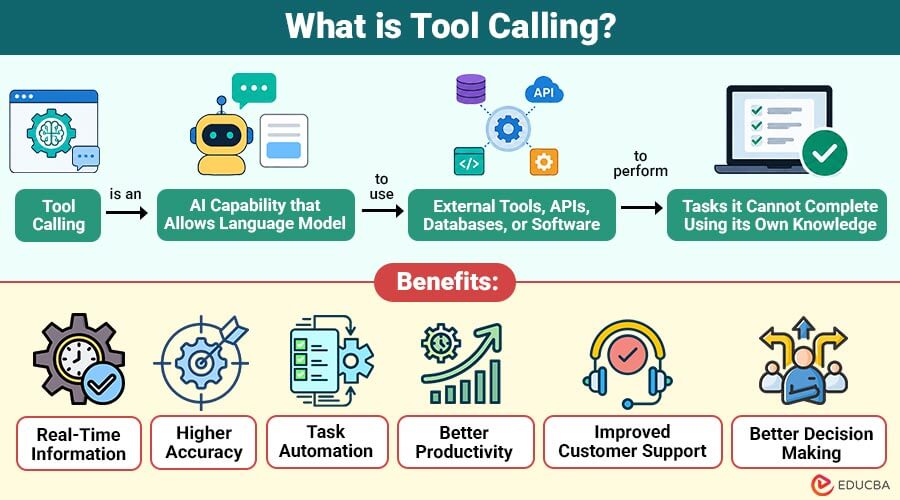
Tool Calling is an AI capability that allows a language model to use external tools, APIs, databases, or software to perform tasks it cannot complete using its own knowledge. Instead of only generating text, the AI decides when a tool is needed, sends the required information, receives the result, and uses it to provide an accurate response.
For example, if a user asks for today’s weather, the AI can call a weather API, retrieve the latest forecast, and present the information instead of relying on outdated training data.
As AI assistants become more advanced, tool calling helps them perform real-world tasks such as searching the web, booking appointments, querying databases, performing calculations, sending emails, and interacting with business applications.
Table of Contents:
Key Takeaways:
- Tool calling enables AI to use external tools, APIs, and databases to efficiently execute accurate real-world tasks.
- It improves AI by accessing real-time information, automating workflows, and reducing errors through the use of trusted external sources.
- Tool calling supports applications across customer service, healthcare, finance, education, e-commerce, and enterprise business automation.
- Successful tool calling requires secure integration, authentication, privacy protection, reliable error handling, and efficient API management.
Why is Tool Calling Important?
Traditional AI models generate responses based only on the information they learned during training. They cannot access live information or perform actions independently.
Tool calling solves this limitation by enabling AI to:
1. Access Real-Time Information
Retrieves current data from external APIs, websites, or services, ensuring accurate, up-to-date AI responses.
2. Perform Complex Calculations
Executes mathematical operations, financial computations, and logical processing beyond standard language model capabilities efficiently today.
3. Retrieve Data from Databases
Fetches relevant information from connected databases, ensuring quick, accurate, and context-aware responses for users consistently.
4. Automate Repetitive Tasks
Performs recurring actions automatically, reducing manual effort, saving time, and improving overall operational efficiency significantly daily.
5. Connect with External Software
Integrates with business applications, cloud services, and APIs to exchange data and execute workflows seamlessly.
6. Improve Response Accuracy
Verifies information using trusted external sources, effectively reducing errors, hallucinations, and outdated responses during conversations.
7. Complete Real-World Actions
Books appointments, sends emails, creates reports, updates records, and performs practical tasks without manual intervention efficiently.
How Does Tool Calling Work?
The tool calling process usually follows these steps:
1. User Sends a Request
The user asks the AI to complete a task.
Example:
“What is the current weather in Mumbai?”
2. AI Understands the Request
After analyzing the prompt, the language model concludes that providing current weather information is necessary to respond. Instead of guessing, it decides to use a weather tool.
3. AI Selects the Appropriate Tool
The AI chooses the most suitable tool for the task.
Examples include:
- Weather API
- Search engine
- Calculator
- Database
- Email service
- Calendar application
4. AI Sends the Required Parameters
The model prepares the required input for the selected tool.
Example:
Location = Mumbai
The tool receives this information and processes the request.
5. Tool Executes the Task
The external tool performs the requested operation.
Examples include:
- Looking up weather
- Searching a database
- Calculating a formula
- Sending an email
- Booking a meeting
6. Tool Returns the Result
After completing the task, the tool sends the output back to the AI model.
For example:
- Temperature: 29°C
- Condition: Cloudy
- Humidity: 78%
7. AI Generates the Final Response
The AI converts the tool output into a natural, easy-to-understand response.
Example:
“The current temperature in Mumbai is 29°C with cloudy skies and 78% humidity.”
Types of Tools Used in Tool Calling
AI systems can connect with many different types of tools.
1. Search Engines
Retrieve up-to-date information from the internet to help AI answer questions accurately using the latest available online data.
Examples:
- Google Search
- Bing Search
2. Weather Services
Provide real-time weather forecasts, temperature, rainfall, and climate updates through reliable weather APIs and online services.
Examples:
- OpenWeather API
- WeatherAPI
3. Databases
Store and efficiently retrieve structured business, customer, product, or application data for accurate, AI-powered information access.
Examples:
- MySQL
- PostgreSQL
4. Calculator Tools
Perform mathematical, financial, and statistical calculations accurately, ensuring reliable results beyond standard language generation capabilities.
Examples:
- Basic arithmetic
- Financial calculations
5. Email Services
Enable AI to efficiently draft, send, organize, and manage emails through integrated email platforms and communication services.
Examples:
- Gmail
- Microsoft Outlook
6. Calendar Applications
Help AI efficiently schedule meetings, manage appointments, set reminders, and organize events across connected calendar platforms.
Examples:
- Google Calendar
- Microsoft Outlook Calendar
Benefits of Tool Calling
Here are the key benefits of tool calling that improve AI capabilities, automate tasks, and enhance business efficiency.
1. Real-Time Information
AI accesses live data from connected tools, providing current, accurate, and reliable responses rather than outdated training data.
2. Higher Accuracy
Specialized tools reduce errors in calculations, searches, and data retrieval, improving response quality and overall decision accuracy.
3. Task Automation
AI automatically completes repetitive business tasks, reducing manual effort, saving time, and significantly increasing operational efficiency.
4. Better Productivity
Employees accomplish work faster because AI interacts directly with multiple applications, reducing unnecessary switching between software platforms.
5. Improved Customer Support
AI retrieves customer details, checks order status, and answers queries quickly, delivering faster and more personalized support.
6. Better Decision Making
Live business data provides reliable insights, helping organizations make informed decisions consistently using current, accurate information.
Common Use Cases of Tool Calling
Tool calling is widely used across industries.
1. Customer Support
AI retrieves order details, refund status, delivery updates, and customer records to provide faster, more efficient support experiences.
2. Healthcare
AI accesses patient records, schedules appointments, retrieves medical information, and provides accurate support to healthcare professionals daily.
3. Finance
AI calculates loan payments, retrieves market data, analyzes financial information, and generates reports for better business decisions.
4. E-Commerce
AI searches product catalogs, tracks shipments, checks inventory, and helps customers find products quickly and accurately online.
5. Human Resources
AI schedules interviews, retrieves employee records, answers HR questions, and efficiently automates routine human resources administrative tasks.
6. Education
AI searches for learning resources, checks course schedules, answers student questions, and effectively supports personalized educational experiences daily.
Challenges of Tool Calling
Although powerful, tool calling also has several challenges.
1. Security Risks
Tools with inadequate security may reveal private data, raising the possibility of misuse, illegal access, and data breaches.
2. Authentication
Many external APIs require secure authentication before granting AI permission to access protected resources.
3. Error Handling
External tools may fail, return incomplete information, or become temporarily unavailable, necessitating reliable error-handling mechanisms.
4. Latency
Calling external services increases response time because AI must wait for tools to process and return results.
5. Cost
Many APIs charge usage-based fees, increasing operational costs when AI applications make frequent requests to external tools.
6. Data Privacy
Organizations must protect sensitive customer information and ensure compliance with privacy laws when using connected external tools.
Example of Tool Calling
Below is a simple example showing how AI uses an external tool to complete a task and provide an accurate response.
Imagine you ask an AI assistant: “Calculate 785 × 923.”
Instead of estimating the answer, the AI calls a calculator tool.
The calculator returns: 724,555
The AI then replies: “The answer is 724,555.”
The AI did not perform the calculation itself—it used an external tool.
Difference Between Tool Calling and Function Calling
Although the terms are often used interchangeably, they differ slightly.
| Tool Calling | Function Calling |
| Broader concept of using external tools | Calling a predefined function with structured inputs |
| Can include APIs, databases, search engines, and software | Calls specific functions defined by the developer |
| Supports many types of external systems | Focuses on executing predefined functions |
| Common in AI agents and automation platforms | Common in language model integrations |
Final Thoughts
Tool Calling enables AI models to interact with external tools, APIs, databases, and software to retrieve live information and complete real-world tasks. It improves accuracy, automates workflows, and expands the capabilities of AI assistants beyond text generation. As AI applications become more capable and integrated with business systems, tool calling will remain a fundamental technology for building reliable, efficient, and production-ready intelligent applications.
Frequently Asked Questions (FAQs)
Q1. Can tool calling work without an internet connection?
Answer: Yes, if the required tools are available locally, such as offline calculators, local databases, or installed software. However, cloud APIs and online services require an internet connection.
Q2. Does tool calling make AI smarter?
Answer: Tool Calling does not increase the AI model’s intelligence. Instead, it extends the model’s capabilities by allowing it to access external information and perform actions beyond its built-in knowledge.
Q3. Can one AI request use multiple tools?
Answer: Yes. A single request may involve several tools. For example, an AI can search for flight options, check the weather at the destination, and add the trip to a calendar in one workflow.
Q4. Is tool calling only used with large language models?
Answer: No. While it is commonly associated with LLMs, other AI systems and automation platforms can also use tool calling to interact with external applications and services.
Recommended Articles
We hope that this EDUCBA information on “Tool Calling” was beneficial to you. You can view EDUCBA’s recommended articles for more information.


