


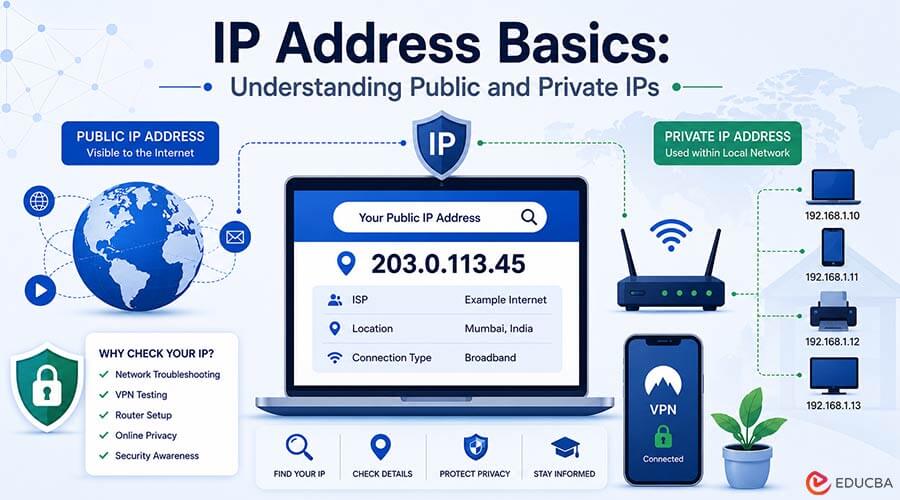
Every internet connection uses an IP address. Understanding IP Address Basics helps users learn how websites, apps, emails, video calls, and online services communicate through networks. Still, many people only hear about IP addresses when they are troubleshooting a network problem, checking a VPN, setting up a router, or learning cybersecurity basics.
For beginners, the first question is usually simple: what is my IP address, and why does it matter?
Quick Answer
As part of learning IP Address Basics, an IP address is a unique set of numbers assigned to a device or network, allowing it to connect and communicate over the internet or a local network. It helps data travel to the correct destination. It helps data reach the correct destination.
When you open a website, your device sends a request. The website sends the response back through your IP address. Without IP addresses, online services would not know where to deliver information.
A common beginner task is learning how to find my IP address. Online IP lookup tools allow users to quickly check their public IP address and provide useful information, including the internet service provider (ISP), approximate location, VPN status, and other network-related details.
IP Address Basics: Public IP vs. Private IP
Before checking an IP address, it helps to understand that there are two common types.
A public IP address is the address websites and online services see when your network connects to the internet. Your internet service provider, mobile carrier, company network, or VPN provider usually assigns this address.
A private IP address is used inside a local network. Your phone, laptop, printer, router, smart TV, or office computer may each have a private IP address. These addresses help devices communicate inside the same home, office, or school network.
For example, your laptop may have a private IP address inside your home Wi-Fi network, but websites usually see the public IP address assigned to your router.
Why People Check Their IP Address?
People check their IP address for many practical reasons.
A remote worker may want to confirm which network they are using. A student may be learning the basics of networking. A gamer may be troubleshooting connection issues. A small business owner may be checking firewall or access settings. A traveler may want to know whether a VPN is working.
Checking your IP address can help with:
- Network troubleshooting
- VPN testing
- Router setup
- Remote work access
- Website security checks
- Understanding public vs. private networks
- Basic cybersecurity learning
It is a simple step, but it can explain a lot about how your device appears online.
What an IP Address Can Reveal
A public IP address can often show general network information. This may include the internet service provider, the approximate city or region, the country, and the type of connection.
However, an IP address does not usually reveal your exact home address. IP location is often approximate. It may show where an internet provider routes traffic, not where a person is physically sitting.
This is an important privacy point. An IP address can provide useful technical context, but it should not be treated as a complete identity.
How to Find Your Public IP Address?
The easiest way to find your public IP address is by using an IP lookup page. This displays the address that websites can usually see when you connect to the internet.
You can also check your IP address through a web search or network utilities, but an online IP lookup tool is often the simplest option for beginners.
After checking your public IP address, you may also find additional details such as:
- Internet Service Provider (ISP)
- Approximate location
- Whether the address is associated with a VPN, proxy, mobile carrier, or data center
How to Find Your Private IP Address?
Finding your private IP address depends on the device you are using.
On Windows:
Users can open Command Prompt and run the ipconfig command to view their network information.
On macOS:
Users can open System Settings, select the active network, and view their IP details.
On Mobile Devices:
On many phones, the private IP address can be found under Wi-Fi network details.
A private IP address is useful for local troubleshooting, such as setting up devices, checking router connections, or diagnosing network issues.
What Happens When You Use a VPN?
A VPN can change the public IP address that websites see. Instead of seeing the IP address assigned by your internet provider, websites may see the IP address of the VPN server.
This can help reduce direct exposure of your home or mobile network IP address. It can also add privacy on public Wi-Fi.
But a VPN does not make someone fully anonymous. Websites may still recognize users through account logins, cookies, browser fingerprinting, device identifiers, or app permissions.
Common Beginner Mistakes
- The first mistake is confusing public and private IP addresses. Changing a private IP address on your laptop usually does not change the public IP address that websites see.
- The second mistake is thinking an IP address reveals an exact street address. In most cases, it does not.
- The third mistake is assuming a VPN solves all privacy issues. A VPN changes one important network signal, but it does not eliminate all forms of tracking.
- The fourth mistake is ignoring mobile networks. A phone may use different IP addresses when switching between Wi-Fi and mobile data.
Final Thoughts
Learning IP Address Basics and knowing how to find an IP address are among the simplest ways to understand how internet connections work. It helps explain networking, VPNs, routers, public Wi-Fi, cybersecurity alerts, and online privacy.
For beginners, the key is knowing which IP address you are checking. A public IP shows how your network appears to websites. A private IP helps devices communicate inside your local network.
An IP address is not your full identity, but it is an important part of your digital connection. Understanding it makes everyday troubleshooting easier and helps users make smarter privacy decisions online.
Recommended Articles
We hope this guide on IP Address Basics helps you understand how IP addresses work, how to find them, and why they matter for networking and online privacy. Explore these recommended articles for additional insights into networking, cybersecurity, and internet technologies.


