


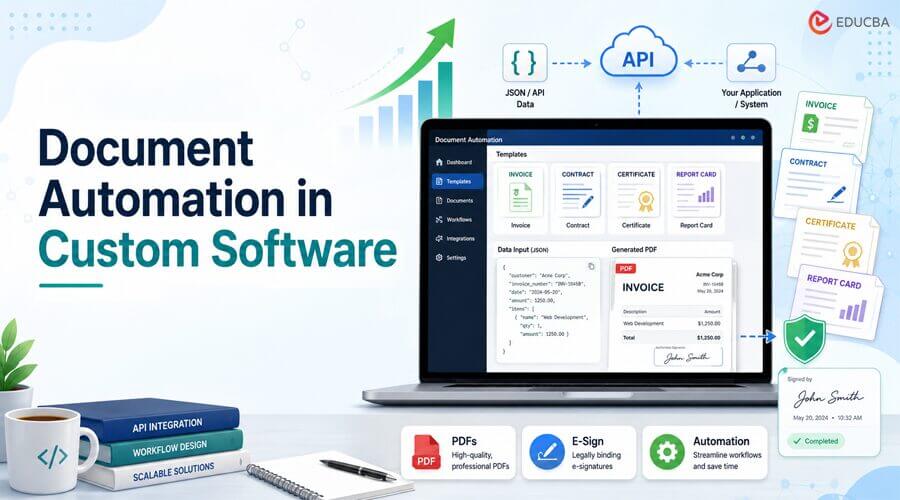
Every Document Automation in custom software build eventually runs into the same requirement: someone needs a PDF. An invoice for the billing module. A certificate for the LMS. A packing slip for the logistics dashboard. A lease agreement for the property platform. A service contract for the client portal. It looks like a small ticket. It rarely stays one.
Why Document Automation in Custom Software Matters?
Teams usually reach for the fastest option available in their stack – wkhtmltopdf, a headless Chrome instance, a PDF library bolted onto the backend. It works for the first template. Then the second template needs a different layout, and a table splits across a page break in the wrong place. The third needs conditional line items and locale-specific currency formatting the library does not handle out of the box. By the fifth template, someone on the team is maintaining a small internal rendering engine that was never scoped as its own project.
None of this is really wrong – it is just expensive in the wrong place. Document rendering, font embedding, and page-layout math are not the part of a healthcare platform, a construction management tool, or a logistics system that a client is paying for. It is infrastructure sitting underneath the product, not the product itself, and it keeps drawing engineering time long after the “PDF export” ticket was closed.
The teams that stop rebuilding this on every project converge on the same pattern: design the template once, keep it out of the codebase, and generate documents through an API call that any backend – .NET, Node, PHP, Python, whatever the stack happens to be – can trigger from existing application logic.
Key Features Supporting Document Automation in Custom Software
The pattern itself is simple. A template – text blocks, tables, charts, barcodes, QR codes – is designed visually and mapped to a JSON schema. The application sends data matching that schema to an API endpoint; the service renders the PDF or image and returns it. Nothing about the document’s layout lives in application code, which means a template change is a design change, not a deploy.
CraftMyPDF is one platform built around this pattern, and it is a useful reference point because it is aimed at production use rather than one-off document generation:
- A drag-and-drop editor that is not developer-gated: Once a template is wired to a JSON schema, someone in ops, finance, or client success can update copy, branding, or layout without opening a pull request.
- Expression-based formatting: Currency, date, and number formatting, plus conditional logic, live inside the template as JavaScript-style expressions – {{ format(data.total_amount, “number”, “$0,0.00”) }} – instead of being hard-coded per document type.
- Regional endpoints: Teams shipping to clients across regions, which is close to a default state for outsourced and offshore development work, can generate and store documents through US, EU, Singapore, or Australia endpoints when a contract requires data residency.
- SOC 2 Type II compliance: Which shortens the security-review conversation on fintech, healthcare, or enterprise engagements.
A basic generation call looks like this:
curl -X POST “https://api.craftmypdf.com/v1/create” \
-H “Content-Type: application/json” \
-H “X-API-KEY: YOUR_API_KEY” \
-d ‘{
“template_id”: “YOUR_TEMPLATE_ID”,
“export_type”: “json”,
“data”: {
“client_name”: “Acme Logistics”,
“invoice_number”: “INV-2026-0113”,
“due_date”: “2026-08-15”,
“total_amount”: 4280.00
}
}’
One endpoint, one payload, and the PDF generation API handles rendering, formatting, and delivery. Nothing about that call changes whether the document is generating an invoice, a certificate, or a packing slip only the template and the JSON shape do.
The Part Most Document Automation Stops Short Of
Generating the PDF is usually only half the workflow. A service agreement, an onboarding packet, a lease, a vendor contract – none of these are done when they are rendered. They are done when someone signs them. Automated systems often fall back to manual tasks: generating PDFs, emailing them, tracking responses, and chasing signatures.
For a construction platform tracking subcontractor agreements, or a fintech onboarding flow that requires a signed disclosure before an account is activated, that manual gap undoes a good chunk of the time saved by automating the generation in the first place. CraftMyPDF added e-signature workflow automation through Documenso, supporting ESIGN Act, UETA, and eIDAS compliance. It fits into the same template-and-generate workflow instead of needing a separate vendor integration.
E-Signature Capabilities That Enhance Document Automation in Custom Software
- Place the signature, name, and date fields on the template and assign them to specific recipients, just like any other dynamic field.
- Recipients can be signers, approvers, viewers, CC’d, or an assistant role that pre-fills fields ahead of a signer in a sequential chain.
- Signing can run parallel (every recipient gets it at once) or sequential (one recipient at a time, useful for approval chains).
- The same API call that generates the PDF also creates the signing envelope and emails recipients their signing links – there is no separate “now call the e-sign API” step to wire up.
- Document status moves through a trackable lifecycle – queued, sent, completed, rejected, expired – visible from a dashboard rather than an inbox someone has to babysit.
For a custom build, that collapses two vendor integrations into one. Instead of using a PDF library and a separate e-signature API connected with webhooks, template design, data mapping, document creation, and signing all work through one system and one set of login details.
Where This Actually Shows Up on a Roadmap?
Mapped against the kind of work that lands on a software development backlog, the pattern covers more ground than it looks like at first:
- Client portals and SaaS dashboards: Invoices, statements, and usage reports created when needed instead of made in advance and stored.
- Real estate and property platforms: lease agreements and disclosures that need a signature before a listing can move to the next stage
- Construction and field service tools: service agreements, purchase orders, and inspection certificates tied to a project record
- Fintech and healthcare onboarding: Generate consent forms and disclosures dynamically and obtain legal signatures before an account or case can proceed.
- Education and training platforms: completion certificates issued automatically the moment a course or module closes out
In each case, the alternative is the same developer maintaining a rendering pipeline as a side project to the actual product, with a separate manual or semi-automated process for anything that requires a signature.
A Note for Teams Building on Behalf of Clients
For an agency shipping this inside a client’s product rather than an internal tool, the branding question comes up almost immediately – a client generally does not want their contracts or invoices going out under a vendor’s name. CraftMyPDF offers a white-label template editor, so the design surface and the generated documents themselves can carry the client’s own branding rather than the platform’s, which matters when the deliverable is going out under someone else’s name.
The Build-vs-Buy Math is Usually Simple
Document rendering and e-signature compliance are both deep enough as problems that owning them in-house is a real, ongoing cost: page-layout edge cases, font licensing, PDF/A compliance, ESIGN/UETA handling, envelope tracking, retry logic for failed sends. Most teams do not differentiate the client’s product with any of it. They are better off treating this dependency as infrastructure and buying it, just as few teams build their own payment processor or email deliverability layer from scratch.
For teams evaluating Document Automation in Custom Software for an upcoming project, CraftMyPDF’s free plan includes 50 PDF or image generation requests per month, with no credit card required. It provides enough capacity to connect a template, test APIs, and evaluate e-signature workflows before production.
Final Thoughts
As software platforms become increasingly document-driven, Document Automation in Custom Software offers a practical way to reduce development overhead, improve operational efficiency, and streamline document workflows. By separating template management from application code and combining document generation with e-signature automation, teams can focus engineering resources on product features that deliver direct value to customers instead of maintaining complex document infrastructure.
Author: Jacky Tan
Jacky Tan is part of the team behind CraftMyPDF, a template-based PDF and image generation API that developers use to automate invoices, contracts, reports, and – most recently – e-signature workflows.
Recommended Articles
We hope this guide helps you understand how document automation in custom software accelerates PDF generation, e-signatures, and workflow efficiency while reducing development overhead. Explore these recommended articles for more insights into API integration, business process automation, digital document management, e-signature solutions, and custom software development.

