


What is Buffering?
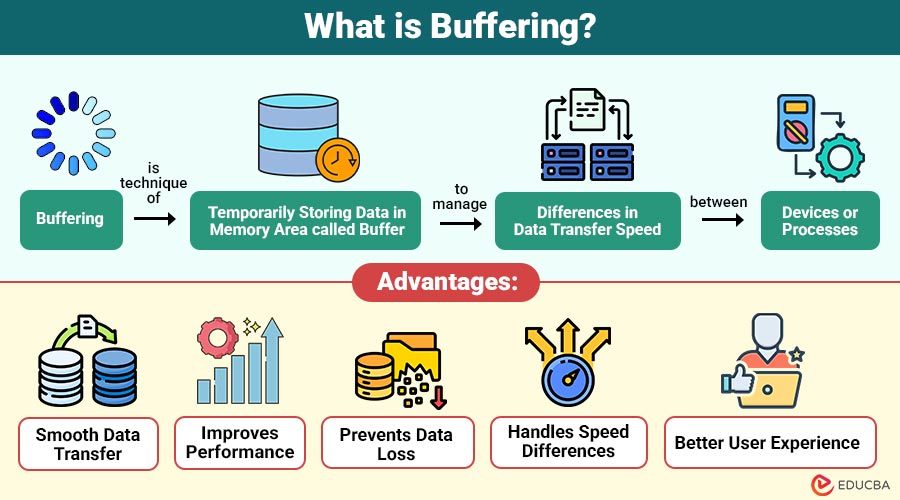
Buffering is a technique of temporarily storing data in a memory area called a buffer to manage differences in data transfer speed between devices or processes.
A buffer is a small portion of RAM (Random Access Memory) used to hold data while it is being moved from one place to another. Buffering ensures that the receiving device gets data at a steady rate, even if the sending device is slower or faster.
Table of Contents:
- Meaning
- Why is Buffering Needed?
- Working
- Types
- Advantages
- Disadvantages
- Buffer Overflow and Underflow
- Real-World Uses
- When Does Buffering Happen?
- How to Reduce Buffering?
Key Takeaways:
- Buffering temporarily stores data in memory to maintain smooth communication between devices working at different processing or transfer speeds.
- It helps prevent interruptions, data loss, and performance issues by ensuring continuous data flow during processing, streaming, or file transfer operations.
- Although it improves efficiency, excessive buffering can cause delays, memory usage, overflow, underflow, and a slower system response.
- Problems usually occur due to slow internet, large files, an overloaded CPU, or insufficient memory but can be reduced with proper system optimization.
Why is Buffering Needed?
Here are the main reasons why it is required in computer systems and applications:
1. To Manage Speed Differences
Different devices operate at different speeds, so it stores data temporarily to enable smooth communication between fast and slow components.
2. To Ensure Continuous Data Flow
Prevents interruptions by keeping data ready in memory, allowing programs, videos, and audio streams to run smoothly without stopping.
3. To Improve System Performance
By reducing direct input and output operations, it helps programs process data faster and improves overall system efficiency.
4. To Prevent Data Loss
Temporary storage keeps data safe until it is processed, reducing the risk of losing information during transfer between devices or programs.
5. To Support Streaming and Multimedia
Essential in video, audio, and gaming applications because it preloads data, preventing lag, pauses, or playback interruptions.
How Does Buffering Work?
It works by storing data in temporary memory before it is processed.
1. Data is Received from the Source
Data is first received from the source device, server, or application and prepared for temporary storage before processing.
2. Data is Stored in Buffer Memory
The received data is placed in a temporary buffer, where it waits before being processed or transferred.
3. Data is Sent to the Destination when Ready
When the receiving system is ready, buffered data is gradually transferred to the destination for processing or display.
4. Process Continues until Complete
This cycle repeats continuously until all data is successfully transferred, processed, and delivered to the destination system.
Example (Video Streaming):
- Video Downloads Partially: When video starts streaming, a portion of the video file is downloaded first, rather than the entire file.
- Data Stored in Buffer: The downloaded video data is stored in buffer memory so that the media player can access it smoothly during playback.
- Player Reads from Buffer: The video player reads small portions of data from the buffer continuously, rather than requesting it directly from the server.
- Video Plays Smoothly: Since the data is already stored in the buffer, the video plays continuously without interruption, even if the network slows down.
Types of Buffering
Here are the main types used to improve data processing, performance, and smooth communication between devices.
1. Single Buffering
It is a technique that uses a single memory buffer to temporarily store data before processing, with reading and writing operations alternating within the same buffer.
How it Works:
- Data is stored in one buffer
- The program reads data from the same buffer
- After reading, new data is stored
Used in:
- Simple programs
- Basic input/output operations
- Low-memory systems
2. Double Buffering
It is a method that uses two separate buffers: one stores incoming data while the other sends data for processing, improving performance and speed.
How it Works:
- One buffer stores data
- The other buffers send data
- Buffers switch roles
Used in:
- Graphics systems
- Video playback
- Gaming applications
3. Circular Buffering
It is a technique that uses a fixed-size buffer in a loop, where data is continuously written, and when full, new data overwrites the oldest stored data.
How it Works:
- Data written at the end
- After full, start from the beginning
- Old data replaced
Used in:
- Audio streaming
- Network systems
- Embedded systems
4. Disk Buffering
It is a method of temporarily storing data in memory before writing it to disk, reducing disk access time and improving overall system performance and efficiency.
How it Works:
- Data stored in the memory buffer
- The buffer collects data
- Written to disk together
Used in:
- File copy
- File download
- Database systems
5. Network Buffering
It is the process of temporarily storing data before sending or receiving over a network, helping to handle slow connections, prevent data loss, and ensure smooth communication.
How it Works:
- Data received from the network
- Stored in buffer
- Sent when ready
Used in:
- Video streaming
- Online gaming
- File transfer
6. Video Buffering
It is a process of temporarily storing data before sending or receiving over a network, helping to handle slow connections, prevent data loss, and ensure smooth communication.
How it Works:
- Video downloaded partially
- Stored in buffer
- The player reads from the buffer
Used in:
- YouTube
- Netflix
- Online classes
Advantages of Buffering
Here are the main advantages that help improve data transfer, system performance, and user experience.
1. Smooth Data Transfer
Temporarily stores data to maintain continuous data flow and prevent interruptions during communication between devices and programs.
2. Improves Performance
Temporary storage in memory reduces waiting time for input and output operations, helping programs run faster and more efficiently.
3. Prevents Data Loss
Holds data until processing completes, reducing the chances of missing, corrupted, or lost information during transfer operations.
4. Handles Speed Differences
Allows fast and slow devices to work together by storing data temporarily until the receiving device is ready.
5. Better User Experience
Preloads data for streaming and gaming, reducing lag, pauses, and interruptions, ensuring smooth, continuous user interaction.
Disadvantages of Buffering
Here are the main disadvantages that can affect system performance, memory usage, and processing efficiency.
1. Uses Extra Memory
Requires additional RAM space for temporary storage, which can increase memory usage and reduce available system resources for other tasks.
2. Delay at Start
May cause an initial waiting time before playback or processing starts, as data must be loaded into memory first.
3. Complex Implementation
Some techniques require careful design and management, making implementation complex, especially in systems that handle large amounts of data or process data in real time.
4. Overflow Problems
If the buffer becomes full and new data arrives, an overflow may occur, causing data loss or errors during transmission or processing.
5. Underflow Problems
If the buffer becomes empty while data is needed, underflow occurs, causing pauses, interruptions, or system slowdown during processing or playback.
Buffer Overflow and Underflow
These problems occur when buffer memory does not contain sufficient data, leading to errors, interruptions, or performance issues during processing.
Buffer Overflow
A buffer overflow occurs when a buffer’s memory capacity is exceeded, and additional data continues to arrive, causing data overwriting, errors, or unexpected program behavior.
Problems:
- Data loss
- Program crash
- Security issues
Buffer Underflow
Buffer underflow occurs when the buffer is empty, but the system still needs data, causing an interruption because the required data is unavailable for processing.
Problems:
- The video stops
- Audio breaks
- Slow performance
Real-World Uses
Here are some common real-world uses of buffering, which temporarily store data to ensure smooth processing and better performance.
1. Video Streaming
Video streaming services use buffering to temporarily store video data, allowing smooth playback without interruption, even when the internet speed slows or becomes unstable.
2. Audio Playback
Audio players use buffering to store sound data in advance, preventing audio drops and ensuring continuous music playback even if the system slows down.
3. Keyboard Input
When you type quickly, the keyboard buffer temporarily stores characters before processing, guaranteeing that you don’t lose any keystrokes even when the computer processes input slowly.
4. Printer Spooling
Printer spooling uses it to store print data in memory before printing, allowing the computer to continue working while the printer prints documents.
5. File Transfer
During file transfer, it temporarily stores data before sending or receiving, helping maintain steady transfer speeds and preventing errors caused by slow connections.
When Does Buffering Happen?
It occurs when data cannot be processed at the same rate at which it is received or sent.
1. Internet is Slow
When the internet speed is low, data arrives slowly, so it stores data temporarily to allow smooth playback without interruption.
2. File is Large
Large files take longer to load, so it stores parts of them in memory to enable gradual processing and smooth use.
3. Device Speed is Different
When sending and receiving devices operate at different speeds, it helps balance data flow by temporarily storing data until the slower device is ready.
4. Network Busy
When many users use the network at the same time, data transfer slows down, so it helps store data until it can be processed properly.
5. CPU Overloaded
When the CPU is handling many tasks, it cannot process data immediately, so it stores data temporarily until the processor becomes available.
How to Reduce Buffering?
Here are some common ways to reduce and improve performance while streaming, downloading, gaming, or using online applications.
1. Use Fast Internet
Using a high-speed internet connection helps data load faster, reducing wait times and preventing interruptions during streaming, downloading, or online gaming.
2. Close Background Apps
Closing unnecessary background applications frees up memory and CPU, allowing the system to process data faster and reducing performance issues during heavy tasks or streaming.
3. Clear Cache
Clearing the cache removes temporary files that slow performance, helping applications run smoothly and reducing loading problems while browsing, watching videos, or using online services.
4. Reduce Video Quality
Lowering video resolution reduces the amount of data needed, allowing videos to load faster and play smoothly even when internet speed is slow or unstable.
5. Upgrade RAM
Increasing RAM improves system performance by allowing more data to be processed at once, reducing delays and helping prevent lag during multitasking or when running heavy applications.
6. Restart Device
Restarting the device clears temporary memory and stops unnecessary processes, helping the system run faster and reducing issues in apps, games, or streaming services.
7. Use Wired Connection
Using a wired internet connection provides more stable and faster data transfer than wireless, reducing interruptions, lag, and slow playback during streaming, gaming, or file downloads.
Final Thoughts
Buffering is an important technique in computers, networking, and multimedia systems to ensure smooth data transfer between devices operating at different speeds. By temporarily storing data in memory, it prevents interruptions, improves performance, and enhances the user experience. Although it may sometimes cause delays, it is essential for modern computing, especially in streaming, gaming, operating systems, and data communication.
Frequently Asked Questions (FAQs)
Q1. Why does buffering happen in videos?
Answer: Buffering happens when the internet speed is slower than video playback speed.
Q2. Is buffering good or bad?
Answer: Buffering is useful, but too much buffering causes delay.
Q3. What causes buffering?
Answer: Slow internet, low memory, large files, or high CPU usage.
Recommended Articles
We hope that this EDUCBA information on “Buffering” was beneficial to you. You can view EDUCBA’s recommended articles for more information.

