
What is CMMS (Computerized Maintenance Management System)?
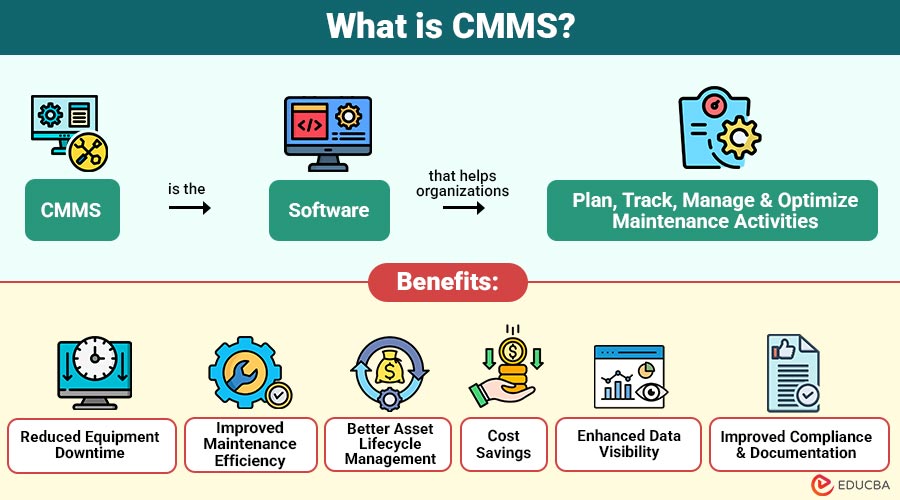
A CMMS is the software that helps organizations plan, track, manage, and optimize maintenance activities. It centralizes maintenance-related data, including equipment information, maintenance schedules, work orders, spare parts inventory software, and technician activities.
The primary goal of CMMS is to improve equipment reliability, reduce downtime, and increase maintenance efficiency by automating maintenance processes and providing real-time insights into asset performance.
Table of Contents:
Key Takeaways:
- CMMS centralizes maintenance data, helping organizations track assets, manage work orders, and improve operational efficiency.
- Automated maintenance scheduling in CMMS reduces equipment downtime, improves reliability, and extends asset lifecycles.
- It improves maintenance planning through reporting, analytics, and real-time insights into equipment performance and costs.
- Organizations across manufacturing, healthcare, and transportation use CMMS to streamline maintenance workflows and ensure compliance.
Key Components of CMMS
A CMMS typically consists of several modules that help organizations manage different aspects of maintenance operations.
1. Asset Management
Asset management is one of core functions of CMMS. It stores detailed information about equipment, machinery, and infrastructure, such as:
- Asset location
- Purchase details
- Maintenance history
- Warranty information
- Performance records
This helps maintenance teams monitor the lifecycle of assets and make informed decisions about repairs or replacements.
2. Work Order Management
CMMS enables organizations to create, assign, and track maintenance work orders. These work orders may include tasks such as equipment repairs, inspections, and preventive maintenance.
Work order management helps maintenance teams:
- Track task progress
- Assign responsibilities
- Maintain service records
- Improve workflow efficiency
3. Preventive Maintenance Scheduling
Preventive maintenance is essential for preventing equipment failures. It allows organizations to schedule routine maintenance tasks based on time intervals, usage, or performance metrics.
For example, machines can be scheduled for inspection every month or after a certain number of operating hours.
4. Inventory and Spare Parts Management
Maintenance operations require spare parts and tools. It helps track inventory levels, automatically reorder parts, and maintain records of spare parts usage.
This prevents delays caused by unavailable parts and reduces excess inventory costs.
5. Reporting and Analytics
Provides detailed reports and analytics related to maintenance activities, including:
- Equipment downtime reports
- Maintenance costs
- Technician performance
- Asset reliability metrics
These insights help organizations optimize maintenance strategies and improve operational efficiency.
How Does CMMS Work?
A CMMS collects and organizes maintenance data in a centralized system. The typical workflow involves the following steps:
1. Asset Data Entry
Organizations input asset details, including machine specifications, location, operational parameters, warranty information, and maintenance history, into the CMMS database.
2. Maintenance Scheduling
The system automatically schedules preventive maintenance tasks based on predefined intervals, usage data, equipment condition, and organizational maintenance policies.
3. Work Order Creation
When maintenance is required, the CMMS generates work orders detailing tasks, required resources, priority levels, and technician assignments.
4. Task Execution
Technicians perform assigned maintenance tasks, inspect equipment, repair faults, and update the work order status using the CMMS platform.
5. Data Recording and Analysis
The CMMS records maintenance activities, tracks performance metrics, and generates reports, helping managers evaluate asset reliability and maintenance efficiency.
Key Features of CMMS
Modern CMMS platforms offer a range of features to improve maintenance management.
1. Centralized Maintenance Database
Makes it simple to access and manage all maintenance-related data by storing it on a single platform.
2. Mobile Accessibility
Many CMMS solutions offer mobile apps that let technicians access work orders, update task statuses, and record maintenance activities in the field.
3. Automated Alerts and Notifications
The system sends alerts for upcoming maintenance tasks, equipment failures, or inventory shortages.
4. Compliance Management
Maintains maintenance records and audit trails to assist firms in adhering to industry laws.
5. Integration with Other Systems
Can integrate with enterprise systems such as ERP, IoT devices, and asset management systems to improve operational visibility.
Benefits of CMMS
Implementing a CMMS offers several advantages for organizations.
1. Reduced Equipment Downtime
Schedules preventive maintenance and monitors asset conditions, helping organizations detect issues early and minimize unexpected equipment failures and operational downtime.
2. Improved Maintenance Efficiency
Automated workflows, task assignments, and work order tracking help maintenance teams organize tasks efficiently and complete maintenance activities faster.
3. Better Asset Lifecycle Management
CMMS provides performance insights, maintenance history, and usage data, enabling organizations to extend equipment lifespan and optimize asset utilization.
4. Cost Savings
Preventive maintenance and better planning reduce emergency repairs, minimize downtime costs, and help organizations control overall maintenance expenses effectively.
5. Enhanced Data Visibility
Centralized maintenance data enables organizations to monitor equipment performance, analyze maintenance trends, and make more informed strategic operational decisions.
6. Improved Compliance and Documentation
Stores maintenance records, service logs, and inspection reports, helping organizations maintain proper documentation and meet industry regulatory compliance requirements.
Real-World Applications of CMMS
CMMS is widely used across various industries.
1. Manufacturing
Manufacturing companies use CMMS to monitor machinery, schedule preventive maintenance, reduce production downtime, and ensure consistent equipment performance.
2. Healthcare
Hospitals use CMMS to manage medical equipment maintenance, track service history, ensure safety compliance, and improve the reliability of critical healthcare devices.
3. Facility Management
Facility managers use CMMS to maintain HVAC systems, lighting, plumbing, elevators, and building infrastructure efficiently across offices, malls, and campuses.
4. Transportation and Logistics
Transportation companies use CMMS to manage fleet maintenance, track vehicle repairs, schedule inspections, and ensure operational safety and regulatory compliance.
5. Energy and Utilities
Energy companies use CMMS to maintain turbines, pipelines, generators, and electrical infrastructure, ensuring reliable power production and minimizing operational disruptions.
Limitations of CMMS
Despite its benefits, CMMS also has some limitations.
1. Implementation Costs
Initial CMMS implementation can be expensive due to software licensing, system customization, training programs, and integration with existing organizational systems.
2. Data Management Challenges
Incorrect, outdated, or incomplete data entry can reduce CMMS effectiveness, leading to inaccurate maintenance schedules and poor asset management decisions.
3. Training Requirements
Employees require proper training to understand CMMS features, workflows, and data entry processes, which may consume time and organizational resources.
4. Resistance to Change
Some employees may resist adopting CMMS because they prefer traditional maintenance methods and may feel uncomfortable using new digital systems.
5. System Integration Issues
It might be difficult and need technical know-how to integrate CMMS with current enterprise systems, such as asset management platforms or ERP.
Final Thoughts
CMMS helps organizations manage maintenance operations by centralizing data, automating workflows, and supporting preventive maintenance. It reduces equipment downtime, improves asset performance, and lowers operational costs. CMMS is widely utilized in a variety of industries, including manufacturing, healthcare, and transportation. Because of technology like artificial intelligence, cloud computing, and the Internet of Things, it is always changing.
Frequently Asked Questions (FAQs)
Q1. Who uses CMMS?
Answer: Maintenance managers, facility managers, technicians, and operations teams use CMMS to plan, track, and manage maintenance activities.
Q2. Is CMMS suitable for small businesses?
Answer: Yes, Many cloud-based CMMS solutions are scalable and reasonably priced, which makes them appropriate for small and medium-sized enterprises.
Q3. Can CMMS support predictive maintenance?
Answer: Yes, modern CMMS systems can integrate with IoT sensors and analytics tools to enable predictive maintenance strategies.
Q4. How long does it take to implement a CMMS?
Answer: CMMS implementation time varies by organization size and complexity. Small businesses may deploy it in a few weeks, while large enterprises may take several months.
Recommended Articles
We hope that this EDUCBA information on “CMMS” was beneficial to you. You can view EDUCBA’s recommended articles for more information.

