
Updated February 21, 2026
What is Data Archiving?
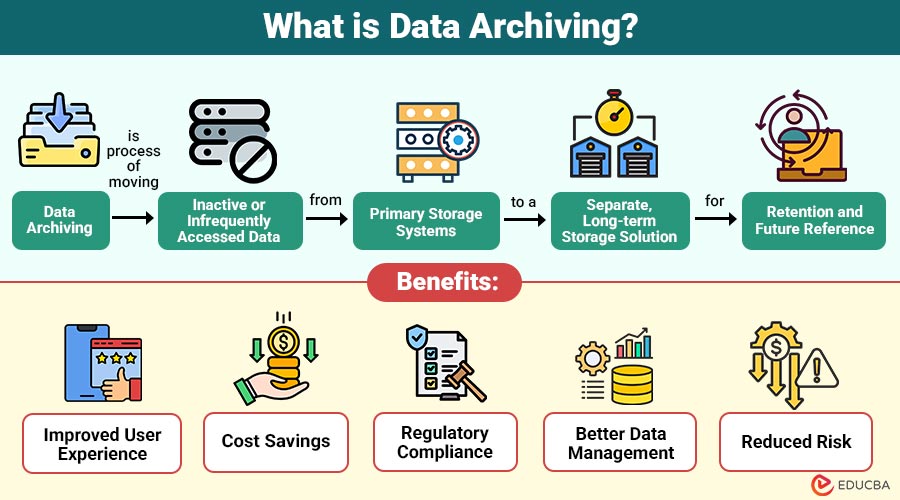
Data archiving is process of moving inactive or infrequently accessed data from primary storage systems to a separate, long-term storage solution for retention and future reference.
Unlike backups, which are primarily created for disaster recovery, archived data is stored for long-term preservation, compliance, or historical purposes. Archived data is typically indexed and searchable, allowing organizations to retrieve specific records when needed.
Table of Contents:
- Meaning
- Importance
- Types
- Key Characteristics
- Benefits
- Challenges
- Process
- Difference
- Real-World Examples
- Best Practices
Key Takeaways:
- Data archiving optimizes storage by moving inactive data to low-cost systems without sacrificing long-term accessibility.
- Effective archiving improves application performance, reduces costs, and supports compliance through structured retention policies governance.
- Archived data remains secure, searchable, and integrity-protected, enabling audits, analytics, and historical business insights decisions.
- Successful archiving requires clear policies, automation, encryption, and regular audits aligned with regulations globally.
Why is Data Archiving Important?
Organizations adopt data archiving for several strategic reasons:
1. To Improve Application Performance
Archiving inactive data reduces database size, enabling faster queries, improved response times, and smoother performance for active business applications.
2. To Reduce Storage Costs
Storing data that’s rarely used in cheaper archive storage reduces the cost of main storage and saves money on overall IT expenses.
3. To Meet Regulatory Compliance Requirements
Ensures long-term retention, secure storage, and easy retrieval of records that comply with legal, regulatory, and industry standards.
4. To Enhance Data Governance
Archiving supports structured data management, clear retention policies, access controls, and accountability throughout the data lifecycle.
5. To Maintain Historical Records
Archived data preserves organizational history, enabling trend analysis, audits, investigations, and strategic decision-making using past information.
Types of Data Archiving
Below are the common types organizations use to store, manage, and protect data based on cost, compliance, and accessibility needs.
1. On-Premises Archiving
Data is stored in physical storage systems located within the organization’s infrastructure. This method offers high control but requires hardware maintenance and capital investment.
2. Cloud-Based Archiving
Cloud archiving stores data in online services like Amazon Web Services or Microsoft Azure, letting you easily expand storage, save money, and access data from anywhere.
3. Hybrid Archiving
A combination of on-premises and cloud storage. Organizations maintain sensitive data locally while moving less critical archives to the cloud.
4. Email Archiving
Email archiving safely keeps old emails so companies can follow rules and provide records when needed. It’s common in industries like finance and healthcare.
Key Characteristics of Data Archiving
Below are the essential characteristics that define and distinguish it from active data storage and backup solutions.
1. Long-Term Retention
Archived data is stored securely for extended periods, aligned with organizational policies, business needs, and regulatory retention requirements.
2. Searchability
Archived data remains indexed and searchable, allowing authorized users to retrieve specific records quickly when required for audits or analysis.
3. Compliance-Oriented
Supports legal, regulatory, and industry compliance by enforcing retention schedules, access controls, and audit-ready record management.
4. Cost Optimization
Archiving inactive data to lower-cost storage tiers reduces primary storage expenses while maintaining accessibility when needed.
5. Data Integrity
Archived data is protected against alteration through encryption, checksums, and access controls, ensuring authenticity, reliability, and long-term trustworthiness.
Benefits of Data Archiving
Below are the key benefits that help organizations improve performance, reduce costs, and ensure compliance while managing growing data volumes effectively.
1. Improved System Performance
Deleting old or unused data makes databases smaller, speeds up searches, makes apps run faster, and keeps the system stable and efficient.
2. Cost Savings
Using lower-cost archival storage significantly reduces primary storage demand, infrastructure spending, maintenance overheads, and long-term operational expenses budgets.
3. Regulatory Compliance
Archiving preserves historical records to satisfy GDPR, HIPAA, and financial regulations, ensuring audit readiness, legal defensibility, and mandatory retention compliance.
4. Better Data Management
Separating active and inactive data improves organization, simplifies governance policies, enhances accessibility, and enables more efficient information lifecycle management practices.
5. Reduced Risk
Secure archiving minimizes accidental deletion, protects sensitive information, supports traceability, strengthens security controls, and significantly reduces operational and compliance risks.
Challenges of Data Archiving
Below are the common challenges organizations face when implementing and managing strategies effectively.
1. Data Classification Complexity
Determining archive candidates demands robust classification frameworks, accurate tagging, stakeholder alignment, and continuous governance across diverse data sources and enterprise-wide systems.
2. Retrieval Delays
Archived datasets often reside in cold storage, causing slower access times that can hinder urgent audits, investigations, or business decisions.
3. Security Concerns
Without strong encryption, access controls, and monitoring, archived information becomes vulnerable to breaches, insider misuse, and long-term exposure risks globally.
4. Compliance Mismanagement
Poorly defined retention schedules and enforcement failures may violate regulations, increase legal liability, trigger fines, and undermine audit defensibility requirements.
Data Archiving Process
A structured archiving process typically includes:
1. Data Identification
Organizations analyze usage patterns and business value to identify inactive data suitable for archiving without impacting daily operations.
2. Policy Definition
Throughout the data lifecycle, retention policies specify the duration of data storage, access permissions, compliance standards, and deletion guidelines.
3. Data Migration
Inactive data is securely transferred from primary systems to archival storage while preserving structure, integrity, and accessibility requirements.
4. Indexing and Metadata Creation
Archived data is indexed with metadata to enable efficient searching, retrieval, auditing, and contextual understanding when needed.
5. Monitoring and Maintenance
Organizations regularly review archived data, validate integrity, update policies, ensure compliance, and optimize storage usage over time.
Difference Between Data Archiving and Data Backup
The table below highlights the key differences in terms of purpose, storage, accessibility, retention, and cost.
| Aspect | Data Archiving | Data Backup |
| Purpose | Long-term storage of inactive data | Recovery after data loss |
| Accessibility | Occasionally accessed | Frequently restored in emergencies |
| Storage | Separate archival system | Backup storage system |
| Retention | Long-term retention policies | Short-term or scheduled cycles |
| Cost | Optimized for lower cost | It can be expensive for full copies |
Real-World Examples
Below are practical examples that illustrate how different industries use archiving to meet compliance, performance, and storage efficiency requirements.
1. Banking Industry
Banks archive transaction records older than five years to comply with financial regulations while maintaining quick audit access.
2. E-commerce Platforms
Online retailers archive old order histories to optimize database performance while preserving customer transaction data.
3. IT and SaaS Companies
Technology companies archive system logs and user activity data to efficiently manage storage.
Best Practices for Effective Data Archiving
Below are proven best practices for implementing secure, compliant, and efficient strategies.
1. Establish Clear Retention Policies
Set how long to keep each type of data so you follow the rules, avoid using too much storage, and manage data properly throughout its life.
2. Automate Archiving Processes
Automating archiving minimizes manual intervention, reduces errors, ensures consistency, and improves efficiency across large-scale enterprise data environments.
3. Encrypt Archived Data
Strong encryption protects data from hackers, stops unauthorized changes, and helps meet privacy rules.
4. Ensure Easy Retrieval
Data must remain searchable and accessible to authorized users for audits, investigations, analytics, and business continuity needs.
5. Regularly Audit Archive Systems
Periodic audits verify security controls, compliance, data integrity, and system performance while identifying gaps or areas for improvement.
6. Align with Regulatory Requirements
Knowing the rules for your industry helps make sure your data-keeping policies follow the law, keep required records, protect privacy, and pass audits.
Final Thoughts
Data archiving is a strategic approach to efficiently and cost-effectively manage growing data volumes. It improves system performance, supports regulatory compliance, lowers storage costs, and strengthens data governance. As data keeps growing, organized archiving is important for the long term. Using modern tools, clear rules, and cloud storage turns archiving into a smart business advantage.
Frequently Asked Questions (FAQs)
Q1. Is cloud archiving secure?
Answer: Yes, if encryption, access control, and compliance measures are properly implemented.
Q2. Can archived data be restored?
Answer: Yes. Archived data can be retrieved, although retrieval time may vary depending on storage type.
Q3. What types of data can be archived?
Answer: Emails, transaction records, documents, logs, multimedia files, and historical databases can all be archived.
Recommended Articles
We hope that this EDUCBA information on “Data Archiving” was beneficial to you. You can view EDUCBA’s recommended articles for more information.


