

Difference Between Mailbird vs Thunderbird
Mailbird vs Thunderbird will give out the similarities and differences by comparing its characteristics, specifications, advantages, and disadvantages. Mailbird is an email client for Windows 7, 8, and 10 desktops for sending and receiving emails, managing events, and contacts from other email providers like Outlook, Yahoo, Gmail, etc. Thunderbird is a free, open-source email client, news client, personal information manager, chat client, and RSS developed by Mozilla which allows users on Microsoft, MacOS, Windows, Linux, and other supported systems to send and receive emails. Here we shall compare Mailbird and Thunderbird and check out the similarities and key differences.
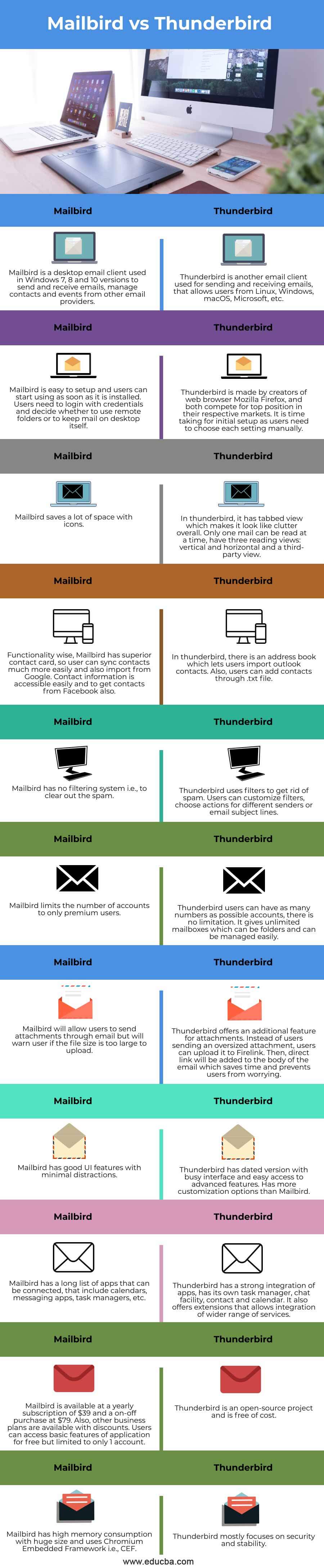
Head to Head Comparison Between Mailbird vs Thunderbird (Infographics)
Below are the top differences between Mailbird vs Thunderbird.
Key Differences of Mailbird vs Thunderbird
Apart from the differences listed in the comparison table, we still have some of the key similarities or points to be discussed on Mailbird and Thunderbird.
- Mailbird has a Pro version, in which there is an additional feature of Snooze emails. It will reschedule the mails using snooze option. Besides, Thunderbird does not have this feature.
- Mailbird has a free trial version, but users often get Ads to upgrade to a premium version whereas there are no Ads coming up on Thunderbird.
- Both of them have email clients and both have individual ups and downs.
- Both of them support shortcut keys. For e.g., C is for composing an email, and Space bar is for Quick View. Thunderbird takes a step back with the traditional form of shortcut keys by using CTRL pressed for every action.
- Thunderbird has terrible interaction with MacOS, for instance, drag and drop image option, which is a simple function but does not work with MacOS.
- Interface of Thunderbird is much more outdated, similar to Windows XP.
- In Thunderbird, subject lines can sporadically disappear from the list of emails.
- In some cases, clicking on subject line of emails can bring up the wrong email which is a serious bug in Thunderbird.
- Mailbird has an option of speed reader, i.e., it lets user select the speed at which user wants to read the mail.
- Mailbird supports almost 17 languages all over the world which are majorly spoken.
- Mailbird has an Undo option i.e., user can quickly undo any mail if any unintended mail is sent.
- Mailbird also has a Video conferencing option to conduct remote meetings and also an option to quick preview the attachments.
- Thunderbird has the option to quick web search as Mozilla was the one which developed Thunderbird so users can search directly on the search bar available.
Comparison Table (Mailbird vs Thunderbird)
| Mailbird | Thunderbird |
| Mailbird is a desktop email client used in Windows 7, 8, and 10 versions to send and receive emails, manage contacts and events from other email providers. | Thunderbird is another email client used for sending and receiving emails, that allows users from Linux, Windows, macOS, Microsoft, etc. |
| Mailbird is easy to set up and users can start using as soon as it is installed. Users need to login with credentials and decide whether to use remote folders or to keep mail on desktop itself. | Thunderbird is made by creators of the web browser Mozilla Firefox, and both compete for a top position in their respective markets. It is time taking for initial setup as users need to choose each setting manually. |
| Mailbird saves a lot of space with icons. | In thunderbird, it has a tabbed view which makes it look like clutter overall. Only one mail can be read at a time, have three reading views: vertical and horizontal, and a third-party view. |
| Functionality wise, Mailbird has a superior contact card, so users can sync contacts much more easily and also import from Google. Contact information is accessible easily and to get contacts from Facebook also. | In thunderbird, there is an address book which lets users import outlook contacts. Also, users can add contacts through .txt file. |
| Mailbird has no filtering system i.e., to clear out the spam. | Thunderbird uses filters to get rid of spam. Users can customize filters, choose actions for different senders or email subject lines. |
| Mailbird limits the number of accounts to only premium users. | Thunderbird users can have as many numbers as possible accounts, there is no limitation. It gives unlimited mailboxes which can be folders and can be managed easily. |
| Mailbird will allow users to send attachments through email but will warn user if the file size is too large to upload. | Thunderbird offers an additional feature for attachments. Instead of users sending an oversized attachment, users can upload it to Firelink. Then, direct link will be added to the body of the email which saves time and prevents users from worrying. |
| Mailbird has good UI features with minimal distractions | Thunderbird has dated version with busy interface and easy access to advanced features. Has more customization options than Mailbird. |
| Mailbird has a long list of apps that can be connected, that include calendars, messaging apps, task managers, etc. | Thunderbird has a strong integration of apps, has its own task manager, chat facility, contact, and calendar. It also offers extensions that allow integration of a wider range of services. |
| Mailbird is available at a yearly subscription of $39 and an on-off purchase at $79. Also, other business plans are available with discounts. Users can access basic features of the application for free but limited to only 1 account. | Thunderbird is an open-source project and is free of cost. |
| Mailbird has high memory consumption with huge size and uses Chromium Embedded Framework i.e., CEF. | Thunderbird mostly focuses on security and stability. |
Conclusion
With this, we shall conclude the topic “Mailbird vs Thunderbird”. We have seen what Mailbird, and Thunderbird are and had a walkthrough of their features, similarities, differences, and characteristics both. We have also compared Mailbird with Thunderbird in every aspect and have listed out the key features of each, along with some uses, advantages, and disadvantages. However, based on all the above points, Thunderbird is the one that is advantageous compared to Mailbird in many aspects. Selecting mail application among these two would purely be a user’s choice though. Thanks! Happy Learning!!
Recommended Articles
This is a guide to Mailbird vs Thunderbird. Here we discuss the Mailbird vs Thunderbird key differences with infographics and a comparison table. You may also have a look at the following articles to learn more –

