

Updated May 26, 2023

Matlab Index Exceeds Matrix Dimensions Error
In MATLAB, an ‘index exceeds matrix dimensions error’ is encountered when we try accessing an element in the array/matrix which is not in the index or not present in the array/matrix. The simple way to resolve this error is by ensuring that we are trying to access the element in the matrix or array. The array’s length should be greater than or equal to the index we call or attempt to access.
In the latest versions of MATLAB (Starting from R2018b), the error message is:
“Index exceeds the number of array elements.”
Syntax:
If A is an array, then we access any element of it using the below syntax:
E = A(n)Where ‘n’ is the element index we want to access.
If ‘n’ is greater than the number of elements in the array, then we get the index exceeds matrix dimensions’ error in the case of a matrix or the’ index exceeds the number of array elements’ error in the case of an array.
Examples of Matlab Index Exceeds Matrix Dimensions
Let us now understand how we get this error in MATLAB and how to resolve it.
Example #1
In the first example, we will create an array with five elements and try accessing the 7th element of this array (which does not exist). This will result in an index exceed dimensions error. The steps to be followed for this example are:
- Initialize the array
- Try accessing the element which is out of the index
Code:
A = [3, 5, 1, 7, 10]E = A(7)This is how our input and output will look in the Matlab command window:
Input:
A = [3, 5, 1, 7, 10]
E = A(7)
Output:
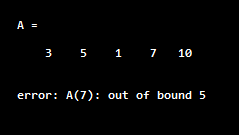
As we can see in the output, we got the error message since we are trying to access an element that does not exist in the array. To overcome this error, we must try accessing an element in the range, i.e., for E = A(n), ‘n’ must be less than or equal to 5.
Example #2
In this example, we will create a matrix of size 3 X 3 and try accessing an element in the 4th row (which does not exist). This will result in an index exceed dimensions error. The steps to be followed for this example are:
- Initialize the matrix
- Try accessing the element which is out of the index
Code:
A = [3, 5, 1; 7, 10, 5; 3, 6, 9]E = A(4, 2)This is how our input and output will look in the Matlab command window:
Input:
A = [3, 5, 1; 7, 10, 5; 3, 6, 9]
E = A(4, 2)
Output:
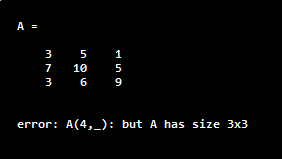
As we can see in the output, we got the error message since we are trying to access an element that does not exist in the matrix. To overcome this error, we must try accessing an element in the range, i.e., for E = A(m, n), ‘m’ and ‘n’ must be less than or equal to 3.
Example #3
In this example, we will create a matrix of size 4 X 4 and try accessing an element in the 5th column (which does not exist). This will result in an index exceed dimensions error. The steps to be followed for this example are:
- Initialize the matrix
- Try accessing the element which is out of the index
Code:
A = [3, 15, 10, 4; 4, 5, 8, 0; 13, 5, 7, 10; 3, 4, 1, 6]E = A(4, 5)This is how our input and output will look in the Matlab command window:
Input:
A = [3, 15, 10, 4; 4, 5, 8, 0; 13, 5, 7, 10; 3, 4, 1, 6]
E = A(4, 5)
Output:
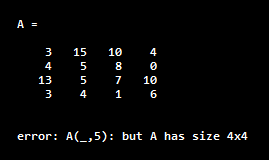
As we can see in the output, we got the error message since we are trying to access an element that does not exist in the matrix. To overcome this error, we must try accessing a part in the range, i.e., for E = A(m, n), ‘m’ and ‘n’ must be less than or equal to 4.
Conclusion
‘Index exceeds matrix dimensions error’ is encountered when we try accessing an element in the array or matrix which is not in the index or not present in the array/matrix. In the latest versions of MATLAB (Starting from R2018b), the error message is: “Index exceeds the number of array elements (n)”. We can resolve this error by ensuring that the index we are trying to access is within the range of the array or matrix.
Recommended Articles
We hope that this EDUCBA information on “Matlab Index Exceeds Matrix Dimensions” was beneficial to you. You can view EDUCBA’s recommended articles for more information.

