
Updated March 13, 2023

Introduction to Calling Functions in Matlab
Calling a function, also referred to as invoking a function, is used to pass the control of the program to the required function, which in turn performs defined tasks and returns the control of the program back to the main program if the return statement of this function is executed or if the function-ending brace is encountered. A function is called by simply passing the required arguments or parameters into the name of the function. In this topic, we are going to learn about Calling Functions in Matlab.
Below is the table showing some of the functions provided by MATLAB:
| Function | Details |
| 1. Remainder | Used to find the remainder of a division |
| 2. Integral | Used to integrate a function or symbolic expression |
| 3. Diff | Used to differentiate a function or symbolic expression |
| 4. Max | Used to find the maximum value |
| 5. Mean | Used to find average or mean |
Examples of Calling Functions in Matlab
Let us now understand the syntax to call the above functions in MATLAB:
Example #1
In this example, we will learn how to call the ‘remainder function’ in MATLAB.
Syntax:
A = rem(x, y)
Below are the steps to be followed:
- Initialize ‘Dividend’ and ‘Divisor’
- Pass the ‘Dividend’ and ‘Divisor’ as parameters to the rem function
Code:
x = 29

y = 5

A = rem(x, y)
Input:
x = 29
y = 5
A = rem(x, y)
Output:
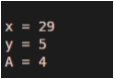
As we can see in the output, we have obtained the remainder of the input variables by calling the rem function.
Example #2
In this example, we will learn how to call ‘integral function’ in MATLAB.
Syntax:
A = integral(fx, min, max)
Below are the steps to be followed:
- Create the function to be integrated. for this example, we will take fx = x^4 * exp(-x) * cos(x) as our input function
- Pass the function along with the limits of integration as the parameters to the integral function
Code:
fx = @(x)x.^4.*exp(-x).*cos(x);

A = integral(fx, 0, Inf)
Input:
fx = @(x)x.^4.*exp(-x).*cos(x);
A = integral(fx, 0, Inf)
Output:
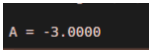
As we can see in the output, we have obtained the integral of the input function by calling the integral function.
Example #3
In this example, we will learn how to call the ‘max function’ in MATLAB.
Syntax:
A = max(Z)
Below are the steps to be followed:
- Initialize the array whose maximum value we need
- Pass the array as a parameter to the max function
Code:
Z = [2 5 8 1 10];

A = max(Z)
Input:
Z = [2 5 8 1 10];
A = max(Z)
Output:
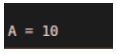
As we can see in the output, we have obtained the maximum number out of all the numbers present in the array by calling the max function.
Example #4
In this example, we will learn how to call ‘mean function’ in MATLAB.
Syntax:
A = mean(Z)
Below are the steps to be followed:
- Initialize the array whose mean value we need
- Pass the array as a parameter to the max function
Code:
Z = [2 0 8 11 10];

A = mean(Z)
Input:
Z = [2 0 8 11 10];
A = mean(Z)
Output:
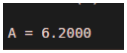
As we can see in the output, we have obtained the mean of the numbers present in the array by calling the mean function.
Conclusion
- ‘Calling a function’ passes the control of the program to the function
- A function is called by passing the parameters or arguments into the name of the function
- Once a function performs its defined tasks, the control of the program is passed back to the main program.
Recommended Articles
This is a guide to Calling Functions in Matlab. Here we discuss the Examples of Calling Functions in Matlab along with the codes, inputs, and outputs. You may also have a look at the following articles to learn more –

