

Updated May 11, 2023

Introduction to PostgreSQL Vacuum
In PostgreSQL, whenever we perform a delete operation or update the records that lead to obsolete dead tuple formation, then in reality, those records are not physically deleted and are still present in the memory and consume the space required by them. PostgreSQL reclaims storage space used by dead tuples only after performing VACUUM. VACUUM removes these tuples, freeing up space for other uses. It is recommended to execute VACUUM frequently, especially on tables that are frequently used and manipulated and where most of the operations occur.
If you perform a vacuum operation without specifying any parameters, the database will vacuum all tables if you are a superuser or only the tables that you have permission to vacuum if you are not a superuser. However, if you specify a table name as a parameter, only that table will be vacuumed.The vacuum is not present in SQL.
Along with vacuuming the database, it is common to also perform an analyze operation. Maintaining statistics requires analyzing the database and storing the results in the pg_statistic table.These statistics are essential for determining the most efficient execution plans for optimal performance. If you want to perform an analysis on specific columns, you can specify a list of columns to be analyzed. When you use the ‘analyze’ command with a list of columns as a parameter, only statistics for those columns will be collected.
Syntax and Parameters
Below are the syntax and parameters of PostgreSQL VACUUM:
Syntax:
VACUUM [({FULL | FREEZE | VERBOSE | ANALYZE}[, ...])] [tablename [(columnname [,...])]]
VACUUM [ FULL ] [ FREEZE ] [ VERBOSE ] [ tablename ]
VACUUM [ FULL ] [ FREEZE ] [ VERBOSE ] ANALYZE [ tablename [ (columnname [, ...] ) ] ]
Parameters:
Other parameters are specified in the vacuum method.
- Tablename: It is an optional parameter. It is the name of the table on which you want to perform a vacuum or analyze. The default value is all tables in the current database.
- Columnname: These are the names of columns for which you can perform vacuum and analyze and are optional. When no specific column name is specified, the default value analyzes all the columns of a table.
- FULL: This is the optional parameter which, when not specified, the vacuum done frees up space for some other users in the same table. A VACUUM operation allows reading and writing operations to continue on the table being vacuumed and does not impose any locks on the table. Nevertheless, the VACUUM operation does not immediately return the reclaimed space to the operating system.
When performing a FULL VACUUM operation on a table, the entire table becomes locked, which prevents any operations from being performed until the vacuum operation is complete. During a FULL VACUUM operation, the system rewrites the entire directory or file containing the table data to a new location, preserving only the saved changes. During a FULL VACUUM operation, the database permanently deletes dead tuples, resulting in more available space for the operating system compared to a non-full vacuum operation. Executing the analyze operation can be slow, and you should only perform it when there are no active operations being executed on the database. Scheduling vacuum operations at midnight when users are not accessing the system is a common recommendation. However, performing vacuum operations with the FULL option involves a high volume of I/O operations.So the user may find the application performance slower and cause problems while using the application. Therefore, it is not recommended to perform a FULL vacuum operation as a daily routine. In some special cases, such as when the operating system needs additional memory, performing a full vacuum can be beneficial because it reduces both the memory usage of the database and the memory occupied by frequently used or manipulated tables. - FREEZE: When the “freeze” option is specified, it aggressively freezes tuples in the table, which is equivalent in functionality to setting “vacuum_freeze_min_age” to zero.
- VERBOSE: The VERBOSE option can be used with the vacuum command to print information about the tables and vacuum-related details for all the tables for which the operation is being performed. If the VERBOSE option is not specified, the VACUUM operation only prints the names of the tables where it is being executed.
- ANALYZE: Updating the statistics in pg_statistic is necessary to build and use the most efficient execution strategies.
Examples of PostgreSQL Vacuum
Let us login using my Postgres user and then open my psql command-prompt using the following commands –
sudo su – postgresEnter the password of the superuser if you are logging in using the superuser. In my case, Postgres is my superuser.
psqlEnter the password if set by you while accessing the psql.
The output will be somewhat like the following if your default database is Postgres.
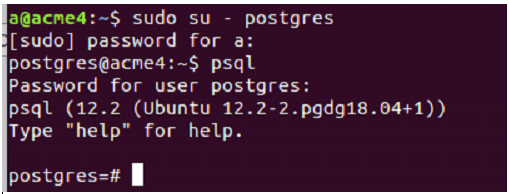
Let us see all the tables present in my postgres database using \dt command that results in the following output –
\dt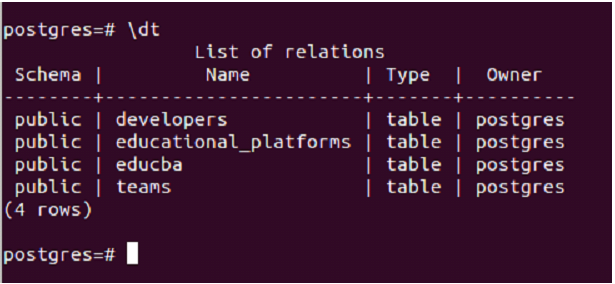
Now, suppose we want to perform a vacuum on the educba table and print all the vacuum operation related details in the report format then we will use the following command-prompt
VACUUM VERBOSE educba;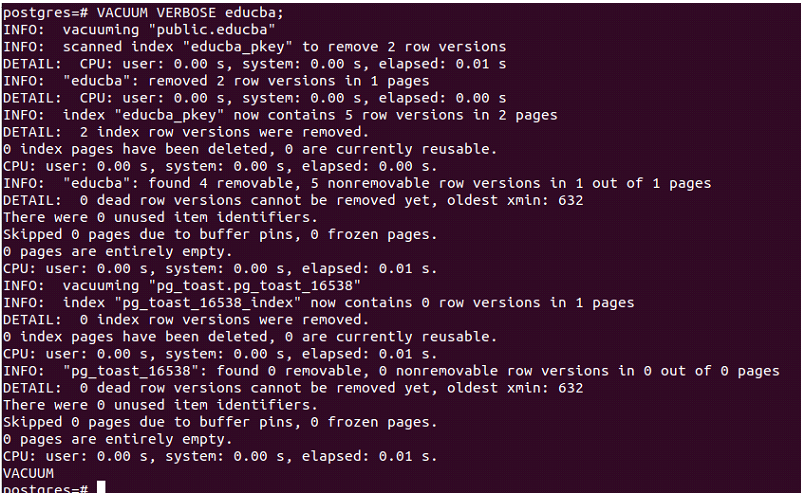
The code did not find a row that contains a dead tuple.As a result, the system displays the message “There were 0 unused item identifiers” along with other details, indicating that there are no dead rows.
Now, let us check the contents of the table educba using the following query statement –
select * from educba;
Now, we will delete the row with course_duration as 30 and technology_name as javascript using the following query statement –
delete from educba where course_duration=30;
As you can see, the statement successfully deleted one row. However, the deleted row remains in the physical memory until a vacuum operation is performed. Performing a VACUUM operation on the “educba” table will remove the tuple with “javascript” as the “technology_name” from the physical memory of the database, as it is dead and no longer in use. This will help to reclaim storage space that was previously occupied by this tuple. Performing the following query now results in the following output –
VACUUM VERBOSE educba;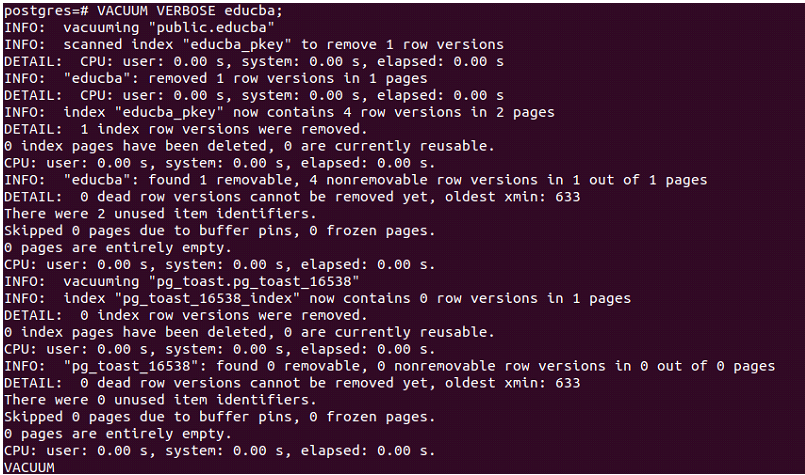
Now, it says it removed 1-row versions in 1 page that stands for dead tuple that we deleted. The VACUUM operation also displays other information related to its execution.
Recommended Articles
We hope that this EDUCBA information on “PostgreSQL Vacuum” was beneficial to you. You can view EDUCBA’s recommended articles for more information.

