

Updated May 3, 2023
Introduction to PostgreSQL Triggers
PostgreSQL Triggers will be associated with a specific view or table; it will execute with a specified function when a specific event occurs. Utilizing events, a PostgreSQL trigger executes particular events at a predetermined time. PostgreSQL trigger will invoke automatically when any event (Insert, Update, or delete) occurs on a table or views. To create a new trigger in PostgreSQL, we need to define the trigger function first, and then bind this trigger function to the specified table.
A specific event triggers a PostgreSQL trigger automatically, whereas a user-defined function does not have this automatic triggering capability.
Syntax and Parameters of PostgreSQL trigger
You use the “CREATE TRIGGER” statement to create a new trigger in PostgreSQL. The trigger will occur when any particular event occurs on a table or view.
Syntax
CREATE [ CONSTRAINT ] TRIGGER name(must be distinct of any other trigger in same table) { BEFORE | AFTER | INSTEAD OF } { event (Event Name)[ OR ... ] }
ON table (Table_name)
[FROM referenced_table_name]
[NOT DEFERRABLE | [DEFERRABLE] {INITIALLY IMMEDIATE | INITIALLY DEFERRED} ]
[FOR [EACH] {ROW | STATEMENT} ]
[WHEN (condition) ]
EXECUTE PROCEDURE function name (arguments)
Where event can be one of the following:
INSERT
UPDATE [OF Column_name [, ... ] ]
DELETE
TRUNCATE
Parameter
- Name – The name of the trigger. This name will be distinct from any other trigger from the same table.
- Before – Determines that we are calling the function before the event.
- After – Determines that we are calling the function after the event.
- Instead Of – Determines that we are calling the function instead of the event.
- Event – Any event like Insert, Update, delete or truncate will fire the trigger.
- Table name – Name of the table or view
- Referenced table name – This is the name of other tables referenced by constraints. This option is only specified with constraints triggers.
- DEFERRABLE, NOT DEFERRABLE, INITIALLY IMMEDIATE, and INITIALLY DEFERRED – This is the PostgreSQL trigger’s default time.
- For each row, this will specify that the trigger will be fired once for every row affected by trigger events.
- For each statement – This will default if we have not specified any row or statement. This will specify that it will be fired once for every statement affected by a trigger event.
- Condition – Condition will be the Boolean expression that determines that the trigger function will be executed.
- Function name – User-supplied function that is not arguments and will return a trigger.
- Arguments – When executing the trigger, you can provide an optional comma-separated argument to the function.
PostgreSQL Triggers Working
Below is the working of PostgreSQL Triggers.
- It is a set of actions that run automatically when specific database events like (Insert, Update, Delete, and Truncate) will perform on a table.
- It will provide two important types of triggers.
- Row-level triggers
- Statement level triggers
- If a trigger is marked as “FOR EACH ROW,” it will call for each row that the operation modified.
- When you set a trigger to “FOR EACH STATEMENT,” the operation will call it for every statement it modifies.
- The main difference between the row-level and statement-level triggers is that if we update 20 rows in a single table, row-level triggers will be invoked 20 times. Instead of that, statement-level triggers are executed only one time.
- The system will activate statement-level triggers automatically if trigger levels are not defined.
- You can choose when to activate a trigger as the user – either before or after an event occurs. If you set the trigger to activate after the event, it will have access to all changes made. However, setting it to activate before the event will skip the operation for the current row.
- It is essential and useful when many applications access a single database.
- It is also useful when we are maintaining complex data integrity rules that rule we cannot implement elsewhere except at the database level.
- Creating a new trigger in PostgreSQL first, we need to create a trigger function. It does not take any argument; it will return value with the trigger type.
- Following is the syntax of creating a trigger function is as follows.
Create Trigger Function
Below is the syntax for creating Trigger Function:
Syntax:
CREATE FUNCTION trigger_function_name ()
RETURNS trigger AS- We can create a trigger function in any language that PostgreSQL supports. It will receive data from its calling environment through a unique trigger data structure.
- Trigger data contains a set of local variables in the PostgreSQL trigger function.
- After creating a trigger function, we can bind it into one or more trigger events, such as Update, Truncate, Delete, and Insert.
You can define the function in the following compatible languages:
- PL/pgsql
- PL/Python
- Pl/ Java
Examples of PostgreSQL Triggers
Please find below the steps to create the trigger in PostgreSQL.
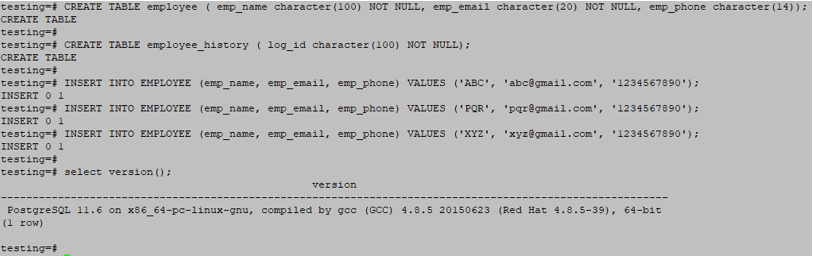
Example #1 – Create a table and insert a record for testing
Code:
testing=# CREATE TABLE employee ( emp_name character(100) NOT NULL, emp_email character(20) NOT NULL, emp_phone character(14));
testing=# CREATE TABLE employee_history ( log_id character(100) NOT NULL);
testing=# INSERT INTO EMPLOYEE (emp_name, emp_email, emp_phone) VALUES ('ABC', '[email protected]', '1234567890');
testing=# INSERT INTO EMPLOYEE (emp_name, emp_email, emp_phone) VALUES ('PQR', '[email protected]', '1234567890');
testing=# INSERT INTO EMPLOYEE (emp_name, emp_email, emp_phone) VALUES ('XYZ', '[email protected]', '1234567890');
Output:
Example #2 – Create a trigger function
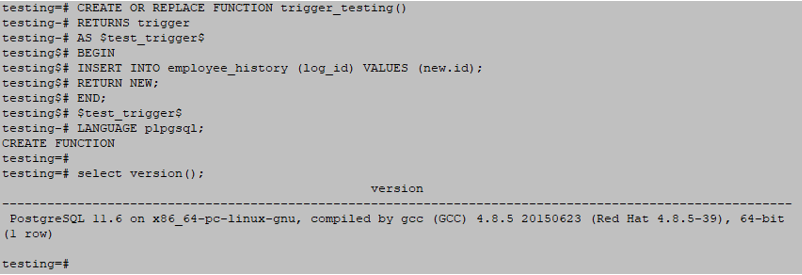
We have created a trigger function name as trigger_testing.
Code:
CREATE OR REPLACE FUNCTION trigger_testing()
RETURNS trigger
AS $test_trigger$
BEGIN
INSERT INTO employee_history (log_id) VALUES (new.id);
RETURN NEW;
END;
$test_trigger$
LANGUAGE plpgsql;
Output:
Example #3 – Create a trigger
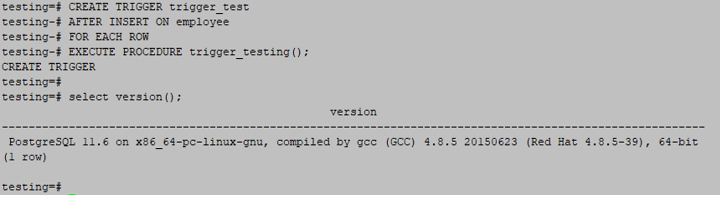
We have to create a trigger name as a trigger_test.
Code:
CREATE TRIGGER trigger_test
AFTER INSERT ON employee
FOR EACH ROW
EXECUTE PROCEDURE trigger_testing();
Output:
Example #4 – Drop trigger in PostgreSQL
You can drop a trigger by dropping the “DROP TRIGGER” statement in PostgreSQL.
Syntax
DROP TRIGGER trigger_name on table_name;Example
testing=# drop trigger trigger_test on the employee;Output:

Conclusion
You use the “CREATE TRIGGER” statement to create a new trigger in PostgreSQL. Row-level and statement-level triggers are the two main important types of PostgreSQL triggers.Database tables or views activate a function automatically when an event takes place.
Recommended Articles
We hope that this EDUCBA information on “PostgreSQL Triggers” was beneficial to you. You can view EDUCBA’s recommended articles for more information.

