

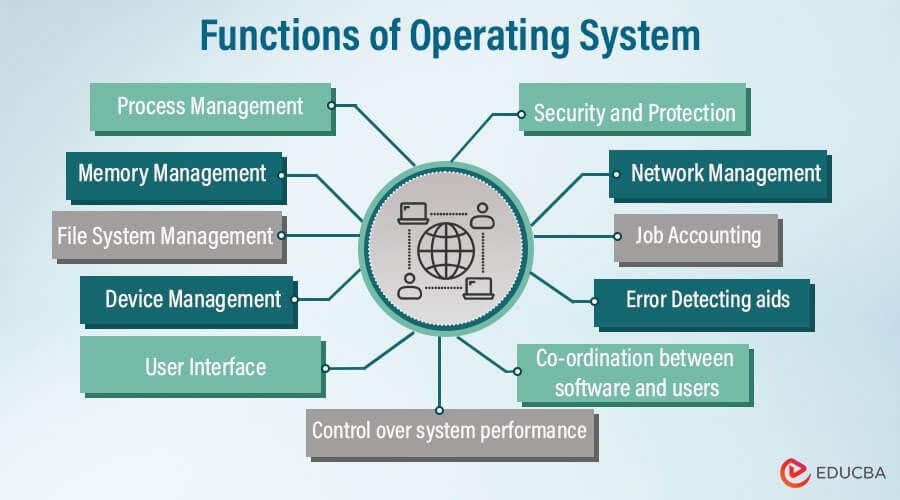
In the fast-paced, interconnected digital world, the Operating System (OS) serves as a vital bridge between users and a computer’s underlying hardware. With its multifaceted role, the Operating System is pivotal in facilitating smooth program execution, optimizing resource allocation, and ensuring overall system efficiency. As we explore the Functions of the Operating System, we delve into a realm of capabilities that encompass resource allocation, memory management, process scheduling, device management, file handling, user interfaces, and robust system security measures. In this ever-evolving technology landscape, the Operating System serves as the backbone that enables seamless computing experiences and empowers users to harness the full potential of their machines.
Table of Content
- Introduction
- What is an Operating System?
- Types of Operating Systems
- Functions of the Operating System
- Operating System Services
- Characteristics of Operating System
What is an Operating System?
A computer’s operating system (OS) is crucial software that manages hardware and software resources and provides essential services to computer programs. It is an intermediary between a computer system’s hardware and software components, facilitating communication and coordination. The primary objective of an operating system is to create a convenient and efficient computing environment for users while ensuring the most effective use of available resources.
OS manages the following resources – input devices, output devices, storage devices, and network devices. Input devices include a keyboard and mouse. Output devices are monitors, printers, and scanners; network devices include modems, and so on. Also, storage devices include internal and external storage drives. The main components of an OS are the kernel, user interface, and application programming interface. The kernel provides basic control to the devices. The user interface facilitates interaction with the system. The code is written by application developers using the application programming interface.
Types of Operating Systems
The major types of operating systems include:
- Batch Operating System: Processes groups of jobs automatically without requiring user interaction. It is widely used for large-scale data processing.
- Time-Sharing Operating System: Enables multiple users to use a computer system simultaneously by distributing CPU time among them. Examples include Linux and UNIX.
- Real-Time Operating System (RTOS): Executes tasks within strict time limits, making it suitable for applications such as robotics, industrial automation, and aerospace systems.
- Distributed Operating System: Manages resources and data across multiple interconnected computers, enabling efficient distributed computing.
- Embedded Operating System: Designed for specialized devices and embedded systems, offering lightweight performance and efficient resource utilization. Examples include Android and FreeRTOS.
Functions of the Operating System
The operating system performs the following functions:
1. Process Management
Process management is the function of an operating system that creates, schedules, executes, and terminates processes while ensuring efficient CPU utilization.
Key Responsibilities:
- Process creation
- Process scheduling
- Process synchronization
- Process termination
- Process Synchronization and Communication
- Process States and Control
Example: When a user opens Chrome, Spotify, and Microsoft Word simultaneously, the operating system allocates CPU time to each process to ensure smooth execution.
2. Memory Management
Memory management controls all the allocation and release of memory resources, ensuring programs have the memory they need while avoiding resource conflicts and inefficiencies.
Key Responsibilities:
- Memory allocation
- Memory deallocation
- Address Mapping
- Virtual memory management
- Memory protection
- Paging and Swapping
Example: When several applications run simultaneously, the operating system regulates RAM usage to maintain performance and reduce the risk of system slowdowns or crashes.
3. File System Management
File system management organizes, stores, retrieves, and secures files and directories on storage devices.
Key Responsibilities:
- File Organization
- File creation and deletion
- Directory management
- File access permissions
- Metadata management
- File System Integrity and Recovery
Example: When saving a PDF document, the operating system determines where it is stored and how it can be accessed later.
4. Device Management
Device management enables communication between hardware devices and software applications through device drivers and resource allocation mechanisms.
Key Responsibilities:
- Device driver management
- Device allocation
- Device Configuration
- Input/output management
- Device synchronization
Example: When printing a document, the operating system communicates with the printer driver to complete the task.
5. User Interface Management
User interface management provides the medium through which users interact with a computer system.
Key Responsibilities:
- GUI support
- CLI support
- Menu-driven interfaces
- Natural Language Interface
- Touch-based interaction
Example: Windows features a graphical user interface (GUI) that enables users to interact with the system through icons, menus, and on-screen windows.
6. Security and Protection
Security and protection functions safeguard data, applications, and system resources against unauthorized access and cyber threats.
Key Responsibilities:
- User authentication
- Access control
- Data encryption
- Malware protection
- Firewalls and Intrusion Detection Systems
Example: Password-protected user accounts prevent unauthorized access to sensitive information.
7. Network Management
Network management enables communication between computers and devices connected through local or global networks.
Key Responsibilities:
- Network monitoring
- Network configuration
- Network troubleshooting
- Performance optimization
Example: The operating system manages Wi-Fi connectivity and internet access for users.
8. Control over System Performance
This function monitors and optimizes system resources to maintain stable and efficient performance.
Key Responsibilities:
- CPU monitoring
- Memory usage tracking
- Performance optimization
- Resource balancing
Example: The Task Manager in Windows helps monitor CPU and memory usage.
9. Job Accounting
Job accounting tracks resource usage by applications, users, and processes for performance analysis and resource planning.
Key Responsibilities:
- Resource tracking
- Usage reporting
- Billing support
- Capacity planning
Example: Cloud platforms monitor resource consumption to calculate customer usage costs.
10. Error Detection and Handling
Error detection and handling identify system faults and take corrective actions to maintain system reliability.
Key Responsibilities:
- Detect hardware errors
- Detect software faults
- Generate error logs
- Recover from failures
Example: The operating system displays warning messages when a storage device develops errors.
11. Coordination Between Software and Users
The operating system acts as an intermediary between users and software applications, ensuring smooth communication and resource sharing.
Key Responsibilities:
- Software execution
- User interaction
- Resource coordination
- Application support
Example: When a user launches a web browser, the operating system allocates memory, CPU resources, and device access required to run the application.
Operating System Services
Some of the key services provided by an operating system are discussed below:
- Program Execution: The OS manages program execution and ensures they run correctly on the hardware.
- Input-Output Operations: It facilitates input and output operations, enabling data exchange between the computer and its peripherals.
- Error Handling: It handles errors and exceptions that occur during program execution.
- Resource Allocation: The OS allocates system resources, such as CPU time, memory, and peripherals, to different programs and processes.
- Communication Between Processes: It facilitates communication and data sharing between different processes running on the system.
- Resource Administration: It efficiently manages system resources, including CPU scheduling and memory management.
Characteristics of an Operating System
The main characteristics include:
- Resource Management: Computer operating systems manage various resources, including the Central Processing Unit (CPU), memory (RAM), storage devices, and Input/Output (I/O) devices. They allocate and schedule these resources to different processes and applications to prevent conflicts and ensure smooth execution.
- Multitasking: Modern operating systems support multitasking, allowing multiple processes or applications to run concurrently. The OS manages task switching to create the illusion of parallel execution, even on single-core processors.
- Virtual Memory: Operating systems use virtual memory techniques to manage memory resources efficiently. Virtual memory allows processes to access more than is physically available by using disk space as an extension of RAM.
- Task Management: The OS manages tasks and processes, including creation, termination, and suspension/resumption. It ensures fair time-sharing among multiple processes and prioritizes critical tasks.
- Input and Output Management: Operating systems control input and output activities, allowing applications to interact with peripherals such as keyboards, mice, monitors, printers, and network devices.
Frequently Asked Questions (FAQs)
Q1. What is the role of the kernel in an operating system?
Answer: The kernel forms the central part of an operating system, providing crucial functions such as managing processes, memory, and devices and allocating system resources. It also serves as a mediator between the hardware and software components of the system, communicating directly with the hardware.
Q2. Can I have multiple operating systems on one computer?
Ans: It is possible to install multiple operating systems on one computer. This is called dual-booting or multi-booting. During the boot process, each operating system will have its own partition or disk space to select.
Q3. How does memory management impact system performance?
Ans: Effective memory management is crucial for optimizing system performance. Insufficient memory can lead to slowdowns and system crashes, while efficient memory allocation improves responsiveness.
Q4. Are operating systems only used in computers?
Ans: No, Operating systems are used in various computing devices such as computers, smartphones, tablets, servers, embedded systems, etc. The operating system’s type and features may vary depending on the device and its intended purpose.
Conclusion
The functions of an operating system are diverse and essential for the efficient operation of a computer system. From process management to user interface, each function contributes to the overall performance and usability of the system. Understanding these functions is crucial for both end users and system administrators to make the most of their computer systems.
Recommended Articles
We hope this EDUCBA information on “Functions of Operating System” has benefited you. You can view EDUCBA’s recommended articles for more information.

