

Excel VBA CLng
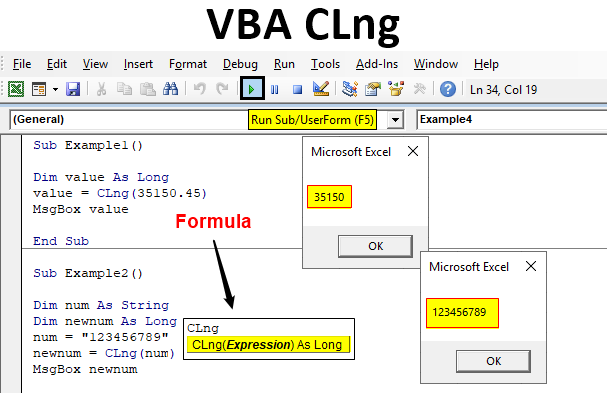
Excel VBA CLng function is used to convert an expression or a variable’s value to a long integer. Every variable which is used in any programming language has a certain data type. Each data type has some range limited to it which means up to how much values a variable can store. For an example a long data type can store from -2,147,483,648 and 2,147,483,647. This is the limit of the Long data type. There are many instances when numerical data or value is assigned to a non-numerical data type or variable. In such scenarios we encounter errors. But in Excel VBA CLng is one such function that allows us to convert or change these values to the desired data type.
VBA CLng Function Syntax:
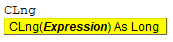
Now this expression can be a value or a variable or it can be any expression. The use of this function is to convert that expression or value to long integer but there are certain scenarios where we may encounter errors while using this function. Let us discuss how we use this function in examples and then we will discuss the possible errors we might encounter while using this function.
How to Use the CLng Function in VBA?
We will learn how to use the CLng function using the VBA code in Excel.
Example #1
Let us begin with the first example for the CLng function. Let us start with the basics first and see how this function works. Follow the steps below to see how exactly the VBA CLng function works.
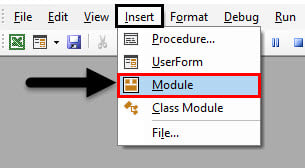
Step 1: Insert a new module inside Visual Basic Editor (VBE). Click on Insert tab > select Module.
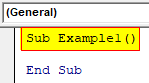
Step 2: Insert a new subprocedure.
Code:
Sub Example1()

End Sub
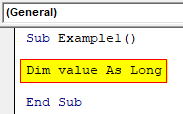
Step 3: Let us just declare some variable as long.
Code:
Sub Example1()

Dim value As Long

End Sub
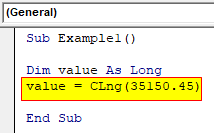
Step 4: We can assign this variable a value using the CLng function.
Code:
Sub Example1()

Dim value As Long
value = CLng(35150.45)

End Sub
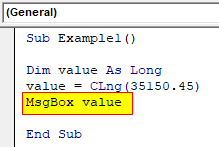
Step 5: So now we can use the Msgbox function to display the result.
Code:
Sub Example1()

Dim value As Long
value = CLng(35150.45)
MsgBox value

End Sub
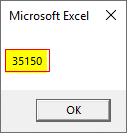
Step 6: Run this code by hitting the F5 or Run button which is placed on the topmost ribbon of VBE.
Example #2
Earlier we talked about how we sometimes declare a variable with non-numeric data type but assign a numeric value. Let us try it in this example. Follow the steps below.
Step 1: Let us declare our second example subprocedure.
Code:
Sub Example2()

End Sub
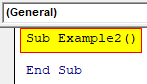
Step 2: Declare two variables, one as a string and another as long.
Code:
Sub Example2()

Dim num As String
Dim newnum As Long

End Sub
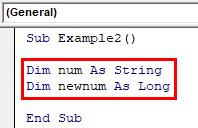
Step 3: We can see that we have a variable as a string and let us assign a numeric value.
Code:
Sub Example2()

Dim num As String
Dim newnum As Long
num = "123456789"

End Sub
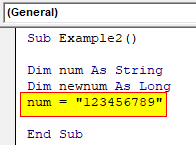
Step 4: Now we can CLng function to convert it to long.
Code:
Sub Example2()

Dim num As String
Dim newnum As Long
num = "123456789"
newnum = CLng(num)

End Sub
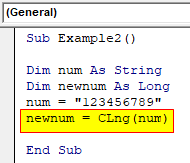
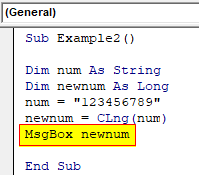
Step 5: We can use the Msgbox function.
Code:
Sub Example2()

Dim num As String
Dim newnum As Long
num = "123456789"
newnum = CLng(num)
MsgBox newnum

End Sub
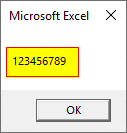
Step 6: Let us execute the code by hitting the F5 or Run button.
Example #3
We also discussed above that we might encounter some errors while using this function. Let us go through a couple of examples on how we can encounter some possible errors.
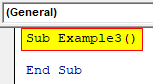
Step 1: In the same module let us declare another subprocedure.
Code:
Sub Example3()

End Sub
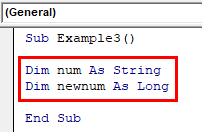
Step 2: Let us again declare two variables one as a string and another as long.
Code:
Sub Example3()

Dim num As String
Dim newnum As Long

End Sub
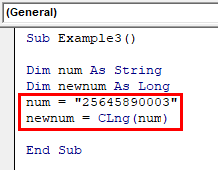
Step 3: Now let us assign a string value to the string variable and then try to convert it to long using the CLNG function.
Code:
Sub Example3()

Dim num As String
Dim newnum As Long
num = "25645890003"
newnum = CLng(num)

End Sub
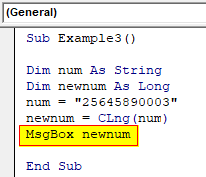
Step 4: We can use mgsbox function to check if we get any result.
Code:
Sub Example3()

Dim num As String
Dim newnum As Long
num = "25645890003"
newnum = CLng(num)
MsgBox newnum

End Sub
Step 5: Run this code by hitting the F5 or Run button which is placed on the topmost ribbon of VBE.
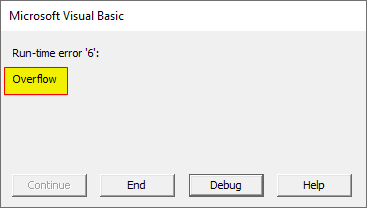
We received type mismatch because we tried to convert a string value to long.
Example #4
There is another type of error we can encounter using the CLng function. Follow the steps below to see how exactly the VBA CLng function works.
Step 1: In the same module let us declare another subprocedure.
Code:
Sub Example4()

End Sub
Step 2: Let us again declare two variables one as a string and another as long.
Code:
Sub Example4()

Dim num As String
Dim newnum As Long

End Sub
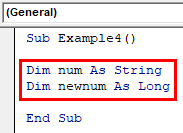
Step 3: Now let us assign a value greater than long can hold to the string variable and then try to convert it to long using the CLng function.
Code:
Sub Example4()

Dim num As String
Dim newnum As Long
num = "25645890003"
newnum = CLng(num)

End Sub
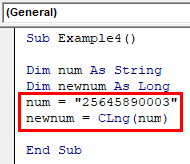
Step 4: We can use Mgsbox function to check if we get any result.
Code:
Sub Example4()

Dim num As String
Dim newnum As Long
num = "25645890003"
newnum = CLng(num)
MsgBox newnum

End Sub
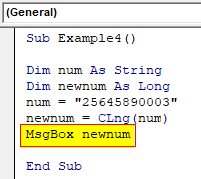
Step 5: When we execute the above code by hitting the F5 or Run button we will encounter the following error.
We have encountered this error because the value was greater than the long data type can hold.
Explanation of CLng in VBA
As we discussed above how we use CLng function to convert an expression or a value to Long data type value. However, we also saw that in the process we encounter some errors when we provide data that is non-numeric or the data or value is out of the range of long data type.
Things to Remember
There are few things which we need to remember about CLng in VBA and they are as follows:
- CLng is a function in VBA which is used to convert a value to a long data type.
- This function has a single argument as an input.
- While using this function we should consider in mind the range of long data type which is -2,147,483,648 and 2,147,483,647.
- This function is used as an expression.
Recommended Articles
This is a guide to the VBA CLng. Here we discuss how to Use the CLng Function in Excel VBA along with practical examples and downloadable excel template. You can also go through our other suggested articles –

