


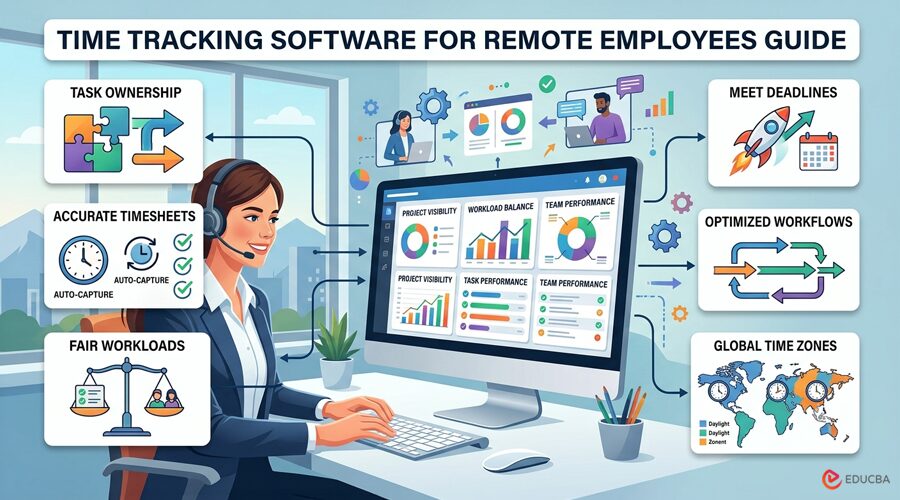
Remote work problems rarely start with an employee forgetting to clock in. More often than not, problems arise when managers are unaware that projects are overrunning and that some employees are burning out due to excessive workloads. Throughout his experience managing remote technology projects, the author encountered these challenges repeatedly. Over time, he realized that recording work hours was important but only one part of effective project management. For time data to deliver real value, it needed to show where hours were spent and provide insights that helped improve planning, resource allocation, and overall project outcomes. Therefore, time-tracking software for remote employees should not only log work hours but also provide insights into project progress, workload distribution, and each employee’s contributions. The right time tracking software for remote employees helps managers track work, solve problems early, and keep teams productive.
What Are the Operational Problems That Time Tracking Software for Remote Employees Should Address?
Speaking matter-of-factly, time tracking software for remote employees can obviously confirm when someone started to work. However, many do not understand that a time record is not the same as knowing the task an employee worked on or whether the workload is distributed fairly. That is why, when choosing time tracking software for remote employees, you must first identify the operational problems the tool is meant to solve. Here are the six that come up most often.
1. Unclear Task Ownership
When work updates are scattered across emails, chats, daily stand-ups, and project management tools, it naturally becomes difficult to follow where a project is headed. While you may believe that a task is active, your team might not know who is responsible for the next step.
2. Inaccurate Timesheets
Manual timesheets rely primarily on memory. By the end of the week, or even by the end of the day, employees often estimate how much time went into various tasks. With the timesheets done, managers are left with the hefty task of matching calendar entries and project records to those logged hours. A few years ago, when the project manager was also responsible for verifying timesheet entries, the process proved to be slow, time-consuming, and frustrating for the entire team.
3. Uneven Workloads
A project plan may show you that each employee has an equal number of assignments, but it may not reflect differences in effort. One employee likely handles more routine tasks, while the other handles complex assignments involving testing and rework. In that case, both employees will have the same hours logged on the record.
However, the imbalance will remain invisible. That is why the goal should be to acknowledge that difference and then reassign work or adjust deadlines to avoid burnout. By doing so, you can manage a remote workforce more objectively and remove guesswork from workload decisions.
4. Missed Deadlines
Projects rarely run past the deadline without a clear indicator. More often than not, the warning sign shows up as tasks taking longer than estimated. However, if such signals are missed, project managers may have to reduce scope, assign additional resources, remove a blocker, or even explain the delay to stakeholders.
5. Inefficient Workflows
Frequent task switching, slow approvals, repeated revisions, unnecessary meetings, and duplicate administrative work can consume hours without advancing a project. At times, organizations find that when a task takes longer than expected in remote teams, the underlying issue is often inefficient workflows and communication gaps. Moreover, that is not just true for my team; almost 81% of employees believe remote collaboration is more challenging for them, too.
6. Limited Visibility Across Time Zones
For distributed teams, an online status indicator is not enough for a manager. You should always know who is available, which task is awaiting input, when the next step will commence, and other relevant project details. Those who handle such teams know that coordinating them across different regions is a hassle. While one employee tends to complete their part near the end of the day, the other does not see it until their shift has started.
How Time Tracking Data Supports Better Remote Operations?
The value of time tracking software for remote employees depends entirely on what managers do with the information.
Choose Software Around the Problems You Need to Solve
Once you have identified the operational gaps, the next step is to choose a tool that addresses them without complicating the workflow. Many organizations adopt feature-rich productivity tracking software without considering whether it truly benefits their teams. Therefore, organizations should first define the outcomes they seek. For example, if inaccurate timesheets are the primary concern, simple automatic time capture may be sufficient. However, if projects regularly exceed estimated timelines, task-level reporting becomes far more important. Another factor that deserves careful consideration is usability.
The makeup of your workforce shapes this decision as well. Remote project teams need hours mapped against tasks and deadlines. Hourly staff working on site need confirmation that they turned up at all. Retail, warehouse, and field service operations are usually better served by time and attendance software.
A tool implemented across the team should be able to track work without interrupting it. Likewise, managers should be able to interpret the reports without spending hours reorganizing them. Lastly, before choosing a platform, consider its compatibility, privacy controls, reporting depth, setup requirements, and dashboard usability. These were also the parameters the author used to evaluate the system implemented by a previous organization.
Real-World Example
A few years after the organization transitioned to remote work, managers found it harder to track project progress and team workloads. To improve visibility, the company implemented time tracking software for remote employees using TimeBee. The biggest improvement came when employees started logging their time against specific projects and tasks. This made project reports more accurate and gave managers a clearer view of how time was being spent. As a result, they could identify issues such as unclear instructions, unrealistic deadlines, and workload imbalances much earlier.
The same time records also supported payroll, attendance, and client billing, reducing the need for separate manual records. Features such as shift scheduling, time-zone settings, and performance reports further improved coordination across remote teams. Overall, the implementation reduced manual administrative work and improved project visibility. Advanced features like screenshots and activity tracking required careful setup and clear privacy guidelines for responsible use.
Turn Time Tracking Data into Better Business Decisions
The dashboard information should not be the only outcome you get from a remote time tracker. Instead, the data must lead to measurable improvements in how work is planned and managed.
Some of the most useful outcomes include:
- Data on previous task durations should improve project estimates, scheduling, and staffing decisions.
- Managers should recognize persistent overload before it leads to employee burnout.
- Automated records should reduce errors in timesheets, payroll, attendance, and billing.
- Individuals should be able to identify interruptions and recurring time drains to better manage their time.
- Teams should identify delayed approvals, repeated rework, unnecessary meetings, and inefficient handoffs.
How to Implement Time Tracking Without Damaging Trust?
The way time-tracking software for remote employees is implemented ultimately determines whether it becomes a useful asset or merely a source of resentment. Here is how the organization introduced TimeBee to its team to encourage better adoption.
1. Explain the Purpose Transparently
Before introducing a new tool, always make sure your employees know what is being collected, why it is needed, who has access to it, and how long it is kept within the system.
2. Involve Employees in the Rollout
Employees understand the day-to-day workflow better than anyone else. Therefore, you can benefit from using their input to define project categories, task names, idle thresholds, working schedules, and legitimate exceptions.
3. Provide Role-Specific Training
No matter how user-friendly a tool is, there should be proper sessions where employees learn to select tasks, correct records, review their own information, and report any concerns. On the other hand, managers should also learn to interpret available data and use it to make responsible decisions.
4. Set Firm Privacy Boundaries
Organizations should collect only what they can reasonably justify. Use features only when they add value, not just because the option exists. Instead, use screenshot frequency, application tracking, location data, and input monitoring as appropriate for the employee’s role and organizational needs. Remember, 91% of employees prefer remote work for its flexibility and autonomy; therefore, the tool you implement should support it, not undermine it.
5. Collect and Act on Ongoing Feedback
The initial setup should not remain unchanged indefinitely, as projects, tasks, roles, and categories change over time. Keep taking feedback from your employees to identify any intrusive settings.
6. Use Time Data as a Diagnostic
My preferred sequence when using time data is to identify the pattern, verify the surrounding facts, talk to the employee, and only then decide on a response. That sequence protects employees from snap judgments while still giving me a proper way to address genuine concerns.
Final Thoughts
Time tracking software for remote employees should be viewed as more than a tool for recording work hours. When implemented effectively, it helps reduce manual work, identify operational gaps, and provide the insights needed to improve project management and team performance. As remote work continues to evolve, organizations must balance accountability with flexibility and trust. Used responsibly, time tracking software for remote employees supports fairer workload distribution, better project visibility, and more informed business decisions.
Author: Zack Will
Senior IT Project Manager
Zack Will is a Senior IT Project Manager with over a decade of experience leading complex technology initiatives across enterprise IT, software development, and infrastructure modernization. He is PMP-certified (Project Management Professional) and ITIL-certified, with a strong track record of delivering large-scale projects on time, within scope, and aligned with business goals. Zack specializes in coordinating cross-functional teams, managing stakeholder expectations, and overseeing end-to-end project lifecycles in fast-paced environments. His expertise spans Agile and hybrid delivery models, risk management, and digital transformation programs across global organizations.
Recommended Articles
We hope this guide on time tracking software for remote employees helps you improve project visibility, workload management, and remote team productivity. Explore these recommended articles for more insights on remote work, workforce management, employee productivity, project management, and time tracking.

