
Updated March 6, 2023
Introduction to Teradata Substring
Teradata substring is a predefined string operation function in Teradata database systems, This function has the capability to slice and pick the needed string values from the given primary string. As with any other substring function in other databases, this substring function will pick some specific characters from a string value based on the position named and the length mentioned in the function call. Here in Teradata, the substring process can be achieved in two ways, one using the SUBSTRING function and the other using the SUBSTR function. Both these functions operate almost exactly in the same manner except for a small deviation in their way of operation. The only key difference is the SUBSTR has the capability of processing KANJIEUC character sets.
Syntax:
SUBSTRING (String_expression n1 FOR n2)| Syntax Element | Description |
| string_expression | This mentions the column from which the substring is expected to be extracted. |
| n1 | From the targeted string expression the starting position from which the slicing process is expected to start. |
| FOR | The FOR statement is a keyword mentioning that the value mentioned on the rightside is dependent on the left side value. Here if FOR us omitted then the entire right hand side will be extracted from the string_expression. For Byte values, the trailing binary zeroes are trimmed. |
| n2 | The total substring expression length which is expected to be extracted is mentioned here. If a negative value is placed here then an error will be returned by the function. |
Syntax Element Description
string_expression This mentions the column from which the substring is expected to be extracted.
n1 From the targeted string expression the starting position from which the slicing process is expected to start.
FOR The FOR statement is a keyword mentioning that the value mentioned on the right side is dependent on the left-side value. Here if FOR us omitted then the entire right-hand side will be extracted from the string_expression. For Byte values, the trailing binary zeroes are trimmed.
n2 The total substring expression length which is expected to be extracted is mentioned here. If a negative value is placed here then an error will be returned by the function.
SUBSTR (String_expression n1 n2)| Syntax Element | Description |
| string_expression | This mentions the column from which the substring is expected to be extracted. |
| n1 | From the targeted string expression the starting position from which the slicing process is expected to start. |
| n2 | The total substring expression length which is expected to be extracted is mentioned here. If a negative value is placed here then an error will be returned by the function. |
Syntax Element Description
string_expression This mentions the column from which the substring is expected to be extracted.
n1 From the targeted string expression the starting position from which the slicing process is expected to start.
n2 The total substring expression length which is expected to be extracted is mentioned here. If a negative value is placed here then an error will be returned by the function.
Teradata SUBSTRING Rules, Types, and Compliance
- The SUBSTRING is an extension of ANSI SQL:2011 standard.
- Both the SUBSTRING and SUBSTR have the capability to operate on three major types of arguments. They are Character, Byte, and Numeric arguments. So among the classified data types of Teradata systems these Characters, Bytes, and Numbers can be very efficiently processed. All other data types cannot be processed by this function.
- All the numeric values which are expected to be substring are converted to CHARACTER types internally before processing. Only after this character conversion is accompanied then the slicing or the substring extraction process is carried over the numeric value.
- Basically, Teradata User-defined functions have the built-in capability to understand and cast the character, Numeric, Byte, and Date values implicitly.
- If the string expression passed for substring are of BLOB(Binary Large Objects) datatypes then result in datatypes will also be of BLOB type.
- If the string expression passed for substring are of Byte datatypes then result in datatypes will be of VARBYTE(n).
- If the string expression passed for substring are of CLOB(Binary Large Objects) datatypes then result in datatypes will also be of CLOB type.
- The SUBSTRING/SUBSTR returns a zero on its function return value when any one of the below-given conditions are matched,
(n1 > string_length) AND (0 ≤ n2)
(n1 < 1) AND (0 ≤ n2) AND ((n2 + n1 - 1) ≤ 0)- In agreement through Teradata internationalization plans, KANJI1 help is denounced and is to be superseded withinside the adjoining future. KANJI1 isn’t permanently permitted as an evasion character set; the system alterations the KANJI1 defaulting character set to the UNICODE character set. The formation of new-fangled KANJI1 substances is rather constrained. Even though numerous KANJI1 queries and packages can also furthermore grip to function, websites using KANJI1 need to adapt to an individually different character set as rapidly as conceivable. “”
- Both these functions function practically closely in identical means excluding a trivial deviation in their method of operation. The solitary important difference is the SUBSTR has the competence of dispensation KANJIEUC character sets.
Teradata SUBSTRING, SUBSTR Example
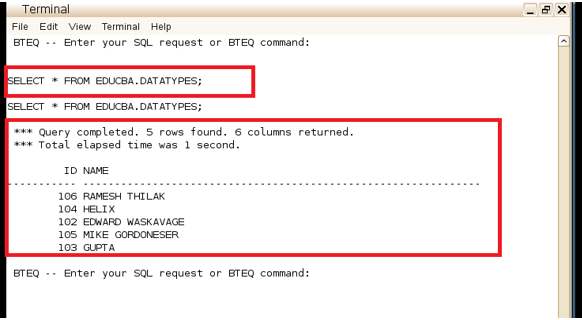
The Below section mentions examples that involve practical execution of Teradata SUBSTRING and SUBSTR function. The outcome of the executions is captured as snaps. Here
The Snap of the table EDUCBA.DATATYPES is shared below,
Example #1
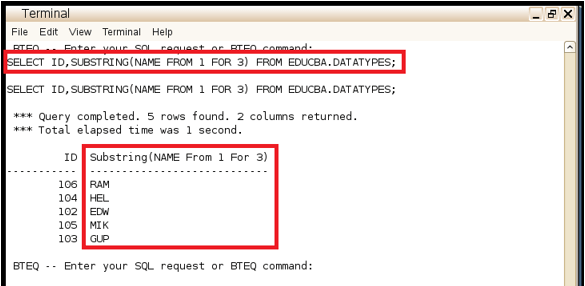
The first Example Involves the use of the SUBSTRING function. From the list of columns associated with this table the first three characters of the NAME column are expected to be retrieved, This is achieved by the below query where the SUBSTRING function is called with the NAME column mentioned in it. The value 1 is used to represent the first character in each row of the NAME column whereas the value 3 is used to represent the length of values that are expected to be sliced. The output snaps print with the first three characters of the NAME field.
Query:
SELECT ID, SUBSTRING (NAME FROM 1 FOR 3) FROM EDUCBA.DATATYPES;Snapshot:
Example #2
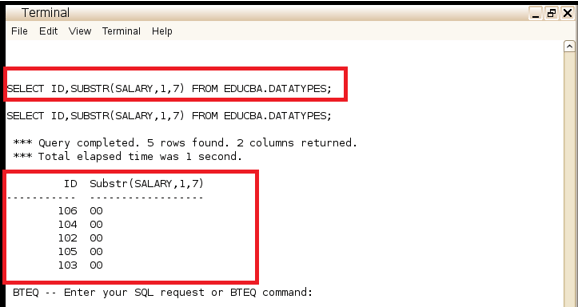
The Second Example Involves the use of the SUBSTR function. Here the salary field which is encoded as a Byte value is expected to be substring. The first seven characters of the byte field are extracted and the equivalent numeric value is displayed. In the given query 1 represents the starting position of the substring process whereas 7 represents the length of the expression which is expected to be substring.
Query:
SELECT ID, SUBSTR (SALARY 1 7) FROM EDUCBA.DATATYPES;Snapshot:
Conclusion
In all Relational databases, the role of functions and UDT’s are very critical, they play a very major role in ensuring that the operations needed are achieved. Here String-based operations are among the most mandatory necessities in sequel databases and as with any other Relational databases these Teradata systems also provide a stable set of options for processing String values. Here SUBSTRING /SUBSTR plays a predominant role in pulling a named set of characters from a given string and using them further for parsing and storage.
Recommended Articles
We hope that this EDUCBA information on “Teradata Substring” was beneficial to you. You can view EDUCBA’s recommended articles for more information.

