
Updated April 20, 2023

Introduction to Teradata Joins
When two or more tables need to be joined together then joins must be used. This joining process mostly involves column level joining where columns within more than one table can be done. In Teradata joins can be done to an extent of up to 128 tables. The join functionality allows retrieval of data from more than several columns in the tables. As far as terdata is concerned this join process can be subdivided into four major types. They are Natural joins, joins which involve theta, Inner join, and outer joins. More than one type of joins can be consolidated in Teradata in the same query.
Concatenation using Joins Function in Teradata
| Merge Method | Description |
| Natural | Matching same columns compared on the equal symbol. |
| Inner | Matching the same columns with the comparative operator. |
| outer | Records from both left and right end table based on the type of outer join. |
| inner | Only records with a match between the compared tables will be returned. |
Example tables snapshots:
select * from educba.table1;
select * from educba.table2;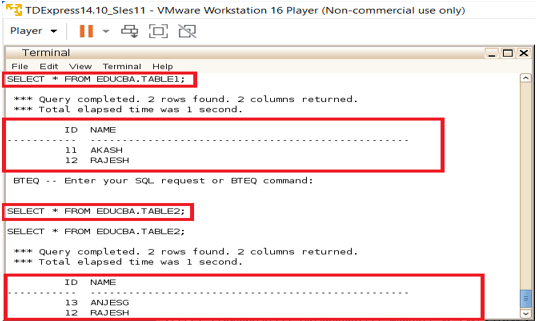
Natural Joins
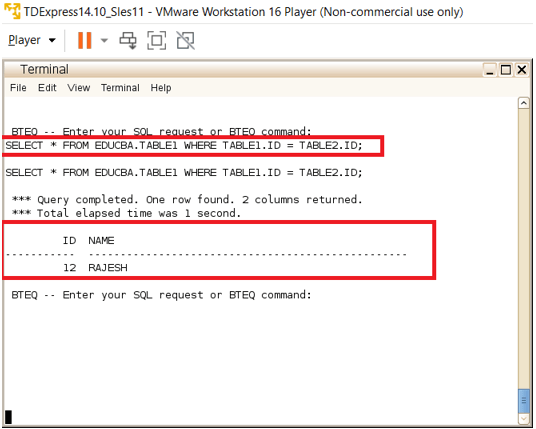
When the join process is applied upon a matching set of columns then the process is called Natural joins. Natural joining process is among the most common type of joins in Teradata systems. These are triggered when both the columns are expected to be the primary index of the associated tables or when a foreign link mapping exists between the tables and related conditions. The Natural join process involves an equality symbol placed between the two columns compared. This means apart from the protocol that two columns are expected to be of the same type the Natural joining process expects the columns to be matched on an equality condition. So, when two columns are of the same type and they are matched on an equal symbol then these columns fall under Natural joins.
Query:
SELECT * FROM EDUCBA.TABLE1 WHERE TABLE1.ID = TABLE2.ID;Output:
Theta Joins
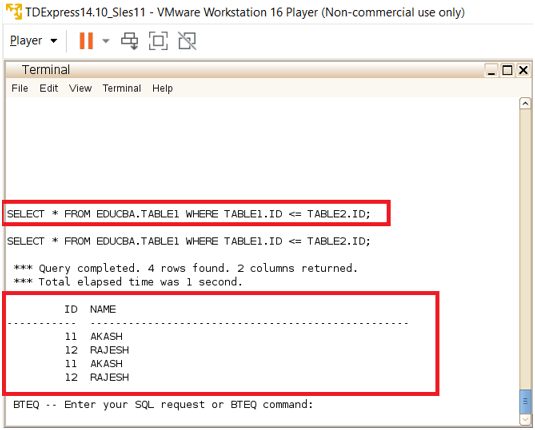
Again, here join process is applied upon a matching set of columns but the matching type varies for theta joins. As like the Natural joining process, the theta joins are also among the most common type of joins in Teradata systems. These are triggered when both the columns are expected to be the primary index of the associated tables or when a foreign link mapping exists between the tables and related conditions. The theta joining process involves a comparative operator to be placed within the columns match. The comparative operators are like greater than the operator, less-than operator, greater than equal to operator, less than equal to operator, and also equality operator.
If the Θ operator is equal (=), then the be a part of is taken into consideration an equijoin. In positive cases, the part of and the equijoin are identical While each join is remodeled in an equality condition, the column names on which tables are joined want now no longer in shape in an equijoin, at the same time as they should in shape in a be a part of.
Query:
SELECT * FROM EDUCBA.TABLE1 WHERE TABLE1.ID <= TABLE2.ID;Output:
Inner Joins
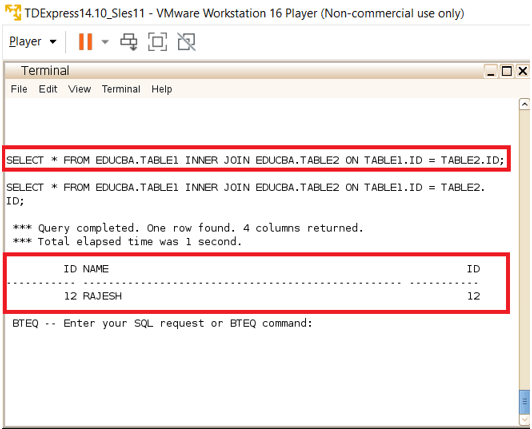
This process involves the joining of two or more tables and the output will return matching rows from the tables.
Query:
SELECT * FROM EDUCBA.TABLE1 INNER JOIN EDUCBA.TABLE2 ON TABLE1.ID = TABLE2.ID;Output:
Outer Joins
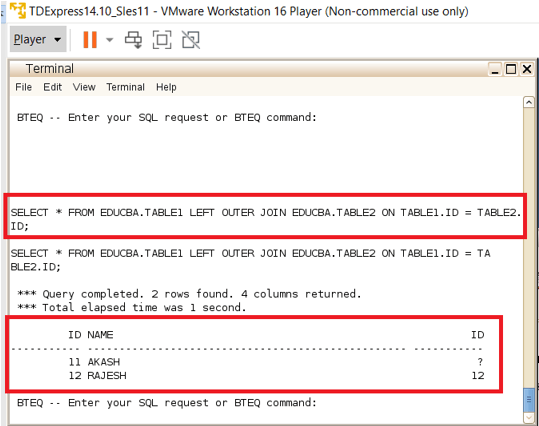
When rows from both tables are expected to be included in the final output then outer joins are preferred. Here the join process involves as like in such a way that the matching rows from both tables can be displayed and along with that the unmatching rows from any one of the tables or both tables can also be retrieved based on the type of outer join selected and executed. More specifically to mention outer join is a form of Inner join where it additionally has the capability to add non-matching rows also from one among the selected tables are both tables as needed.
The outer join used to be subdivided into three major types,
- Left outer join: Every matching row in the right table and all the rows of the left table.
- Right outer join: Every matching row in the left table and all the rows of the right table
- Full outer join: All rows from both the table
Query:
SELECT * FROM EDUCBA.TABLE1 LEFT OUTER JOIN EDUCBA.TABLE2 ON TABLE1.ID = TABLE2.ID;Output:
Self Joins
This is a part of Natural join, Here join takes place in such a manner that the column within the same table is matched upon the generated result set. This a very interesting type of join process. Because self-join is not a very usual condition to be applied. There are rare business scenarios in which self-joins are expected to be triggered which involves the process of binding the columns within the table to a bound new result set.
Cross Joins
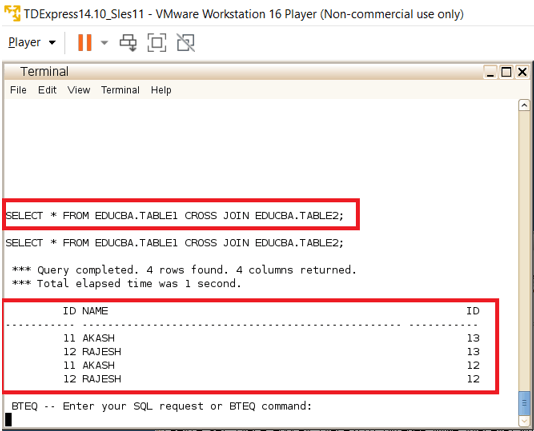
This is a very rare type of join where the joining condition will not be specified, So when a joining condition of tables is omitted then it will result in a cross join which is more specifically of a cartesian product to mention precisely. This involves a multiplication process where each row of each table will be connected with each row of the other table involved. This kind of multiplication will only end up in a cartesian product. This kind of binding will be performed very rarely and yet this process produces effective outputs in rare business conditions. Performance level benchmarking is one key situation where cross joins are predominantly expected.
Query:
SELECT * FROM EDUCBA.TABLE1 CROSS JOIN EDUCBA.TABLE2;Output:
Conclusion
Cojoining two tables is always among the key operations in sequential databases. The conjoining process allows flexibility join two different tables and fetching the needed rows alone from table combinations in a very flexible manner. The Teradata databases almost allow all possible types of sequential joins to be placed efficiently. This is among the major advantages of Teradata functions. These join like self, cross, outer, and inner can perform all possible combinations of joining operations within tables.
Recommended Articles
We hope that this EDUCBA information on “Teradata Joins” was beneficial to you. You can view EDUCBA’s recommended articles for more information.

