
Updated March 15, 2023
Introduction to TensorFlow gather
Tensorflow gather is used to slice the input tensor object based on the specified indexes. The Keras is the library available in deep learning, which is a subtopic of machine learning and consists of many other sub-libraries such as TensorFlow and Theano. These are used in Artificial intelligence and robotics as this technology uses algorithms developed based on the patterns in which the human brain works and is capable of self-learning. Tensorflow Keras is one of the most popular and highly progressing fields in technology right now, as it possesses the potential to change the future of technology.
In this article, you will learn about the overview of TensorFlow, the usage of the same, arguments of the function that need to be supplied, implementation along with an example, and finally, conclude our comment on the gather function in TensorFlow.
TensorFlow gather overviews
Tensorflow gather is used for slicing or dividing a particular tensor input so that the parts are formed as per the indices specified in the arguments. The syntax corresponding to the function is as given below –
tensoflowObj.Gather(arguments, index1, index2, …, validation for the specified indices, axis, dimension batches, operation name)
The output or value returned by the gather function consists of a tensor with the datatype equivalent to the one whose value is passed in arguments.
TensorFlow gather Args
The arguments of parameters used in the gather function are listed in detail one by one –
- Arguments – It is nothing but the source tensor or matrix with the rank equivalent to or greater than the value of axis +1.
- Index 1, index 2, …. – The data type of this tensor is either int 64 or int 32, and the value of this parameter should be in the range of 0 to arguments. Shape [axis].
- Dimensions of the batch – This is an integer value representing the count or number of batch dimensions present. This value should be equivalent to the rank of indices or less than that.
- Axis – This value should be equivalent to or greater than batch dimensions and have the data type 64 or 32. The indices’ value helps specify the axis as it should be higher than or equal to batch dimensions. In addition, this value helps us specify the index from where the value should be gathered.
- Operation name – Hels in the specification of the operation’s name to be performed.
- Validation for the specified indices – This parameter is deprecated and has no usage as, by default, the validation of indexes always happens and is done by the CPU internally.
Note that inside the CPU, if the bound index is found, an error occurs, and in the case of GPU, if we find out the bound index, then the output will contain its corresponding value.
How to use TensorFlow gather?
We will need to follow certain steps to use the TensorFlow gather function. Some of them are as listed below –
- The required libraries should be imported at the top of the code file.
- The input data and the required objects should be assigned the initial value.
- You can optionally print your input data if you want to observe before and after the difference.
- Make use of the gather function to calculate and get the resultant.
- After gathering, you can again print the tensor data to observe the difference made by the gather function.
- Run the code and observe the results.
We need to note certain things when we are using the gather function. First, the gather function starts slicing the tensor from arguments that are params axis, taking along the consideration of indexes. The value of the index can be any integer that can have the tensor of any given dimension. Most often, it is one-dimensional.
The use of the function tensorObj. getitem happens in case of scalar quantities, sclices of python, and tf. newaxis. To handle the indices of the tensor, the tensorObj.gather extends its functionality. When used in its most simple format, it resembles scalar indexing.
The most commonly used case is when we have to pass only a single axis index tensor. As this data does not contain the sequential pattern, it cannot be recognized as a slice of python. The arguments or parameters can have any shape. The selection of the slices is made based on any axis that depends on the argument of the axis whose default value is 0.
TensorFlow gather Examples
Different examples are mentioned below:
Sample Educba Example 1:
# the required libraries are imported

import tensorflow as educbaTensorObj

# input data is assigned the initial value

SampleEducbaData = educbaTensorObj.constant([11, 12, 13, 14, 15, 16])

indexArr = educbaTensorObj.constant([0, 11, 12, 11])

# print your input data before manipulation

print ('SampleEducbaData: ', SampleEducbaData)

print ('indexArr: ', indexArr)

# use gather function to calculate the resultant

resultant = educbaTensorObj.gather(SampleEducbaData, indexArr)

# Print the resultant that is output

print ('resultant: ', resultant)
Output:
After executing and running the above code, we get the following output –
Screenshot of the output –

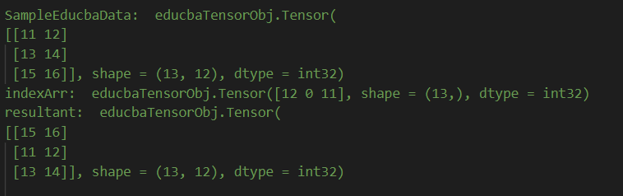
Sample Educba Example 2:
# the required libraries are imported

import tensorflow as educbaTensorObj

# input data is assigned the initial value

SampleEducbaData = educbaTensorObj.constant([[11, 12], [13, 14], [15, 16]])

indexArr = educbaTensorObj.constant([12, 0, 11])

# print your input data before manipulation

print ('SampleEducbaData: ',SampleEducbaData)

print ('indexArr: ', indexArr)

# use gather function to calculate the resultant

resultant = educbaTensorObj.gather(SampleEducbaData, indexArr)

# Print the resultant that is output

print ('resultant: ', resultant)
After executing and running the above code, we get the following output –
Screenshot of the output –
Conclusion
The use of tensorflow gather is used to prepare the slices of the input tensor along the axis depended on the indices that are passed as the argument. Some of the functions that are related with tensorObj.gather include tensorObj.scatter, tensorObj.getItem, tensorObj.gather_nd, tensorObj.boolean_mask, tensorObj.slice and tensorObj.strided_slice.
Recommended Articles
This is a guide to TensorFlow gather. Here we discuss the Introduction, overviews, args, How to use TensorFlow gather, and Examples with code implementation. You may also have a look at the following articles to learn more –

