
Updated March 10, 2023
Introduction to tensorflow flatten
tensorflow flatten is the function used for flattening the inputs and also at the same time keeping the size of the batch the same. Tensorflow is the open-source library used in python programs for implementing deep learning and machine learning. This library is provided by Google and is used in node environments or on browsers for neural network implementation in deep learning. The flattening of each layer of input batches is flattened to one-dimensional input data without affecting the batch size.
In this article, we will learn about .what is tensorflow, its usage, examples related to flattening layers, and also learn about its implementation along with the help of certain code snippet examples.
What is tensorflow flatten?
Tensorflow flatten is the function available in the tensorflow library and reduces the input data into a single dimension instead of 2 dimensions. While doing so, it does not affect the batch size. For example, suppose that we pass the input shape described as (size of the batch, 6, 6) then the shape of the output layer retrieved by using Keras. Layers. Flatten() function will be (size of the batch, 12).
The syntax of Flatten() function is as shown below –
Flatten(set of input, collection of output: name of class = None, scope: name of class = None)
The value returned from the flatten function is as shown below –
Sparse Tensor | Variable | Tensor | Labeled Tensor
The terminologies used in the above syntax are explained in greater detail in the below section –
- Set of input – The tensor model of size which can be [ size of the batch, ….].
- Collection of output – This represents the collections that are added to the final output of the function.
- Scope – This parameter is optional and stands for scope name.
The return value if the tensor that is flattened with only one dimension of size k and shape as [ size of the batch, k].
The error that may occur while executing the above command is ValueError, which occurs if the input rank is less than 2 or unknown.
In most cases, the Flatten() function is used as
flatten (set of inputs)
or
flatten (set of inputs, scope)
Use tensorflow flatten
The input parameter is the argument containing data format, which is an optional parameter and helps maintain the weight order and switch from one format to another of data. We can either specify the channels_first or channels_last value in the parameter. When not, specified the default format of the data is the channels_last which specifies the shape of input such as (size of the batch, … other channels). In the case of channels_first, the shape of the input can be specified in the parameter value in the format of (size of the batch, other channels, ….)
In reality, the actual default value of the parameter is decided by the image_data_format that is specified in the configurations of keras in the config file located in the directory ~/.keras/keras.json. If you don’t change this value ever, then the default value corresponds to channels_last.
In case if we specify the input parameter in such a way that the shape contains only the batch specification without any channel dimensions, for example (size of the batch,) and there are no channel dimensions, then the flattening process using flatten() function adds a new channel dimension and the shape of the output will look like (size of the batch, 1).
tensorflow flatten layers Examples
We will first import all the functions, components, and classes that might be used in the code, such as tensorflow, Sequential from keras. Models, Dense, Activation, and Flatten from the library of keras.layers and then write the below code snippet.
The example of Tensorflow flatten layers are as demonstrated below –
sampleEducbaModel = Sequential ()

firstLayer = Dense (16, input_shape=(8,8))

sampleEducbaModel.add(firstLayer)

secondLayer = Flatten()

sampleEducbaModel.add (secondLayer )

print (secondLayer.input_shape)

print (secondLayer.output_shape)
The output of the above code snippet is as shown below –
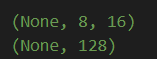
tensorflow flatten Code Examples
Here are the following examples mentioned below
Example #1
Let us take one example of the code snippet where we will use the flatten function to flatten the input without changing the size of the batch.
// Tensorflow library is to be imported

Import tensorflow as educbaExample

// Using educbaExample.keras, we will create a sequential model

SampleEducbaModel = educbaExample.keras.Sequential()

// Now, we will add a new layer of conv2D to the model we created

SampleEducbaModel.add(educbaExample.keras.layers.Conv2D

(64,3,1, input_shape = (3, 64, 64)))

// Before we apply educbaExample.keras.layers.Flatten, we will firstly check the output of the model by printing the same

Print (SampleEducbaModel.output)
The output of the above code snippet after execution is as shown below –

Now, we will add the main command to flatten the layer of the model, which will result from flattening the input
SampleEducbaModel.add(educbaExample.keras.layers.Flatten())
The output of the above code snippet will be as shown below –

Example #2
Let us take one more example of implementing the Flatten() function.
Refer to the below code snippet –
educbaSecondModel = Sequential ()

educbaSecondModel.add (Convolution2D (64,3,3, input_shape = (3,32,32), border_mode=’same’))

print (educbaSecondModel.output_shape)
If we perform the execution of the above code –
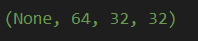
Now, if we do any of the changes in the above code and form the code as shown below for flattening the above-created model –
educbaSecondModel = Sequential ()

educbaSecondModel.add (Convolution2D (64,3,3, input_shape = (3,32,32), border_mode=’same’))

educbaSecondModel.add(Flatten())

print (educbaSecondModel.output_shape)
If we perform the execution of the above code –
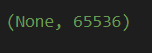
Example #3
In javascript, when we make the use of the flatten function in tensorflow, we can use it as shown below –
const educbaTensorFlow = require("@tensorflow/tfjs")

const sampleInputOfEducba = educbaTensorFlow.input({shape: [5, 4]});

const flattenLayer = educbaTensorFlow.layers.flatten();

console.log(JSON.stringify(flattenLayer.apply(sampleInputOfEducba).shape));
After executing the above code of javascript, we can observe the following output of logs on console –
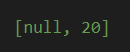
We can observe from the output that the shape of the flatten layer will be [null,12 ] as we have specified that the second dimension we have mentioned was 4 * 3, which results in flattening.
Conclusion
Tensorflow flatten is the function used in tensorflow for flattening the model in such a way that the size of the batch does not get affected.
Recommended Articles
This is a guide to tensorflow flatten. Here we discuss tensorflow, its usage, examples and learn about its implementation along with the help of certain code snippet examples. You may also have a look at the following articles to learn more –

