
Updated March 15, 2023
Introduction to TensorFlow argmax
Tensorflow argmax is the method present in the math package module of the tensorflow library, which is used for acquiring the maximum value from and across the axes. Tensorflow keras is one of the most popular and highly progressing fields in technology right now as it possesses the potential to change the future of technology. In this article, we will try to understand what tensorflow argmax is, how we can use it, some of the associated tools, and learn about its implementation with the help of certain examples.
What is TensorFlow argmax?
The tensorflow argmax method belongs to the math module of the TensorFlow library and is used for getting the maximum value among the axes’ values. The syntax of the argmax method is as shown below, which consists of its fully qualified name –
tensorflow.math.argmax(input_data, source_axes, output_dttype, operation_name)
One more argument is named dimension, but it is now deprecated and is of no use, so there is no need to specify. The arguments and parameters used in the above syntax are as described below –
- Input_data – This is a tensor and should be of one of the following data types –
1. float32
2. float64
3. int32
4. uint8
5. int16
6. int8
7. complex64
8. int64
9. qint8
10. quint8
11. qint32
12. bfloat16
13. uint16
14. complex128
15. half
16. uint32
17. uint64
18. bool
- source_axes – This parameter is also a tensor and should have one of the data types: int 64 or int 32. They must have a value that lies in the range of [-rank (input_data), rank(input_data)]. This parameter helps specify the TensorFlow axis that should be considered for reducing across. In the case of vector quantities, we always set the value of the axis as zero.
- output_dttype – This parameter is optional and is used for specifying tensorflowObj.DType that can value either tensorflowObj.int64 or tensorflowObj.int32. The default value of the parameter corresponds to tensorflowObj.int64.
- operation_name – This parameter is optional and used to specify the operation’s name to be performed.
How do you use argmax?
The return value of the TensorFlow argmax function is a new tensor with the same type as the output_dttype.
We will need to follow certain steps to use the TensorFlow gather function. Some of them are as listed below –
- The required libraries should be imported at the top of the code file.
- The input data and the required objects should be assigned the initial value.
- You can optionally print your input data if you want to observe before and after the difference.
- Use the argmax function to calculate and get the maximum value of the input tensor data.
- Evaluate the tensor value
- After argmax, you can print the value to observe the difference made by the argmax function.
- Run the code and observe the results.
TensorFlow argmax Tools
There is a TF coder tool, which helps create and write down tricky expressions of TensorFlow according to the requirement. For example, when you go for tensor manipulations, you should keep track of tensor shape, various dimensions, and data type compatibility. Along with that, one of the obvious things to keep an eye on is the correctness of mathematical manipulations.
At the same time, the provision of various operations available in TensorFlow makes it difficult to choose a perfect one for us. Making the use of the TF coder tool makes this task easy. So that instead of manually manipulating the code of TensorFlow, we can provide the demonstration of illustrations of certain examples so that it gives us the desired code.
TF coder is a tool for program synthesis and writing TensorFlow’s code. First, you need to provide the input, and after that, it executes the search internally, consisting of combinations that help get the transformation. Finally, the TF coder tool’s output is a code you can add to your project TensorFlow code.
Making the use of TF coder helps you in learning many new concepts and things. For example, many TensorFlow professionals use TF coders to understand new things at Google.
Tensorflow argmax examples
Given below are the examples of TensorFlow argmax:
Example #1
# the required libraries are imported

import tensorflow as educbaTensorObj

# input data is assigned the initial value

sample1 = educbaTensorObj.constant([15,100,15.6,27.9,1,150]) # The maximum value is 150 that is located at 5 index

# use argmax function to calculate the resultant

sample2 = educbaTensorObj.math.argmax(input = sample1 )

# print your input data before manipulation

print('tensor: ',sample2)

# find the value of the supplied tensor

sample3 = educbaTensorObj.keras.backend.eval(sample2)

# Print the resultant that is output

print('value: ',sample3 )
Output:
The execution of the above code gives the following output as a resultant –

Example #2
This example uses a tensor of shape(3,3).
# the required libraries are imported

import tensorflow as educbaTensorObj

# input data is assigned the initial value

sample1 = educbaTensorObj.constant(value = [19,18,127,13,115,14,16,12,11],shape = (3,3))

# printing the initialized tensor

print(sample1 )

# getting the maximum value indices tensor

sample2 = educbaTensorObj.math.argmax(input = sample1 )

# print your input data before manipulation

print('Indices Tensor: ',sample2)

# Evaluating the tensor value

sample3 = educbaTensorObj.keras.backend.eval(sample2)

# Print the resultant that is output

print('Indices: ',sample3 )
Output:
The output of the above code after execution is as shown in the below image –
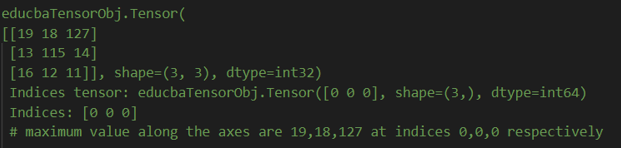
This is because the maximum value along the axes is 19,18,127 at indices 0,0,0, respectively.
Conclusion
Tensorflow argmax is the TensorFlow library method that helps you find the maximum value among the tensor passed as input along and across the axes. This method can be implemented in TensorFlow in a very easy manner. But, first, we need to calculate the maximum value, evaluate its result, and print it so we can see the output value after execution.
Recommended Articles
This is a guide to TensorFlow argmax. Here we discuss the Introduction, What is TensorFlow argmax, and How do you use argmax?Examples with code implementation. You may also have a look at the following articles to learn more –

