
Updated March 15, 2023
Definition of SSIS Replace
The REPLACE command replaces all occurrences of a substring within a string with a new substring(). The REPLACE function typically uses long strings. And it’s frequently used to fix data in a table. For instance, replacing an old link with a newer instance. In addition, SSIS replaces many literals using derived column transformation.
What is SSIS replace?
Replaces a character string only within an expression with a different character string or an empty string to return a text expression. The syntax goes like this:
REPLACE (character_expression,searchstring,replacementstring)
- Character expression: The function looks for a valid character expression.
- The function looks for a valid character expression called search string.
- Replacement string: The replacement expression is a valid character expression.
Replace Null
If the value of the first expression parameter is Blank, it returns the value of the second expression; otherwise, it returns the value of the first expression.
Replace NULL with another value:
ISNULL(ColName)?"New Val”: ColName
How to work SSIS replace?
In this tutorial, I’ll demonstrate how to replace the contents of a file.
In this solution, I’ll demonstrate the following operations:
1. Read the contents of the.sql file into a variable.
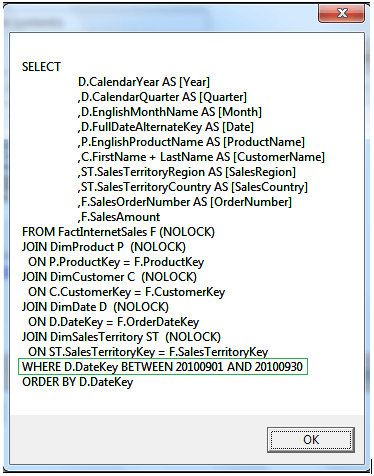
2. To get the current month’s data, change the WHERE condition of the T-SQL query.
3. Return the contents of the file to the file.
Step 1: Create a new SSIS package and add the following two package variables:
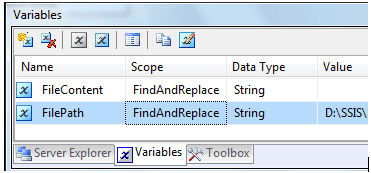
Step 2: Rename Script Task to Script Task – Read File and Then Find and Replace String. Next, select User: File Path as ReadOnlyVariables and User::FileContent as Read Write Variables in the Script Task Editor by double-clicking on it. Now go to Edit Script… and copy and paste the following code:
public void Main()

{

String EInfo = "";

String FPath = Dts.Variables["User::FPath"].Value.ToString();

try

{

String FContent;

FContent = ReadFile(FPath, EInfo);

if (EInfo.Length > 0)

{

Dts.Log("Error when a file is read " + FPath, 0, null);

Dts.Log(EInfo, 0, null);

Dts.Result = (int)ScriptResults.Failure;

return;

}

DateTime currDate, StartDate, EndDate;

currDate = DateTime.Today;

StartDate = currDate.AddDays(-(currDate.Day - 1));

EndDate = StartDate.AddMonths(1).AddDays(-1);

MessageBox.Show(FContent);

FContent = FContent.Replace(

"D.DateKey BETWEEN 21081201 AND 21070121",

"D.DateKey BETWEEN " +

String.Format("{0:yyyyMMdd}", StartDate) + " AND " +

String.Format("{0:yyyyMMdd}", EndDate)

);

MessageBox.Show(FContent);

Dts.Variables["User::FContent"].Value = FContent;

WriteToFile(FPath,FContent,EInfo);

if (EInfo.Length > 0)

{

Dts.Log("While Writing on a file throws an error " + FPath, 0, null);

Dts.Log(EInfo, 0, null);

Dts.Result = (int)ScriptResults.Failure;

return;

}

}

catch (Exception e1)

{

Dts.Log(e1.Message, 0, null);

Dts.Result = (int)ScriptResults.Failure;

}

}

public String ReadFile(String FPath, String EInfo)

{

String strCont;

StreamReader sRe;

try

{

sRe = File.OpenText(FPath);

strCont = sRe.ReadToEnd();

sRe.Close();

return strCont;

}

catch (Exception e1)

{

MessageBox.Show(EInfo);

EInfo = e.Message;

return "";

}

}

public void WriteToFile(String FPath, String strCont, String EInfo)

{

StreamWriter sWr;

try

{

sWr = new StreamWriter(FPath);

sWr.Write(strCont);

sWr.Close();

}

catch (Exception e)

{

MessageBox.Show(EInfo);

EInfo = e.Message;

}

}
Step 3: The package updates are now complete. To test the output, run the package.
SSIS Replace Function
The task offers the following options when the requested action is “FindAndReplace”:
1. Find a matching combination.
2. Replace – a word or phrase that can be used in place of a match. If true, the Source is contained in a package variable. Aside from that, it’s the file connection manager (Boolean).
3.SourceVariable is a package variable that comes from a source (String). The variable type can be a string (path to the source file) or Object (Stream).
4. Source is a file connection manager that allows you to connect to a source file (Connection).
Target is contained in the package variable if IsTargetVariable is true. Aside from that, it’s the file connection manager (Boolean).
5.target package variable (target variable) (String). The variable type can be a string (path to the source file) or Object (Stream).
6.target – file connection manager for the target (Connection).
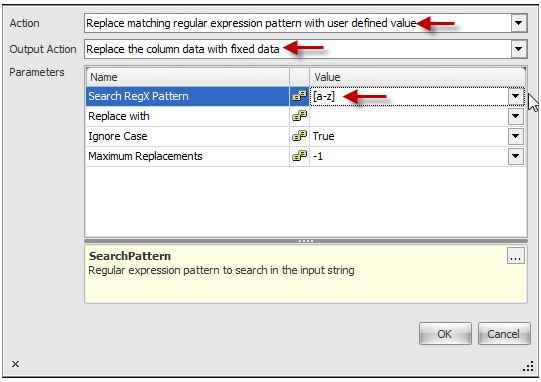
Regular Expressions can be used in SSIS to help in data purification. The RegEx Replace Transform is a simpler technique for data purification with Regular Expressions. Connect the RegEx Replace Transform to the OLE DB Source in the Data Flow Task.
To open the editor, double-click the RegEx Replace Transform. Then, click the drop-down arrow beside the field we want to change with RegEx. Then we can assign the transform to do the cleaning as we wish. In a regular expression, one can effectively identify groups. Each set of parenthesis represents a single Regex pattern. They are accessed in the respective format: (Beginning from 1). Select “Replace matched regular expression pattern with user-defined value” as the Action. We can also extract a string of text from the field using the RegEx pattern we define.Select “Replace the column data with fixed values” as the Output Action.
SSIS replace expression Example
SQL Server Integration Services (SSIS) Expressions can render SSIS applications extremely flexible. To do so, we’ll leverage the Flat Files connection’s expression. The binary operator “+” is inappropriate with the data types “DT WSTR” and “DT I4”. As illustrated below, right-click and pick Properties, then click on Expressions in the Properties window.
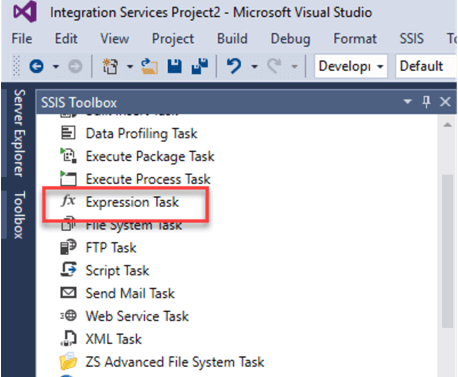
Let’s look at an example to grasp further the syntax of replace in SQL and how it works.
Example #1
REPLACE ("Swizz Valley", "Swizz","Mountains")
The string “Valley” is removed from the Product column in this example.
Example #2
REPLACENULL ((NULL(DT_DECIMAL, 2)), 0 )

// Replaces null val to ‘0’ . And returns an Output 0.00
Example #3
Replace function o replace every character
(DT_STR,8,1262) REPLACE(PPB,"-","") // to get “1234567”
The quotation (“) literals are added in the source string.
There are two choices:
1. Modify your flat file source to define quotation characters for this field so that ” values at the start and end of the string are removed.
2. To get rid of quotes, use another replace.
REPLACE(REPLACE(PPB,"\"",""),"-","")
Conclusion
Therefore, in this article, we studied everything above about replace() in SSIS. The SSSIS replace() function can rapidly and efficiently replace specific data from large databases and tables. We covered some excellent examples of SSIS Replace expressions in this article. SSIS expressions extend the capabilities of your packages and aid in dynamic modification.
Recommended Articles
This is a guide to SSIS Replace. Here we discuss the definition, What SSIS replace is, How to work SSIS replace, and examples with code implementation. You may also have a look at the following articles to learn more –

