

Updated May 19, 2023

Introduction to SQL TRUNCATE()
TRUNCATE in standard query language (SQL) is a data definition language (DDL) statement used to delete complete data from a database table without deleting it. It frees up space or empties space in the table. However, we should note that TRUNCATE TABLE statements might need to be roll backable in many SQL databases. Also, being a DDL statement, the TRUNCATE table statement does not require a commit at each step; it automatically fires a commit at the end of the execution of the statement. Hence, we should be careful while using it.
We often get confused between TRUNCATE TABLE, DELETE TABLE, and DROP TABLE statements in SQL. So before going ahead, refer to this link for a better understanding – https://www.educba.com/sql-delete-statement/
Syntax and Parameters
The basic syntax for using a SQL TRUNCATE TABLE statement is as follows :
TRUNCATE TABLE table_name;The parameters used in the above syntax are :
Table_name: It is the name of the table whose records or rows you want to delete permanently.
How does the TRUNCATE TABLE statement work in SQL?
TRUNCATE TABLE statement in SQL works by zeroing out a file in the database, i.e., after running a TRUNCATE statement on an existing table, the table becomes empty and hence does not hold any row records. It resets the table to zero entries.
However, its structure, columns, indexes, constraints, relationships, views, etc., are preserved after truncating the table. The entire operation is like erasing data from the table but keeping the table intact.
TRUNCATE in Data Definition Language (DDL) is equivalent to DELETE in Data Manipulation Language (DML). The only difference is that the latter can be rolled back, but the first cannot. However, TRUNCATE is faster than DELETE because it usually bypasses the transaction system. It is not logged (it can vary across SQL databases) and does not follow predicates and hence seems to be faster than the DELETE operation. DELETE is a safer and slower operation.
Examples of SQL TRUNCATE()
Here are a few examples to explain the TRUNCATE TABLE statement in great detail.
Example #1
Simple SQL query to illustrate the function of the TRUNCATE TABLE statement.
To understand the SQL TRUNCATE TABLE, let us consider a “customers” table. The data in the table looks like this.
Command:
SELECT * FROM public.customersOutput:
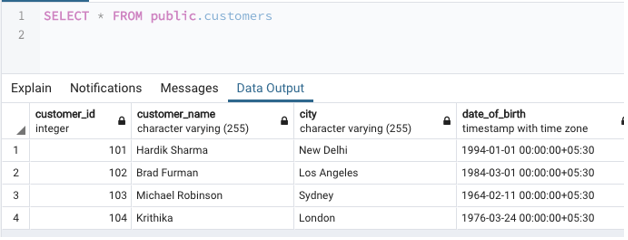
Next, let us run the TRUNCATE TABLE statement on the customer’s table to remove all its records. We can do so using the following SQL query.
Command:
TRUNCATE TABLE customers;Output:
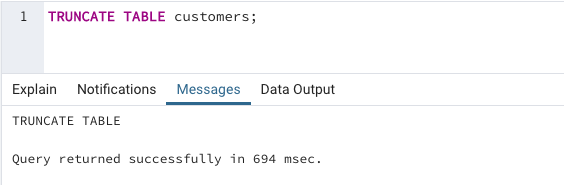
We can see in the figure below that the TRUNCATE TABLE statement has removed all the records in the customer’s table. However, all the columns, relationships, indexes, and table structures have been kept safe.
Command:
SELECT * FROM customers;Output:

Example #2
SQL query to illustrate the difference between SQL DROP TABLE and TRUNCATE TABLE statements.
For this, let us consider two tables, “customer_details” and “students”. The table structure and the data in them look something like this. Records in the “Customer_details” table are as follows:
Command:
SELECT * FROM public.customers_detailsOutput:
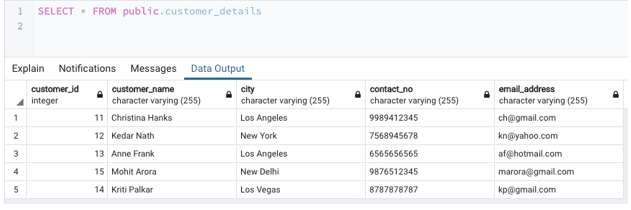
Records in the “Students” table are as follows:
SELECT * FROM public.studentsOutput:
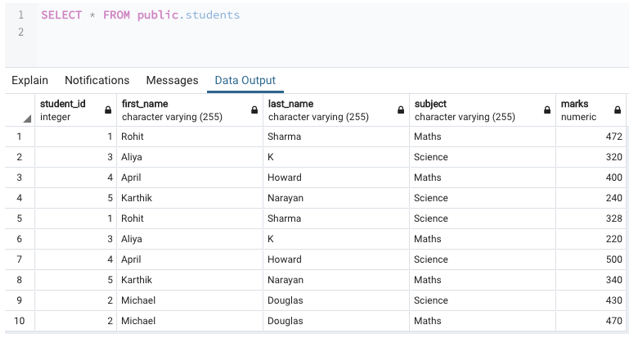
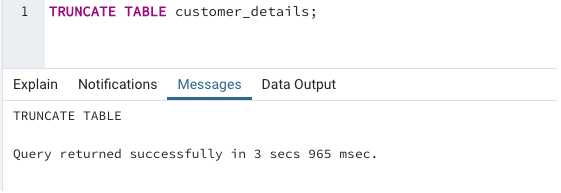
Next, we will run the TRUNCATE TABLE on the customer_details table and DROP TABLE on the student’s table, and then we will check the difference.
Command:
TRUNCATE TABLE customer_details;Output:
Command:
DROP TABLE students;
Output:
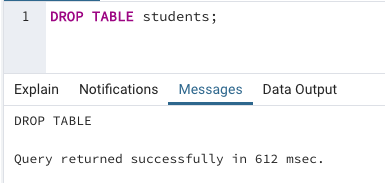
We can observe from the images above that the DROP TABLE statement is faster than the TRUNCATE TABLE statement in SQL.
Now let us check what happened to the two tables after truncating and dropping, respectively.
Command:
SELECT * FROM customer_details;Output:

Command:
SELECT * FROM students;Output:
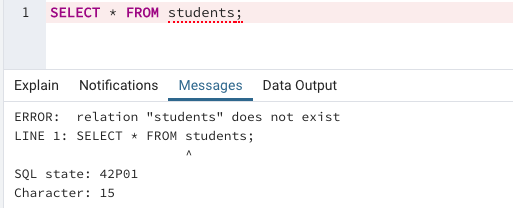
From the above two images, we can observe that in the TRUNCATE statement, the table structure is preserved; only the data/records in the table have been removed. Whereas in the case of the DROP TABLE statement, the entire table has been removed from the database.
Conclusion
TRUNCATE TABLE in SQL is a Data Definition Language (DDL) statement that empties an existing table by removing all the records while preserving table columns, privileges, indexes, views, constraints, relationships, etc. It is equivalent to but faster than the DELETE statement in SQL. However, unlike DELETE, it cannot be rolled back.
Recommended Articles
We hope that this EDUCBA information on “SQL TRUNCATE()” was beneficial to you. You can view EDUCBA’s recommended articles for more information.

