


Updated March 10, 2023

Introduction to SQL ORDER BY Alphabetical
SQL Order by Alphabetical can be done on character-based column values using simply ORDER BY clause in ascending order. In SQL, various clauses can be used with the SELECT clause to achieve some specific functionality or make the resultset to be retrieved in a particular format. ORDER BY clause is one such clause that helps in getting the ordered data from the raw resultset. It returns the sorted and ordered data based on a certain column(s) as the criteria to ORDER the data. The data can be ordered either in ascending or descending way. When columns are in string format or varchar datatype then order by results in sorting of data in alphabetical order when done in ascending manner.
Most of the time, the ORDER BY function is used when using the aggregate functions of SQL Whenever we do not specify the type of the order that is ascending or descending then by default the data is being ordered in ascending way. In this article, we will learn about the syntax, usage, and execution of the ORDER BY clause in SQL for alphabetical order.
Syntax:
SELECT
column1, column2,..., columnm
FROM
target_table
WHERE
conditions_or_constraints
ORDER BY stringColumn;
The syntax of the ORDER BY clause is as shown above. It is the optional clause used in the select clause whenever we need to retrieve the resultset containing multiple column values. It should always be placed after the FROM and WHERE clause in the SELECT clause. Some of the terms used in the above syntax are explained below.
- column1, column2,…, column – These are the names of the columns of the target_table table that need to retrieved and fetched in the resultset.
- target_table – Name of the table from where the result is to be fetched.
- conditions_or_constraints – If you want to apply certain conditions on certain columns they can be mentioned in the optional WHERE clause.
- stringColumn – This is the column that will be considered as the criteria to create the ordering flow in the SQL query. For doing the sorting in an alphabetical manner, this column should be a character-based column having datatype like varchar, nvarachar, text. Etc.
Examples of SQL ORDER BY Alphabetical
Let us consider one table name developers and check its contents using the following query. After retrieving the records of the developers table using the below SELECT query.
SELECT * FROM `developers`;Gives the following output:
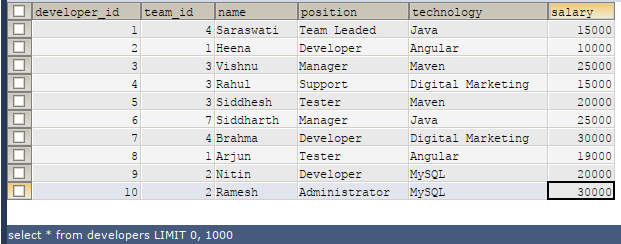
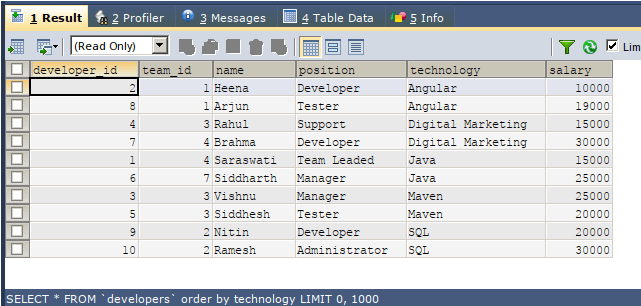
Now, let us simply order the records of the developer’s table based on the technology column value. For this, we can simply use the following query statement where we have just specified the name of the column that is the criteria on which the sorting is to be done without specifying what type of sorting needs to be done –
SELECT
*
FROM
`developers`
ORDER BY technology ;
The output of the execution of the above query statement is as follows that contains the sorting in ascending format on the technology column even when we haven’t mentioned the ASC in GROUP BY clause. This is because ascending is the default type of sorting that is considered. All the character-based columns storing string and text are sorted in an alphabetical manner whenever an order by clause is applied to that column in an ascending manner.
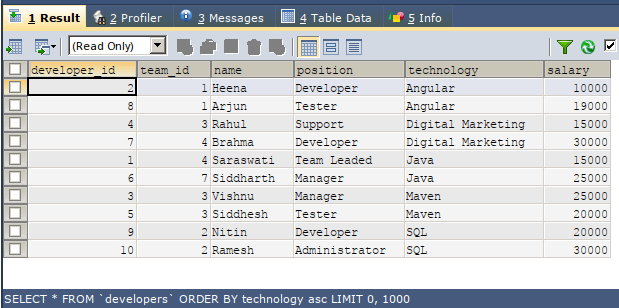
Let us try specifying the ASC explicitly in the query statement –
SELECT
*
FROM
`developers`
ORDER BY technology ASC;
The output of the execution of the above query statement is as follows which is the same as the previous one.
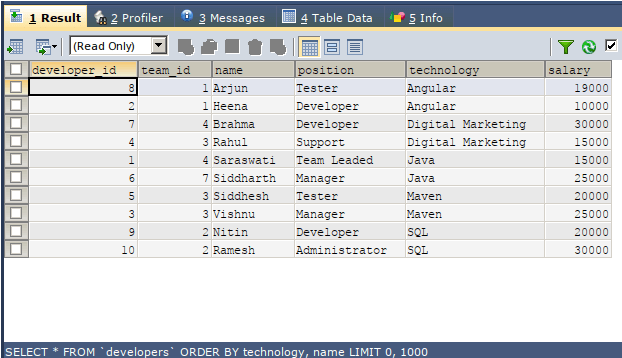
The ordering can be done on more than one column values in SQL. For this, we need to mention al the columns on a priority basis in the comma-separated format in the ORDER BY clause. Consider the following example, where the ordering is firstly done based on column values of the technology column and further again the ordered on the name column.
SELECT
*
FROM
`developers`
ORDER BY technology, name;
The output of the execution of the above query statement is as follows in which we can observe that all the columns are ordered in ascending manner and alphabetically on the technology column and further internally for each of the technology column value the ordering of the same technology valued records is done again on basis of a name column value in an alphabetical manner because that column also has a character-based value stored in it.
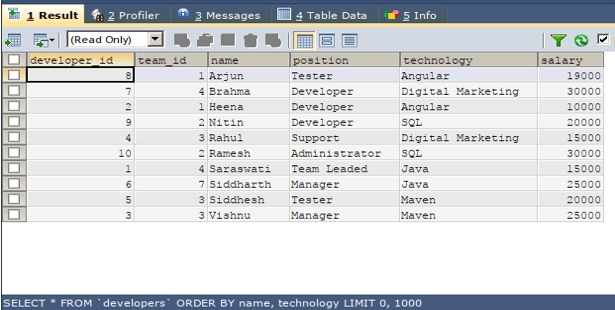
If we revert the specification of column names in order by clause of the above query output will differ as firstly ordering will be done on the name and then on technology. Consider the following query statement.
SELECT
*
FROM
`developers`
ORDER BY name, technology;
The output of the execution of the above query statement is as follows –
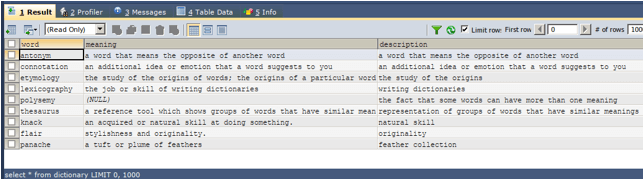
Let us retrieve the records that are ordered in alphabetical order from another table named dictionary. The contents of the table dictionary are as shown below using the select query of SQL –
SELECT * FROM dictionary;The output of the execution of the above query statement is as follows –
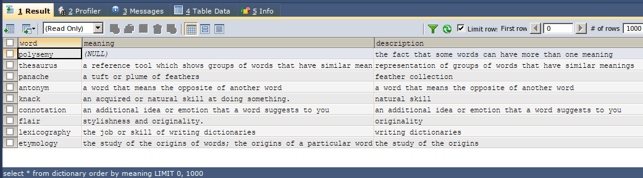
Now, we need to sort the data from the dictionary table in an ascending manner based on the column values of the column named meaning. For this, our query statement will be as follows –
SELECT
*
FROM
dictionary
ORDER BY meaning ;
The output of the execution of the above query statement is as follows containing records of dictionary table that are ordered on basis of meaning column values with the NULL value being at the beginning and further the records are ordered in alphabetical order –
Conclusion
We can use the ORDER BY clause to sort and order results and get the sorted resultset from the original resultset. To perform the ordering in an alphabetical manner, we can either skip specifying the type of order as the default type is ascending or can explicitly mention ASC in the order by clause and mention the criteria for orders containing a column that is character-based. Also, note that in case of multiple column criteria ordering the order in which the names of columns are specified in the order by column matter.
Recommended Articles
We hope that this EDUCBA information on “SQL ORDER BY Alphabetical” was beneficial to you. You can view EDUCBA’s recommended articles for more information.

