


Updated May 6, 2023

Introduction to PostgreSQL Schema
In PostgreSQL, a schema is a named collection of database objects which contain tables, views, sequences, indexes, data types, functions, operators, and other relations. These are symmetrical to the operating system level directory structure, except that the PostgreSQL schemas cannot be nested.
Working of PostgreSQL Schema
- The database schema shows the part of the logical configuration or all of a relational database.
- Access to the schemas can be controlled depending on the cases required.
- The ownership of the schema is transferrable.
- The database schema represents how the entities that make up the database relate to each other, including its views, tables, stored procedures, etc.
How to Create a PostgreSQL Schema?
To create a schema, you need to use the CREATE SCHEMA statement. You can specify the name of your choice for a schema. The CREATE SCHEMA statement will create a schema in the current database.
Syntax #1
CREATE SCHEMA [ IF NOT EXISTS] schema_name;Explanation: Define the schema name for the schema to be created after the CREATE SCHEMA clause. The name of the schema should be unique within the current database. IF NOT EXISTS is an option clause that adds a condition for creating the new schema only if it does not exist. If you try to create a new schema that already exists in the current database without using the IF NOT EXISTS clause will result in an error.
We can create a schema for a specific user as well:
Syntax #2
CREATE SCHEMA [IF NOT EXISTS] AUTHORIZATION user_name;Explanation:
This is similar to Syntax 1 only difference because for creating a schema for the specific users, we need to specify the user_name after the AUTHORIZATION keyword, which is the same as the schema name.
You can create a schema and list of data objects in a single statement.
Syntax #3
CREATE SCHEMA schema_name
CREATE TABLE table_name1 (...)
CREATE TABLE table_name2 (...)
CREATE VIEW view_name1
SELECT select_list FROM table_name1;Examples to Implement PostgreSQL Schema
Let’s understand the CREATE SCHEMA statement with the help of the following examples:
Example #1
Create a New Schema. Create a new schema named EduCBASchema:
Syntax:
CREATE SCHEMA IF NOT EXISTS EduCBASchema;We can fetch all schemas from the current database using the following statements.
Code:
SELECT  *
FROM pg_catalog.pg_namespace
ORDER BY nspname;
Output: The following result will be shown after executing the above statement:

Example #2
Create a new schema for a specific user. Create a schema for EduCBA users:
Syntax:
CREATE SCHEMA AUTHORIZATION EduCBA;Create a schema and its objects in a single statement. The following example uses the CREATE SCHEMA statement to create a new schema named EduCBASCM. It also creates a table called ‘Transactions’ and a view named Transactions_list that belongs to the EduCBASCM schema:
Code:
CREATE SCHEMA EduCBASCM
CREATE TABLE Transactions(
transaction_id SERIAL NOT NULL,
transaction_date DATE NOT NULL
)
CREATE VIEW Transactions_list AS
SELECT transaction_id, transaction_date
FROM Transactions
WHERE transaction_date <= CURRENT_DATE;
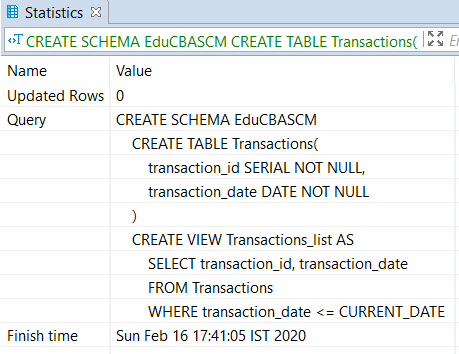
Output: As a result of the above statement, we will get the following statistics:
How to Drop PostgreSQL Schema?
The DROP SCHEMA is used to remove a schema from the current database and remove all of its objects.
Syntax:
DROP SCHEMA [IF EXISTS] schema_name [ CASCADE | RESTRICT ];Explanation:
- Define the schema name after DROP SCHEMA, which we want to delete
- Specify the IF EXISTS keywords which are optional to remove a schema only if the specified schema exists in the current database.
- Use CASCADE to remove a schema, and all of its objects and all other objects are also deleted, which depends on those objects.
- If you want to remove an empty schema, add the RESTRICT keyword.
We can use one line DROP SCHEMA statement for deleting multiple schemas as follows:
Syntax:
DROP SCHEMA [ IF EXISTS ] schema_name_1 [,schema_name_2,...]
[CASCADE or RESTRICT];
Example:
We will use some of the CREATE SCHEMA section’s schemas to understand the examples for dropping a schema.
- Remove an Empty Schema: The following statement is used to remove the EduCBASchema schema:
Code:
DROP SCHEMA IF EXISTS EduCBASchema;- Drop Multiple Schemas: The following statement is used to remove the multiple schemas Books and Notes using a single statement:
Code:
DROP SCHEMA IF EXISTS Books, Notes;- To remove a non-empty schema: The following statement will drop an EduCBASCM schema.
Code:
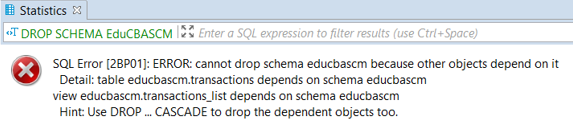
DROP SCHEMA EduCBASCM;The result of the above statement is as follows:
- If the deleted schema is non-empty and you want to delete the same and its objects, you should use the CASCADE option as follows:
Code:
DROP SCHEMA EduCBASCM CASCADE;Advantages of using PostgreSQL Schema
There are various reasons why anyone should use schemas:
- PostgreSQL schema allows you to use a database without interfering with other databases.
- It organizes database objects like views, indexes, sequences, data types, operators, functions, and other relations into logical groups to make these objects more manageable.
- It is used to put third-party applications into separate schemas, which leads them not to collide with the names of each-others objects.
Conclusion
We hope you have learned about PostgreSQL schema from this article and how to create and drop PostgreSQL schema. Also, we hope you got an idea about the working of PostgreSQL Schema and its advantages.
Recommended Articles
We hope that this EDUCBA information on “PostgreSQL Schema” was beneficial to you. You can view EDUCBA’s recommended articles for more information.

