
Updated May 25, 2023

Introduction to PostgreSQL Numeric
While dealing with numbers, extra care needs to be incorporated while storing them, and the right type of datatype should be declared for our numeric field according to the value expected to be stored in it. PostgreSQL provides 10 data types that can store and handle numeric values in PostgreSQL databases. This article will discuss all the datatypes to handle numeric data in PostgreSQL. We will also see its storage size and range required and allowed for each datatype and take an example to understand how these values are stored and retrieved.
Numeric Datatypes in PostgreSQL
In all, 10 numeric data types are present in the PostgreSQL database and contain integral values with 2,4, and 8 bytes of size, floating-point values, and auto-incrementing serial values with variable ranges. The table below lists the name of the data type, the size required to store each value belonging to that datatype, and the usage specifying when and where that data type should be used.
| Numeric Datatype | Size in bytes | Usage |
| Smallserial datatype | 2 bytes space | Integers that will be autoncremented and are small in size. |
| Serial datatype | 4 bytes space | Integers that will be autoncremented and are medium in size. |
| Bigserial datatype | 8 bytes space | Integers that will be autoncremented and are large in size. |
| Smallint datatype | 2 bytes space | Integers that will have a small range of values. |
| Integer datatype | 4 bytes space | Most commonly used and preferred datatype for storing integral values. |
| Bigint datatype | 8 bytes space | Integers that might have a large range of values. |
| Decimal datatype | Variable size | It is a decimal value with user-specified and exact precision values stored in it. |
| Double precision datatype | 8 bytes space | It is a decimal value with variable precision values stored in it with a maximum of 15 decimal digits of precision. |
| Numeric datatype | Variable size | It is a decimal value with user-specified and exact precision values stored in it. |
| Real datatype | 4 bytes space | It is a decimal value with variable precision values stored in it with a maximum of 6 decimal digits of precision. |
Integer Datatypes
These data types allow us to store the integer value that does not contain any fraction part in it and are wholesome numbers. The most preferred data type for storing the integer values is Integer which gives us the range of -2147483648 to +2147483647. Developers use smallint when memory space is a concern, and there is a need to efficiently utilize storage resources, particularly in memory-constrained environments. It possesses a range of -32768 to +32767 and is suitable for storing smaller integer values. Developers use BigInt when the range of Integer is insufficient for storing integer values, as it offers a vast range from -9223372036854775808 to +9223372036854775807.
Let us create one table named educba_integer_demo with three columns of datatype smallint, Integer, and bigint.
CREATE TABLE educba_integer_demo(small smallint,medium integer, big bigint);that gives the following output if the table is created successfully.

Let us enter some records in it.
INSERT INTO educba_integer_demo VALUES(32767,2147483647,9223372036854775807);If the value is inserted correctly, the output will be as follows –

We will increase the value of the big column by one to exceed the range and observe the outcome when we make such an attempt.
INSERT INTO educba_integer_demo VALUES(32767,2147483647,9223372036854775808);The output will be as follows –

As you can see, the system throws an error stating that the bigint value is out of range.
Now, attempt to insert a value that is not in the range of small int using the following query –
INSERT INTO educba_integer_demo VALUES(32778,2147483647,9223372036854775807);that gives the following output with an error saying smallint is out of range –

Inserting a value that is out of range of the Integer also shows the error as follows when a query like this is fired –
INSERT INTO educba_integer_demo VALUES(32767,2147483650,9223372036854775807);
Inserting all the three values that are not in the range provides the following error when such an attempt is made by executing the following query –
INSERT INTO educba_integer_demo VALUES(32790,2147483750,9223372036854775900);
As can be seen, it throws the error for only the first column that it traverses, which in our case is the smallint data type column.
Serial Datatypes
In Postgres, we have three data types available to create the columns that behave in the auto-incrementing fashion for storing values that will automatically be incremented by 1 by default and are unique fields. There are three datatypes – smallserial, serial, and bigserial datatypes. In general, developers use the serial data type in Postgres to store auto-incremented column values that range from 1 to 2147483647. When we don’t have to store many values, we can use smallserial datatype ranging from 1 to 32767. If we know that our database will store a lot of rows, even more than 2147483647, then we can use a bigserial datatype that has a range of 1 to 9223372036854775807.
Let us create the table having all these three data typed columns named educba_serial_demo using the following query –
CREATE TABLE educba_serial_demo(small smallserial,medium serial, big bigserial);Output:

INSERT INTO educba_serial_demo VALUES (DEFAULT,DEFAULT,DEFAULT),(DEFAULT,DEFAULT,DEFAULT),(DEFAULT,DEFAULT,DEFAULT);Executing the above query gives the following output –

Let us see what values are inserted in the educba_serial_demo table using the select statement –
select * from educba_serial_demo;that provides the following output –
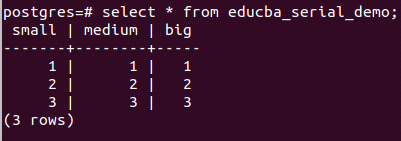
One can notice that the values are automatically inserted incrementally for all three columns.
Floating-point data types
We have four datatypes to store floating-point numbers with different ranges and either user-defined or variable precision. Numeric and decimal have user-defined precision and exact up to 131072 and 16383 digits before and after the decimal point. At the same time, real and double have variable precision with 6 and 15 decimal digit precision, respectively. We can use them per our use case and requirement and specify the precision and scale of numeric and decimal datatypes.
Conclusion – PostgreSQL Numeric
There are 10 numeric data types available in our PostgreSQL database that have different ranges and occupy different storage spaces in the database. We can use them as per our convenience and requirement. However, we must be careful using them and consider their behavior and range.
Recommended Articles
We hope that this EDUCBA information on “PostgreSQL Numeric” was beneficial to you. You can view EDUCBA’s recommended articles for more information.

