

Updated May 4, 2023

Definition of PostgreSQL Administration
PostgreSQL administration is used to authenticate the database from unauthenticated users; PostgreSQL administration is essential to give appropriate access to the database, tables, and all the objects. Roles and users are used in PostgreSQL administration to authenticate with the database. Many methods have been used to authenticate the database from users, like trust, MD5, LDAP, password, SSPI, Kerberos, ident, peer radius, certificate, and PAM. These methods have different authentication algorithms to authenticate with the database; we have used MD5 authentication methods to authenticate the database users in PostgreSQL.
Why Do We Need a PostgreSQL Administration?
Below is the need for administration in PostgreSQL.
- In PostgreSQL, roles and users play essential functions. The role does not have default login privileges, whereas the user has default login privileges to the database.
- The main need for PostgreSQL administration is to authenticate the database from unauthorized access.
- If we do not administer our database, then it will access by an unauthenticated user.
- Roles and user management are very important in PostgreSQL to provide appropriate access to each user.
- If we give inappropriate privileges to the user, then it will happen that data will be misused.
- As per standard guidelines, giving every user appropriate privileges is mandatory. Superuser privileges are not given to any other users.
- In PostgreSQL, Postgres is a superuser; this user has all privileges to access the database.
- As per PostgreSQL administration, we need to take a database backup as per policy to avoid any data loss.
- If we have a data backup, and suddenly our database will crash, there will be chances of data loss.
- To avoid data loss, we must take backup per the backup policy. The backup policy will be defined as per Full, Incremental, and differential basis.
- PostgreSQL backup is mainly divided into two types.
- Logical
- Physical
- We have taken a backup of logical backup using the pg_dump or pg_dumpall command and a physical backup using a pg_basebackup or from third-party tools like pgBackRest etc.
How Does PostgreSQL Administration Works?
Below is the process of how PostgreSQL administration works.
- We have used rules and users to authenticate the database in PostgreSQL. Users have default login privileges to the database, whereas the role does not have login privileges to the database.
- The users’ default connection database is Postgres.
- Any user who connects to the PostgreSQL database needs sufficient privileges to access the database.
- In PostgreSQL, database-level users must connect privileges; at the schema level, it requires user privileges on the specified schema.
- We also need the user who was created on the database to access the database and give specific privileges to the database.
- After user creation, we need to put a user entry in the conf file; this is the PostgreSQL database’s authentication file.
- This file contains the user name, database name, and hostname from whom we have access to the database; also, we need to mention authentication methods for that user.
- Below is the default setting of pg_hba.conf file as follows.
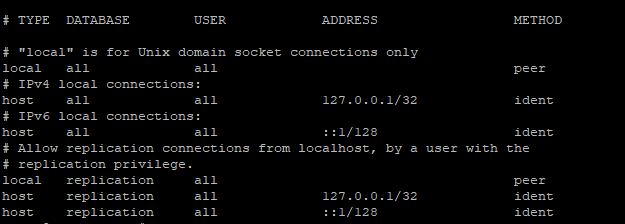
- We can access the PostgreSQL database from localhost or any host. We need to define the IP address of that host in pg_hba.conf file.
- The user is connected to the database user authentication methods. If authentication is successful, the user connects to a specific database; otherwise, it will disconnect with an error.
- After authentication user has access to the database and executes the query to which the user has access.
- If a user cannot execute the specified query, it will throw an error called “Permission Denied”.
- The user also connects through peer authentication in PostgreSQL; it will access through OS user authentication. But in this case, we need both users to have the same name.
- Below is the PostgreSQL configuration files are as follows.
- Postgresql.conf
- Pg_hba.conf
- postgresql.auto.auto.conf
- pg_ident.conf
- PostgreSQL uses multiple authentication methods: trust, MD5, LDAP, password, SSPI, Kerberos, ident, peer, radius, certificate, and PAM.
- These methods have different authentication algorithms for each; we have used MD5 authentication methods to authenticate the PostgreSQL users’ database.
Roles of PostgreSQL Administration
Below are the roles of PostgreSQL administration.
- Roles and users are very important in PostgreSQL to administer the database. The user has default login privileges to the database. Roles do not have default login privileges to the database.
- We can consider the role of a group in PostgreSQL.
- PostgreSQL roles are very important in administering the PostgreSQL database.
- When accessing the database in PostgreSQL administration, one utilizes roles and users for authentication purposes.
- The user employed various authentication methods to verify access to the database.
- PostgreSQL administration is used to authenticate the database from unauthenticated access; PostgreSQL administration is essential to give appropriate access to the database, tables, and all the objects.
- We can see PostgreSQL users and roles by using the following command. The default administrative user is Postgres.
- Postgres is a default administrative user with full access and grant on the database.
- Please find the below image to find database users in PostgreSQL.
postgres=# \du
- Below is the command to create a new role in the PostgreSQL database.
postgres=# create role "test" with password 'test@123';
postgres=# \du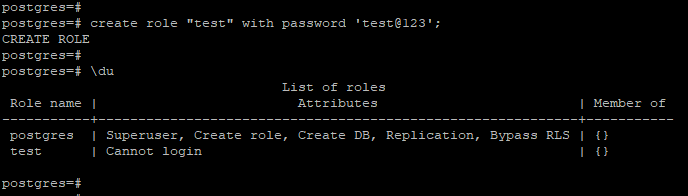
- PostgreSQL role default doesn’t have default privileges, as shown in the above figure. We need to give it manually.
- The below command shows how to give login privileges to a role in PostgreSQL.
alter role "test" with login;
\du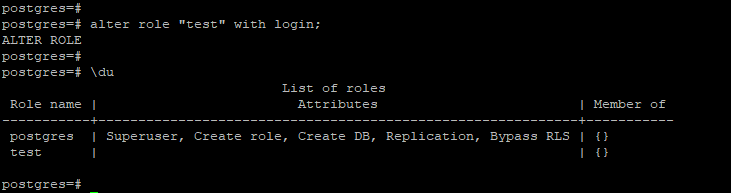
Advantages of PostgreSQL Administration
Below are the advantages of PostgreSQL administration.
- Using PostgreSQL administration, we can prevent data loss by following a backup policy.
- We can prevent the access of users by using proper authentication methods in PostgreSQL.
- We can prevent the user by giving appropriate access to the database.
- Using PostgreSQL administration, we can implement a high availability solution to avoid downtime in the production environment.
Conclusion
PostgreSQL role and the user play a very important role in PostgreSQL administration. The role does not have default login privileges, whereas the user has default login privileges to the database. The main need for PostgreSQL administration is to authenticate the database from unauthorized access.
Recommended Articles
We hope that this EDUCBA information on “PostgreSQL Administration” was beneficial to you. You can view EDUCBA’s recommended articles for more information.

